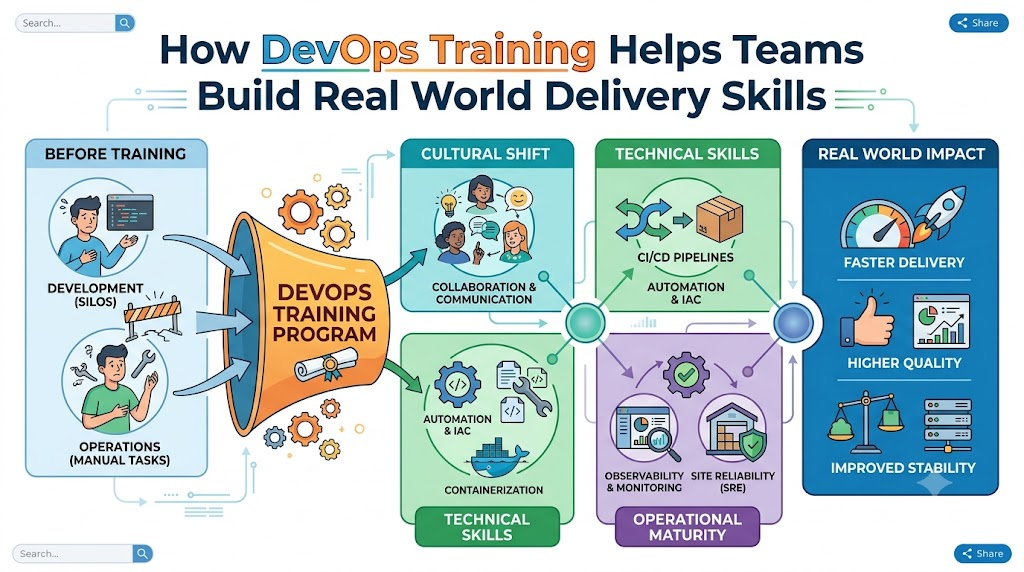
Software teams want to build great apps fast. But building apps is hard work when coders and system helpers work alone. You can learn these modern teamwork skills at DevOpsSchool to ship software safely and quickly.
Learning together helps everyone speak the same language. Coders write new features every day. Operators keep the servers running smooth and fast. Good lessons show both groups how to work as one happy team.
When you learn these skills, you stop making slow manual mistakes. Instead, you build smart systems that check code automatically. Let us explore how these real skills transform tech teams.
What Does DevOps Mean for Normal Teams?
DevOps combines the words development and operations. Development means writing the computer code. Operations means running that code on real servers for people to use.
In the old days, coders tossed their work over a tall wall. The operations team caught it and tried to make it run. Often, the program broke right away.
Today, DevOps brings these two groups to the same table. They share tools and share goals. As a result, they build better products with much less stress.
The Big Shift in Teamwork
Teams used to blame each other whenever things broke down. Now, they solve problems together without pointing fingers.
They write small updates instead of huge, scary changes. This makes finding bugs quick and painless. Everyone learns how the whole machine works from end to end.
Key Operational Concepts You Must Know
To run apps well, teams must master a few core building blocks. These ideas make modern computer systems run without stopping.
Smart Version Control
First, teams must store their code in a safe place. Think of version control like a giant undo button for your work.
It keeps a clear diary of every single text change. So, if a new line breaks the app, you fix it in one second.
- Track changes: You always know who wrote each piece of code.
- Work together: Multiple people can edit files at the same time.
- Roll back fast: You can return to yesterday’s good code anytime.
Automated Testing Pipelines
Next, teams build automated test tracks for their code. These tools run tests every time a coder saves new work.
The pipeline acts like a strict security guard at the gate. It checks for errors and blocks bad code from going live.
Because computers do the checking, humans do not get tired. Teams catch bugs early while they are cheap and easy to fix.
Platform Implementation vs. Culture — What’s the Real Difference?
Many companies buy fancy tools and think they are done. But tools are only half of the puzzle. You also need the right mindset.
| Feature | Platform Implementation (The Tools) | Team Culture (The Mindset) |
|---|---|---|
| Main Goal | Set up robots, servers, and automated pipelines. | Build trust, share duties, and talk openly. |
| Everyday Work | Writing scripts and configuring cloud dashboards. | Helping teammates learn and sharing daily lessons. |
| When Things Break | Tools send alerts and restart broken machines. | People run blameless reviews to fix root causes. |
| Key Benefit | Faster builds and smooth computer setups. | Happy workers who love solving tough puzzles. |
Why Tools Need People
A shiny new sports car cannot drive without a skilled driver. Cloud tools work the exact same way.
If your team does not talk, fancy pipelines will not save you. But when you build trust, simple tools can do wonders. Real training teaches both the buttons and the human habits.
Real-World Use Cases of Modern Operations
Modern companies use these skills every day to stay ahead. Here are three clear examples you can picture easily.
Online Banks Protecting Your Money
Banks must move money safely every single second. They cannot allow errors or site crashes.
With modern training, bank engineers build automated safety checks. The pipeline checks security rules before any new code goes live.
So, customers can check their accounts and send money without worry. The bank updates its app weekly without any downtime.
Big Shopping Sites on Sale Days
Think about huge online stores during holiday sales. Millions of people try to buy toys at the same minute.
Trained engineers set up rules that add more servers automatically. When shoppers leave, the extra servers turn off to save money.
- Auto-scaling: Servers grow in seconds when crowds arrive.
- Self-healing: Broken servers restart on their own right away.
- Zero downtime: Shoppers keep buying even while updates roll out.
Video Apps Streaming Cartoons
Video streaming apps send movies to phones, TVs, and tablets worldwide. If the video stutters, viewers get sad and close the app.
Engineers use live monitors to watch stream quality everywhere. If one server gets slow, the system routes data to another computer.
Because the team practiced these drills, viewers never see a freeze. Everything plays smooth and clear on every screen.
Common Mistakes in Operations Engineering
Learning new habits takes time and patience. Many teams make these easy mistakes when they start out.
- Trying to fix everything on day one: Teams take on too much and get tired fast. Start with one small pipeline first.
- Ignoring team feelings and habits: Buying software without training your staff always leads to failure.
- Skipping tests to save time: Skipping tests always creates huge emergencies later in production.
- Blaming people for accidents: People hide mistakes when bosses get angry. Focus on fixing the broken system instead.
- Leaving security checks for the very end: Always check for locks while you build, not after you finish.
How to Become an Operations Expert — Career Roadmap
You can follow a clear, step-by-step path to master these skills. Take it one step at a time.
+-------------------------------------------------------------+
|               Simple Five Step Learning Path                |
+-------------------------------------------------------------+
| Step 1: Learn Basic Linux and Command Line Commands         |
| Step 2: Write Helper Scripts with Python or Bash            |
| Step 3: Package Apps Inside Clean Containers                |
| Step 4: Automate Cloud Servers Using Text Files             |
| Step 5: Watch Live Systems with Smart Dashboards            |
+-------------------------------------------------------------+
Essential Skills to Practice
- Linux Basics: Learn how to move files and check running programs without a mouse.
- Git Skills: Save your code work safely in clean online branches.
- Docker Tools: Put apps in small virtual lunchboxes so they run anywhere.
- Cloud Power: Learn how to rent computer power in the cloud as you need it.
- System Monitors: Build colorful charts that show computer health at a glance.
FAQ Section
- Can beginners learn these operations skills easily?Yes, anyone can learn these skills with steady practice, basic computer curiosity, and clear, simple lessons.
- Do I need to write code to work in operations?You do not need to build huge programs, but writing short helper scripts makes your daily job much easier.
- Why do teams love using containers for apps?Containers wrap the app and its helpers together, so the app runs the same on every single computer.
- How long does it take to learn these modern skills?Most learners build solid, job-ready skills in about six months of steady, hands-on practice.
- Does this training help coders and operators equally?Yes, it teaches coders how code runs live, and it teaches operators how code is made.
Final Summary
Learning modern delivery skills helps tech teams build better apps with far less stress. Coders and system helpers work together as one strong unit.
They use automated tests, smart pipelines, and cloud tools to deliver features quickly. As a result, companies keep their systems fast, safe, and reliable for everyone.
Start learning these skills step by step today. With practical lessons and patience, your team can deliver amazing software every single week.
Leave a Reply