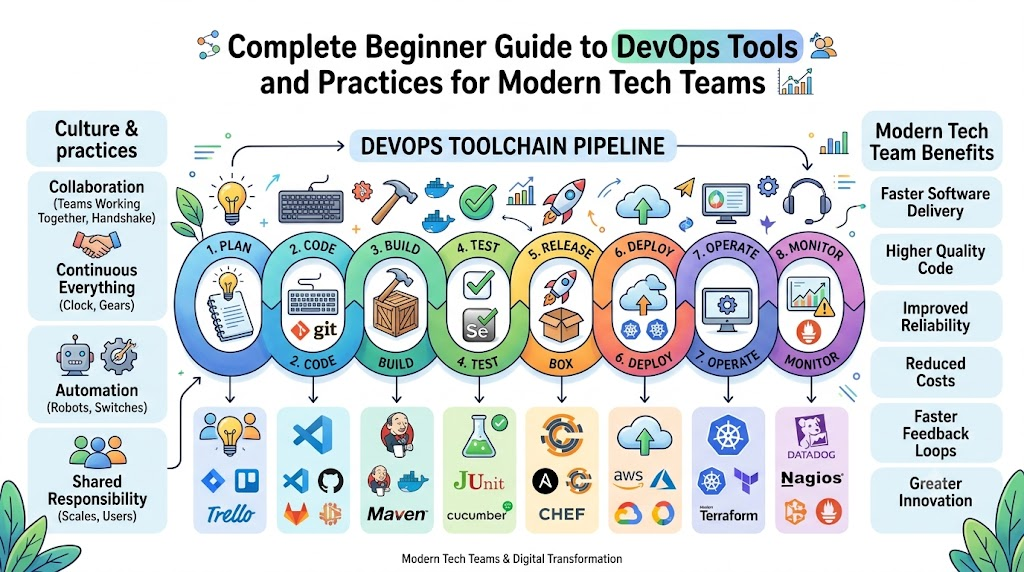
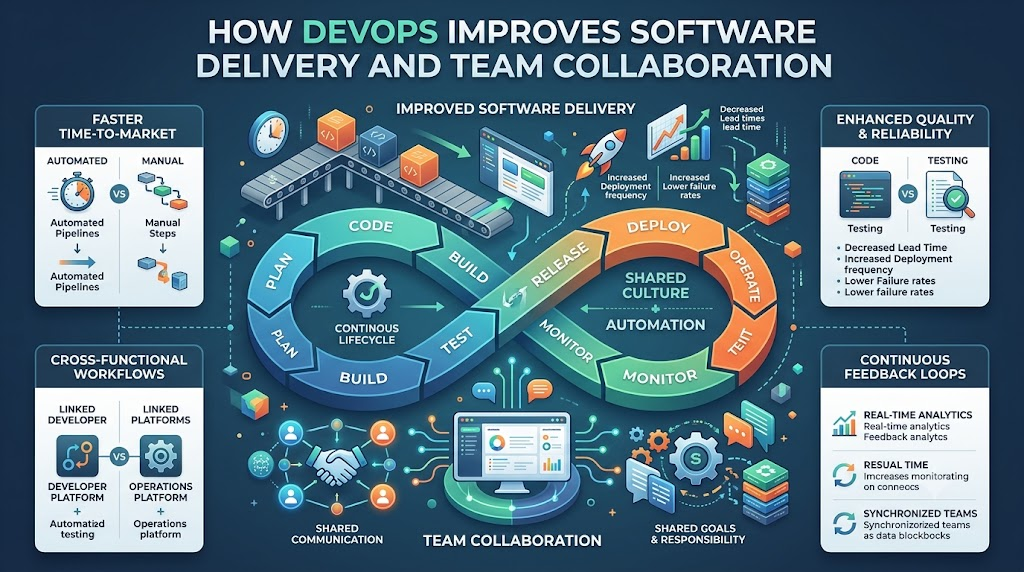
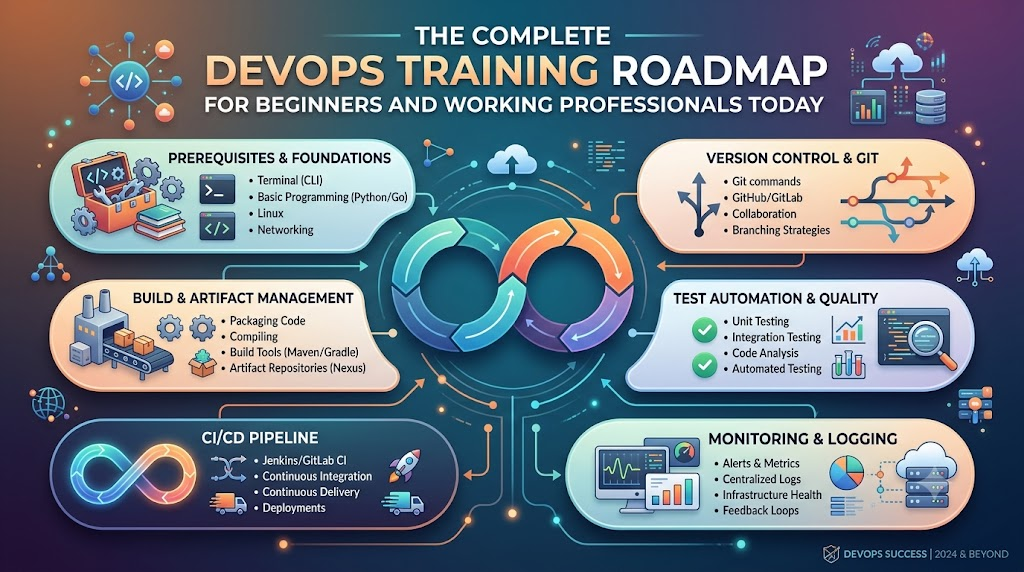
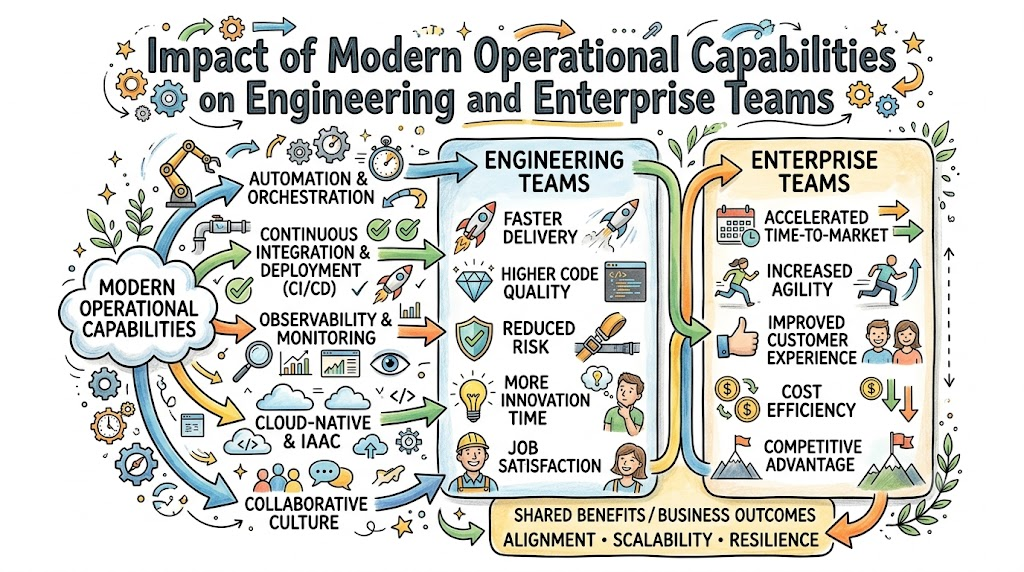
Computers run our world today, from video games to bank apps. But building computer software takes teamwork. People who write code must work well with people who run the servers. You can learn these teamwork tricks through DevOpsSchool to gain real skills fast.
Good training helps you learn how to fix bugs quickly. Also, you learn how to send updates to users without crashing the app.
When you study these tools, you help teams work as one unit. Next, we will look at how this teamwork actually works.
What Is DevOps and How Does It Work?
DevOps connects two different groups of tech workers. First, developers write the code for apps. Second, operations workers keep the computers and networks running.
In the past, these two teams worked in separate rooms. They often blamed each other when things broke down.
Now, they use shared tools to build and fix apps together. So, apps launch faster, and fewer errors happen.
Why Teams Need Fast Software Delivery
Today, users want new app features right away. If a game crashes, players want an instant fix.
DevOps uses smart robots and scripts to test code automatically. Because of this, teams can launch updates every single day.
How Automated Pipelines Work
An automated pipeline works like a factory belt for software. First, a coder writes new instructions and saves them.
Then, the system checks the code for mistakes right away. If the code passes every test, the pipeline sends it to users.
Key Operational Concepts You Must Know
To run modern software, you must understand a few basic ideas. These ideas keep big computer systems safe and fast.
Version Control and Saving Your Work
Version control works just like a magic save button for your code. It keeps track of every single change you make.
If you make a big mistake, you do not need to panic. You simply click a button to bring back the older, working code.
+-------------------------------------------------------------+
|                The Version Control Timeline                 |
+-------------------------------------------------------------+
| [Save 1: First Draft] -> [Save 2: New Feature] -> [Save 3]  |
|                                                     |       |
|    Roll back here if code breaks! <-----------------+       |
+-------------------------------------------------------------+
Automated Testing for Fewer Bugs
Computers can test code much faster than humans can. Automated testing runs hundreds of checks in just a few seconds.
So, developers find spelling errors and math bugs immediately. This habit keeps broken code away from real customers.
Cloud Computing and Virtual Servers
The cloud means renting computers over the internet instead of buying them. Big companies own huge rooms full of servers.
You can rent five new servers with one click. Then, you can turn them off when you finish your work.
Platform Implementation vs. Culture — What’s the Real Difference?
Many people buy expensive software tools and think they are done. But tools are only one half of the puzzle.
You also need a healthy team mindset to win. Let us compare the tools against the culture.
Part
Platform Implementation (Tools)
Team Culture (Mindset)
Main Goal
Set up robots, scripts, and cloud servers
Build trust, share goals, and help peers
Daily Tasks
Write code templates and watch dashboards
Talk openly, share notes, and solve issues
How to Measure
Count how many times you update an app
Check how happy and calm the team feels
When Things Break
Run auto-repair scripts to restart servers
Find why it broke without blaming people
Why Good Culture Matters More
Tools cannot fix an angry or fearful team. If workers fear getting blamed, they hide their mistakes.
A great culture encourages people to speak up early. Because of this trust, teams solve hard problems much faster.
How Tools Support the Team
Smart tools free up your time by doing boring chores. For example, robots can copy files across ten servers at night.
So, engineers get more free time to invent fun features. Good tools make happy teams even more productive.
Real-World Use Cases of Modern Operations
Every company you know uses these methods behind the scenes. Here are three real examples of how they work.
Online Video Streaming Services
When millions of kids watch cartoons at night, servers get busy. Streaming apps use smart scripts to spot traffic jumps.
The system quickly turns on extra servers to handle the crowd. Therefore, your cartoon never stops to buffer.
Shopping Apps on Big Sale Days
Shopping websites get millions of shoppers during big holiday sales. If a server stops, the shop loses money every minute.
Modern operations systems test the store’s code before the sale begins. So, shoppers can buy gifts without seeing error screens.
Mobile Bank Apps
Bank apps must protect your money from bad actors. These teams use automated security scanners on every single line of code.
The system blocks any code that has safety holes. Because of this, your account stays safe every day.
Common Mistakes in Operations Engineering
Beginners often make simple mistakes when they start out. Knowing these traps helps you avoid them early.
Skipping Backups: Forgetting to save safe copies of your data causes huge headaches later.
Doing Tasks by Hand: Typing manual setup commands over and over wastes time and invites typos.
Ignoring Computer Alerts: Turning off loud alarms leads to missed warnings when disks fill up.
Blaming Coworkers: Pointing fingers when an app breaks stops the team from fixing the real problem.
Skipping Security Checks: Leaving open doors in your code invites hackers into your private systems.
How to Become an Operations Expert — Career Roadmap
You can follow a clear, step-by-step path to master these skills. Take your time and practice each step on your computer.
+-------------------------------------------------------------+
|                   Your 5-Step Learning Path                 |
+-------------------------------------------------------------+
| Step 1: Learn Linux and type basic terminal commands.       |
| Step 2: Practice saving code with Git version control.      |
| Step 3: Put small web apps into Docker containers.          |
| Step 4: Rent cloud servers and set them up with code.       |
| Step 5: Build automated pipelines to test your work.        |
+-------------------------------------------------------------+
Steps to Build Real Skills
Master the Command Line: Learn how to move files and read logs using text commands in Linux.
Track Your Code: Practice saving project snapshots so you never lose your homework or code.
Use Containers: Box up your app with all its files so it runs anywhere without errors.
Learn Cloud Systems: Create virtual hard drives and networks using internet cloud platforms.
Set Up Pipelines: Connect your code box to an automated test engine that checks your work.
FAQ Section
What is DevOps in simple words?It is a way for software builders and computer runners to work as one happy team.
Do I need to be a math genius to learn this?No, you only need curiosity, patience, and a desire to solve fun computer puzzles.
What is a software container?A container is like a digital lunchbox that holds an app and everything it needs to run.
Why do teams use the cloud?Teams use the cloud because renting internet servers is faster and cheaper than buying heavy physical boxes.
How long does it take to learn these basic skills?Most new learners can pick up the core basics in about six months of steady daily practice.
Final Summary
Learning modern operations skills opens up great opportunities in technology. You learn how to build apps, fix errors, and run global servers with ease.
Always remember that good teamwork matters just as much as smart code. Treat your teammates with respect, automate boring chores, and keep practicing your skills every day.
DevOps brings two main computer teams together to build awesome apps. First, developers write code to create new software games and helpful tools. Next, operations helpers run big cloud servers so these apps work smoothly every day.
You can learn these skills step by step with DevOpsSchool. Their friendly mentors show beginners how to use cool tools to deliver software fast. Therefore, learning these basic steps will help you build, test, and ship your ideas safely!
devopsschool.cn
What Is DevOps and Why Do Teams Need It?
Long ago, coders and server keepers worked in separate rooms. Coders wrote programs and tossed them over a tall wall. Then, the server keepers had to figure out how to run them.
Because the two teams did not talk, apps broke often. Users got mad because games crashed and took months to update. So, smart workers decided to join forces and work as one happy team.
Now, DevOps lets teams build and share new computer programs quickly. Everyone shares the work and helps each other fix small mistakes right away.
+--------------------------------------------------------------------+
|                      The Simple DevOps Loop                        |
+--------------------------------------------------------------------+
|  1. Plan App  -->  2. Write Code  -->  3. Test Program             |
|       ^                                     |                      |
|  6. Check Bugs  <--  5. Watch App  <--  4. Ship to Users           |
+--------------------------------------------------------------------+
Key Operational Concepts You Must Know
To keep modern software running fast, beginners must learn a few easy ideas.
The Big Magic Notebook for Code
First, coders use a system named version control to save their daily work. Think of it like a magical notebook that remembers every single word you write.
If you make a silly mistake, you can flip back to an older page. As a result, you never lose your work or ruin the whole program.
Git: This free tool records every line of code you change.
GitHub: This website stores your code online so friends can work together.
Branches: These are separate workspaces where you try new ideas safely.
The Friendly Assembly Line
Next, teams build an automated assembly line for their software. In tech speak, we call this continuous integration and continuous delivery.
When you finish writing your code, a robot helper tests it right away. If the robot finds an error, it sends you a message immediately.
+--------------------------------------------------------------------+
|                   The Software Assembly Line                       |
+--------------------------------------------------------------------+
|  Step 1: Save code to the shared project folder.                   |
|  Step 2: A robot checks the code for spelling mistakes.            |
|  Step 3: The robot runs tests to make sure games run fast.         |
|  Step 4: The system puts the finished game on the web.             |
+--------------------------------------------------------------------+
Neat Lunchboxes for Software
Also, modern engineers pack their apps into neat digital boxes called containers. Just like your school lunchbox keeps your sandwich safe, containers hold everything an app needs.
Because of this, the app runs the same way on your laptop as it does on huge cloud computers. You never have to worry about missing files or broken system settings.
Platform Implementation vs. Culture — What’s the Real Difference?
Many companies buy fancy computer programs and expect instant success. But shiny tools alone do not make a great team.
What We Look At
Setting Up Tools (The Tech Box)
Building Culture (The Team Spirit)
Main Goal
Set up robots, servers, and automated pipelines.
Help people talk nicely and work together every day.
Key Helpers
Code scripts, dashboards, and cloud storage systems.
Friendly chats, team support, and shared goals.
How to Measure
Count how fast updates reach user phones.
Check how much team members trust and help each other.
When Things Break
Robots restart servers and sound quick warning alarms.
The team meets to fix the issue without blaming anyone.
Tools Are Only Toys Without Teamwork
You can buy the best soccer ball in the world. But if players never pass the ball, the team will still lose the game.
Culture means people share goals and help each other learn new tricks. When coders and server helpers trust each other, they solve tough problems fast.
Real-World Use Cases of Modern Operations
Many popular apps you use every day rely on modern operations practices.
Online Video Streaming Services
Think about your favorite cartoon streaming site on a busy Saturday morning. Millions of kids log in at the very same time to watch new shows.
Smart systems spot the huge crowd and start up more servers right away. Then, when night comes and kids go to sleep, the extra servers turn off to save money.
Mobile Game Update Days
Have you ever played a mobile game that updates every single week? In the past, companies stopped the game for hours to fix bugs.
Now, teams send small updates to user phones while people play. The new features slip into the game quietly without stopping your fun.
Bank and Store Websites
Online stores get very busy during holiday sales events. Shoppers rush to buy toys and shoes before the items sell out.
DevOps tools test the checkout page thousands of times before the rush begins. So, parents can buy gifts quickly without the shop page freezing up.
Common Mistakes in Operations Engineering
Beginners often make a few easy-to-fix mistakes when they start their learning journey.
Doing Every Task by Hand: Click-happy workers waste hours clicking buttons when a simple script can do the job.
Buying Too Many Tools at Once: Using ten complex tools on day one confuses everyone and slows down the work.
Forgetting to Test Early: Skipping quick tests lets nasty bugs sneak directly onto user screens.
Blaming People for Mistakes: Pointing fingers hurts feelings and stops people from speaking up when things break.
Ignoring System Alarms: Turning off warning bells means you will not notice when your app runs out of memory.
How to Become an Operations Expert — Career Roadmap
You can grow from a curious beginner into an expert engineer with steady practice.
Step 1: Learn Basic Computer Commands
First, learn how to talk to computers using simple text commands. Linux is the operating system that runs most of the internet today.
So, practice typing short words to make folders, move files, and read system notes. Once you feel comfortable typing commands, you can manage any big server.
Step 2: Pick Up a Simple Code Language
Next, learn a beginner-friendly programming language like Python. Python reads almost like plain English books.
You can write short scripts to do your daily chores automatically. For example, your script can back up your files every day at dinner time.
+--------------------------------------------------------------------+
|                      Your Friendly Learning Steps                  |
+--------------------------------------------------------------------+
|  Level 1: Master Linux commands and Git file saving.               |
|  Level 2: Write small Python scripts to do simple chores.          |
|  Level 3: Pack apps inside Docker containers.                      |
|  Level 4: Run apps on cloud servers like AWS or Google Cloud.      |
|  Level 5: Set up watchtower alerts to catch broken parts fast.     |
+--------------------------------------------------------------------+
Step 3: Pack Apps and Send Them to the Cloud
After you learn basic code, start playing with container tools like Docker. Build a small website and pack it into a digital container.
Next, rent a tiny cloud server online and launch your container there. You will feel proud when your friends open your website on their phones!
FAQ Section
Do I need to be a math genius to learn these tools?No, you do not need hard math skills to work with these tools. You only need to think clearly, solve puzzles, and follow simple step-by-step instructions.
What is the first computer tool I should install on my laptop?You should install Git first because it teaches you how to save and track your work. It protects your practice projects from getting lost or accidentally deleted.
How is a container different from a regular computer program?A regular program needs specific software pieces already installed on your machine to work. A container carries all its own pieces inside, so it runs anywhere without extra setup.
Can I practice these tools for free at home?Yes, almost all core tools like Linux, Git, and Docker are completely free to download. Many cloud companies also offer free practice accounts for new learners.
How long will it take to build my first software pipeline?Most new students can build their first simple automated pipeline in just a few weeks. Taking friendly classes helps you practice the right steps quickly and safely.
Final Summary
Modern software delivery works best when people team up and use smart tools. By saving code with Git, packing apps into containers, and running automatic tests, you can build reliable platforms.
Always remember that working kindly with your team matters just as much as learning complex tools. Keep practicing your steps every day, stay curious, and enjoy building the next generation of amazing computer apps!
Software delivery used to feel like an endless game of telephone. One group wrote code, while another group tried to run it on servers.
Consequently, projects moved slowly, systems broke often, and teams blamed each other. If you want to learn these essential modern skills, DevOpsSchool provides hands-on training programs that guide engineers step by step.
Modern software engineering replaces that old wall of confusion with shared goals. As a result, teams release great apps faster and work together like a championship sports crew.
What Is DevOps in Everyday Words?
DevOps connects software development with IT operations. Development means creating features, writing code, and designing app interfaces. Operations means managing cloud networks, keeping servers running, and stopping platform crashes.
When both groups unite, work moves much faster. Programmers no longer throw unfinished code over a wall. Instead, both teams talk every single day and solve bugs early.
Furthermore, everyone shares ownership of the final product. Developers learn how their code behaves on real machines. Meanwhile, operations specialists help developers ship updates without breaking live systems.
+------------------------------------------------------------------+
|                     The Unified DevOps Flow                      |
+------------------------------------------------------------------+
|  Plan Features  -->  Write Clean Code  -->  Run Auto Tests       |
|        ^                                           |             |
|        |                                           v             |
|  Share Feedback  <--  Monitor Live Apps  <--  Ship Update        |
+------------------------------------------------------------------+
The Big Problems of Old-Fashioned Workflows
In traditional setups, teams worked inside isolated silos. Developers cared only about writing brand-new features quickly. Meanwhile, operations teams cared only about keeping servers steady and safe.
Because their goals clashed, tension grew constantly. Developers complained when operations delayed new releases. At the same time, operations complained when new code caused painful outages.
Slow release cycles: Companies waited months or years to launch single software updates.
Manual deployment mistakes: Workers typed complex commands by hand, causing accidental typos and broken services.
Finger-pointing games: When an app failed, workers blamed each other instead of solving problems.
Burnout and late-night calls: Engineers spent weekends fixing sudden production emergencies.
Key Operational Concepts You Must Know
Modern engineering teams use a few simple principles to keep their work smooth, predictable, and error-free.
Version Control and Branching
First, version control acts like a time machine for your project files. Every engineer saves changes to a central repository with clear update notes.
If an error appears, the team rolls back to a safe point instantly. Moreover, team members work on separate branches without overwriting each other’s work.
Continuous Integration and Automated Testing
Next, continuous integration tests code changes the moment an engineer saves them. Automated bots build the whole project and execute safety checks immediately.
When a bug pops up, the bot notifies the author right away. Because errors get caught within minutes, bad code never reaches live user screens.
Continuous Delivery and Fast Shipments
In addition, continuous delivery packages validated code into ready-to-run releases automatically. The pipeline tests each build across test environments that mimic live platforms.
Therefore, releasing new software becomes a routine, low-risk event. Teams can push updates to customers multiple times a day with complete confidence.
Platform Implementation vs. Culture — What’s the Real Difference?
Many organizations buy expensive automation tools and expect instant miracles. However, tools alone cannot repair broken workplace relationships.
Comparison Area
Platform Implementation (The Machinery)
Culture (The Team Spirit)
Main Focus
Cloud servers, script bots, and test tools
Empathy, open communication, and trust
Everyday Task
Building pipelines and tracking CPU metrics
Sharing lessons and helping teammates
Biggest Benefit
Eliminating repetitive, boring manual tasks
Creating a fearless, creative work room
Handling Outages
Alerts trigger automated recovery actions
Teams conduct blameless post-mortems
Building a Safe and Honest Team Culture
Automation platforms provide the engine, but human culture provides the driver. When leaders remove fear, engineers report defects early instead of hiding them.
Similarly, blameless post-mortems focus on fixing fragile systems rather than punishing individuals. This honest mindset builds strong trust across the entire technical team.
Real-World Use Cases of Modern Operations
Leading organizations depend on these unified practices to keep their critical systems online around the clock.
Online Banking Platforms
Banks process millions of sensitive financial transactions every single hour. Therefore, security checks run directly inside their automated delivery pipelines.
Every code update gets scanned for safety vulnerabilities before hitting production. As a result, customers enjoy safe mobile banking without service interruptions.
Video Streaming Services
Streaming platforms experience huge viewer spikes during major sporting events. Automated systems watch server memory and launch extra cloud capacity in seconds.
When the big game concludes, the platform shuts down unused machines automatically. Consequently, streaming companies save money while preventing embarrassing buffer screens.
Ride-Sharing and Map Navigation
Ride-sharing applications push route improvements and pricing updates continuously. By using gradual rollouts, engineers test updates on small groups of drivers first.
If navigation remains accurate, the system releases the update globally. This careful deployment prevents citywide driver confusion.
Common Mistakes in Operations Engineering
Even smart teams fall into common traps when trying to modernize their workflows.
Treating tools as a magic silver bullet: Buying top-tier software will not fix poor team communication.
Skipping automated tests: Rushing deployments without automated tests sends hidden defects straight to customers.
Ignoring telemetry and system logs: Deploying code without monitoring leaves engineers blind during live outages.
Creating a separate DevOps silo: Handing all automation duties to an isolated team recreates the same old bottlenecks.
Automating broken processes: Writing scripts for inefficient manual steps only speeds up bad habits.
How to Become an Operations Expert — Career Roadmap
You can master modern delivery practices by following a clear, step-by-step learning progression.
Start by learning how to use the Linux command line. Practice navigating file trees, changing permissions, and tracking your project history using Git.
2. Build Automated Pipelines
Next, configure automated build systems that compile code and run unit tests. Understanding basic automation helps you eliminate tedious manual deployment tasks.
3. Package Apps inside Containers
Learn how to wrap applications and their dependencies inside tidy container units. Containers ensure that software behaves the exact same way on your laptop and on cloud servers.
4. Manage Infrastructure as Code
Discover how to build cloud servers, storage disks, and firewalls by writing simple text files. Managing infrastructure like software code prevents configuration drift across enterprise teams.
5. Add Live Monitoring and Telemetry
Finally, connect your running applications to real-time metric dashboards and alert systems. Watching live system health helps you identify performance bottlenecks before users ever notice them.
FAQ Section
How does DevOps make software delivery faster?It replaces slow manual steps with automated pipelines that test, build, and deploy code updates within minutes.
Does adopting these practices require learning to code?Yes, engineers need basic scripting skills in languages like Python or Bash to automate daily server tasks.
How does team collaboration improve under this model?Shared goals, transparent communication, and blameless post-mortems eliminate finger-pointing between developers and operations staff.
Is continuous delivery safe for critical production systems?Yes, automated tests and gradual canary rollouts catch defects early, making updates much safer than giant, risky releases.
How can small teams start using these methods?Start small by storing all project files in Git and automating a single repetitive testing step.
Final Summary
DevOps bridges the divide between software creation and system stability. By combining automated delivery pipelines with an open, collaborative culture, technical teams deliver robust features with incredible speed.
Furthermore, replacing tedious manual tasks with smart automation frees engineers to focus on creative problem-solving. Embracing shared accountability and continuous learning will keep your team resilient, fast, and ready for any challenge.
Imagine two groups of kids working together to make a video game. One team writes the fun game story. The other team makes sure the game runs smoothly on your tablet.
In the past, these two teams sat in different rooms and rarely spoke. The story team threw their work over a fence to the computer team. As a result, games crashed, work stopped, and everyone felt mad.
DevOps brings these two teams together so they work as one happy crew. If you want to learn these helpful skills step by step, you can start your journey with DevOpsSchool today. Their friendly classes teach beginners and working pros how to use smart computer tools to build great software together.
What Is DevOps in Simple Words?
DevOps combines two words: development and operations. Development means making new software, like drawing and coding an app. Operations means keeping that app alive and fast so people can use it every day.
When these groups join forces, magical things happen. First, they build software much faster. Next, they fix bugs quickly before players notice them.
Because both sides share the work, nobody blames each other when something breaks. Instead, they fix the problem together like a true sports team.
+------------------------------------------------------------------+
|                    The Friendly DevOps Loop                      |
+------------------------------------------------------------------+
|  Plan the Idea  -->  Write the Code  -->  Test the Build         |
|         ^                                      |                 |
|         |                                      v                 |
|  Learn and Improve  <--  Watch Systems  <--  Ship to Users       |
+------------------------------------------------------------------+
Why Beginners and Working Pros Need a Learning Map
Learning computer tools can feel like walking into a giant candy store with no guide. You might see hundreds of bright tools and wonder where to start.
Therefore, a clear roadmap keeps your learning easy and calm. Beginners learn the strong basics first so they do not get lost.
At the same time, working professionals can skip what they already know. They can jump right into fancy tools that make their daily work life easier.
Beginners build confidence: You learn simple steps one by one without feeling scared or lost.
Coders learn system safety: Programmers discover how to launch their code without breaking servers.
System helpers learn code tricks: Operations staff learn how to write simple scripts to do daily tasks automatically.
Teams deliver faster updates: Everyone understands the big picture so work flows smoothly.
The Main Parts of the Big Software Machine
Think of modern software delivery like a toy factory with a fast assembly line. Every toy must pass through several stations before children play with it.
First, the builders make the toy parts out of plastic blocks. Second, safety helpers check the toy to make sure no small parts fall off.
Finally, a delivery truck takes the toy to the store shelves safely. If any step fails, the whole assembly line stops right away so workers can fix it.
Important Factory Roles
Role Name
Everyday Example
Main Daily Job
Code Builder
The Toy Designer
Writes clean code for new app features.
Test Inspector
The Safety Checker
Runs automatic checks to catch mistakes early.
Release Helper
The Delivery Driver
Pushes good code to user screens safely.
System Guardian
The Watchful Guard
Monitors machines so apps never freeze or crash.
Key Operational Concepts You Must Know
To run healthy software systems, you must understand a few basic ideas. These ideas work like simple kitchen rules that keep cooking clean and safe.
Version Control and Safe Storage
First, you need a safe place to save all your project files. Version control tools work like an unlimited undo button for your homework.
If you make a silly mistake, you can jump back in time with one click. In addition, many team members can work on the same file without overwriting each other.
Furthermore, every change carries a short note explaining what the author fixed. This open history helps everyone understand how the software grew over time.
Continuous Integration and Testing Helpers
Next, robot helpers must test every single code update automatically. Whenever a coder finishes a feature, the robot builds the whole project.
Then, the robot runs hundreds of quick safety checks. If a test fails, the robot alerts the coder right away.
Because of this quick feedback, developers fix mistakes in minutes instead of weeks. This smooth routine keeps bad bugs away from real customers.
Container Boxes for Clean Packing
In the past, programs worked on a developer laptop but failed on big company servers. People wasted whole days asking why things broke.
Today, engineers wrap apps inside neat digital boxes called containers. Each container holds the code, the tools, and the settings inside one shell.
Therefore, the box runs the exact same way on any computer in the world. You pack the toy once, and it plays everywhere without surprises.
Platform Implementation vs. Culture — What’s the Real Difference?
Many companies buy expensive new tools and think their work is finished. However, tools cannot fix teams that refuse to talk to each other.
Feature
Platform Implementation (The Tools)
Culture (The Human Heart)
What It Is
Fast computers, cloud setups, and robot scripts
Trust, teamwork, and kind communication
Main Goal
Doing manual work through smart automation
Helping people share ideas without fear
Big Win
Faster releases and fewer typing mistakes
Happier workers who love solving problems
When Things Go Wrong
Shows a red alert on a monitor screen
Teams gather kindly to learn what happened
Why Good Culture Beats Fancy Tools
You can buy the fastest sports car in the world, but it helps nobody if the driver cannot steer. In the same way, automation tools fail when team members keep secrets from each other.
Therefore, strong teams practice blameless reviews whenever a server goes down. Nobody points fingers or yells at the person who made an error.
Instead, everyone sits down to ask how the system allowed that mistake to happen. Then, they build a better guardrail together so nobody falls into that trap again.
Real-World Use Cases of Modern Operations
Many popular apps that you use every single day rely on these smart methods to run smoothly.
Online Video Games with Huge Crowds
Popular multiplayer games welcome millions of players at the exact same hour. If too many players enter a room, servers might slow down or crash.
Smart monitoring systems notice the crowd right away. They order new cloud servers to wake up within seconds.
When the game ends and players go to bed, the system turns those extra servers off. This quick change saves lots of electricity and money.
Shopping Apps on Big Holiday Sales
Online stores see giant waves of visitors during special holiday gift sales. Shoppers get very upset if the checkout cart stops working during payment.
To prevent sadness, engineers use small deployment steps called canary releases. They show new checkout buttons to only one out of every hundred buyers first.
If those shoppers check out without any trouble, the team sends the update to everyone else. This careful test keeps the whole store safe from nasty surprises.
Hospitals and Doctor Records
Hospitals store important health files that doctors must read without any delays. If a computer goes down, a patient might not get their medicine on time.
Modern operations systems make extra backup copies across three different data centers. If a lightning storm hits one center, the other centers keep working instantly.
As a result, nurses and doctors always see patient files on their screens. Smart setups save real lives by keeping computers healthy and awake.
Common Mistakes in Operations Engineering
Beginners often make simple mistakes when they start their learning journey. You can skip lots of trouble by avoiding these common traps:
Trying to learn every tool at once: Focus on one simple tool first, like basic terminal commands, before touching big systems.
Skipping basic computer rules: Do not jump into cloud clouds before you understand how files and simple networks work.
Writing messy scripts with no notes: Always write clear notes inside your scripts so your teammates understand your steps.
Forgetting about security checks: Never leave passwords or secret keys inside your public project folders.
Working alone like a quiet island: Talk with your teammates every morning so nobody solves the same problem twice.
How to Become an Operations Expert — Career Roadmap
You do not need a fancy degree to become great at modern operations work. You just need to follow simple learning milestones one step at a time.
+--------------------------------------------------------------------+
|                      Step-by-Step Learning Path                    |
+--------------------------------------------------------------------+
|  Step 1: The Computer Base (Linux and Terminal Commands)          |
|  Step 2: Script Magic (Simple Python or Shell Code)                |
|  Step 3: Save Your Work (Git and Safe Repositories)                |
|  Step 4: Box Your Apps (Containers and Docker)                     |
|  Step 5: Cloud and Helpers (Cloud Servers and CI/CD Robots)        |
+--------------------------------------------------------------------+
1. Master the Linux Terminal
First, learn how to talk to a computer using only typed words instead of a mouse. Most servers around the world run on the Linux operating system.
Practice creating folders, moving files, and checking disk space with simple text commands. Once you feel comfortable typing in the terminal, you will feel like a computer wizard.
2. Learn a Helpful Scripting Language
Next, pick a friendly language like Python or Bash to write simple recipe instructions for your computer. You can write small scripts that clean up old files every midnight.
These tiny programs free you from doing boring manual tasks over and over again. As a result, you save time for fun, creative projects.
3. Track Changes with Version Control
Third, practice saving your project steps using distributed tracking tools. Learn how to create a branch, write clean updates, and combine your changes safely.
This skill lets you build projects with people from all across the globe. Everyone sees what you made, and nobody loses any hard work.
4. Package Apps inside Container Boxes
Fourth, learn how to place small web pages and services into clean digital containers. Write simple recipe files that explain how to build the container from scratch.
Once your app sits inside a container, you can run it anywhere without stress. This handy trick makes software testing super fast and fun.
5. Launch Cloud Servers with Code
Finally, discover how to build virtual computers in the cloud by writing simple instruction files. Instead of clicking buttons on a website, you write clear setup rules.
Then, you share those rules with your teammates so everyone has matching servers. Now you are ready to help companies build large, world-class platforms.
FAQ Section
Can I learn these operational skills if I have never written code before?Yes, you certainly can. Many great engineers start with simple terminal commands before they write their very first script.
How much time does it take to learn the core basics?Most learners gain strong, useful skills in about four to six months of regular daily practice.
Do I need a super expensive computer to start practicing?No, any regular laptop will work fine because most practice happens inside free cloud accounts and lightweight terminals.
What is the single most important skill for a beginner?Learning how to ask clear questions and work kindly with your team matters more than any single tool.
Why do companies pay good salaries for these skills?Companies want their websites to run smoothly without ever crashing, and these skills keep their digital businesses safe.
Final Summary
Modern software delivery works best when people join hands and use helpful automation tools together. Learning this friendly way of working helps you build apps that never crash and always stay fast.
Begin your adventure by mastering simple terminal commands and saving your work neatly. Next, practice packaging apps into clean containers and letting robot helpers test your daily updates.
Most importantly, stay curious and treat your teammates with kindness and patience. With regular practice and a clear map, you will grow into an amazing operations hero.
Traditional software delivery models often suffer from persistent friction between application developers and system administrators. Therefore, bridging this operational divide has become a primary objective for organizations striving to maintain competitive delivery speeds and system stability. By pursuing structured industry programs through DevOpsSchool, professionals acquire hands-on proficiency across continuous integration pipelines, automated infrastructure provisioning, and distributed monitoring workflows. Consequently, technical staff learn to eliminate cross-department bottlenecks and deliver reliable cloud services with precision.
Furthermore, engineering teams no longer evaluate software delivery merely by how fast code gets written. Instead, success hinges on how safely, frequently, and predictably software reaches end users. Thus, modern operational capabilities empower both development and infrastructure specialists to take collective ownership of applications throughout their entire operational lifespan.
When enterprises implement unified deployment mechanisms, operational errors drop while incident remediation times shrink dramatically. In turn, organizations establish resilient digital platforms that support rapid business growth without sacrificing platform availability or security compliance.
Strategic Value of Unified Operational Capabilities Across Modern Organizations
Software development without automated deployment workflows frequently produces configuration drift, unpredictable deployment delays, and unstable staging environments. However, establishing unified operational practices transforms software delivery into a standardized, predictable assembly line.
Developers write code while operations engineers configure dynamic environments programmatically. As a result, technical teams reduce delivery friction, uncover regressions earlier in the release cycle, and maintain consistent runtime behavior across development, testing, and production environments.
Core Architectural Foundations
+-------------------------------------------------------------------+
|               Modern Operational Delivery Lifecycle               |
+-------------------------------------------------------------------+
|  Code & Commit  -->  Continuous Integration  -->  Automated Test  |
|        |                     |                           |        |
|  Version Control      Artifact Building           Quality Scans   |
+-------------------------------------------------------------------+
|  Continuous Feedback <-- Observability  <-- Infrastructure as Code|
+-------------------------------------------------------------------+
Essential Competency Breakdown
Automated Code Integration: Development teams merge application updates into shared repositories multiple times per day, immediately triggering automated test suites.
Declarative Infrastructure Provisioning: Platform specialists define virtual networks, compute instances, and storage buckets using structured, version-controlled configuration templates.
Continuous Staging and Verification: Delivery systems push validated builds into simulated staging clusters to catch edge-case configuration failures automatically.
Proactive System Observability: Engineers collect telemetry metrics, application traces, and structured log streams to pinpoint system anomalies before end users experience outages.
Key Operational Concepts You Must Know
Managing modern production workloads requires a solid understanding of fundamental architectural principles that guarantee platform resilience and delivery velocity.
Version Control and Configuration Traceability
First, modern operations demand that every runtime configuration, container manifest, and pipeline definition live inside a centralized version control system. This single source of truth ensures that technical teams track every modification made to the production environment.
Moreover, version-controlled architectures facilitate rapid disaster recovery. Whenever an unintended defect enters the production environment, platform engineers roll back changes to a known stable state with a single commit reversal.
Automated Pipelines and Artifact Generation
Next, automated continuous integration engines eliminate manual build errors by packaging code into immutable release artifacts. By running unit tests, linting tools, and security scanners against every incoming pull request, teams catch system flaws immediately.
Additionally, continuous delivery engines automate the distribution of these artifacts across server clusters. Consequently, releases happen continuously without requiring late-night maintenance windows or prolonged service downtime.
Declarative Environments and Containerization
Furthermore, container technology isolates application binaries, dependencies, and environment variables into lightweight runtimes. This uniformity resolves inconsistencies between local developer workstations and multi-cloud production clusters.
Meanwhile, orchestration engines automatically balance containerized workloads across compute fleets to maintain service availability. When application traffic spikes unexpectedly, orchestration controllers spin up additional replicas automatically to absorb the load.
Platform Implementation vs. Culture — What’s the Real Difference?
Many enterprise organizations assume that purchasing licenses for modern tools guarantees operational efficiency. Nevertheless, platform automation yields poor results without an underlying shift in organizational mindset and communication.
Dimension
Platform Implementation (Tooling)
Cultural Transformation (People & Mindset)
Core Objective
Automating build steps, cloud deployment, and system monitoring
Cultivating collective accountability, transparent feedback, and psychological safety
Implementing automated platforms produces instant tactical benefits, but sustained success requires collaborative accountability. When development and infrastructure teams share responsibility for runtime stability, software engineers design applications with operational constraints in mind from day one.
Simultaneously, infrastructure engineers shift from acting as gatekeepers to functioning as platform enablers. They provide developers with self-service provisioning environments, which eliminates bureaucratic handoffs and accelerates cycle times.
Real-World Use Cases of Modern Operations
Forward-thinking organizations across diverse industries leverage unified operational engineering to improve agility and platform reliability.
Digital Banking Platforms and Real-Time Settlements
Financial banking institutions must adhere to strict regulatory guidelines while processing hundreds of thousands of transactions per minute. Therefore, financial platform teams embed compliance checks and automated policy verification directly inside deployment workflows.
Every pipeline run checks code against data protection standards, vulnerability registries, and role-based access rules. Consequently, banking teams ship platform enhancements continuously while satisfying stringent auditing requirements.
Large-Scale Retail and E-Commerce Infrastructure
Major e-commerce retailers face volatile traffic spikes during seasonal shopping events. By adopting automated container autoscaling and infrastructure-as-code models, engineering teams provision elastic computing capacity dynamically in response to consumer demand.
Moreover, retail organizations execute canary deployments to expose new checkout workflows to small percentages of users before full rollout. Thus, teams validate payment flows safely without risking broad service disruptions during peak sales periods.
Telecommunications and Edge Network Orchestration
Telecommunications providers manage distributed workloads across thousands of edge sites to support ultra-low-latency applications. These organizations employ declarative configuration management to distribute firmware and microservice updates uniformly across remote nodes.
When network anomalies degrade localized services, automated traffic controllers reroute connections to operational edge nodes instantly. As a result, network customers experience uninterrupted service connectivity across distributed regions.
Common Mistakes in Operations Engineering
Even experienced engineering organizations encounter significant hurdles when transforming their delivery pipelines and infrastructure workflows.
Treating Pipelines as Secondary Scripting Tasks: Writing unmaintained, monolithic pipeline scripts without version pinning or modular templates creates fragile delivery paths.
Neglecting Telemetry and Distributed Tracing: Focusing heavily on build automation while ignoring metrics aggregation leaves teams blind during live production outages.
Postponing Security Reviews to Pre-Production: Delaying code audits until deployment day introduces critical delivery bottlenecks and exposes systems to preventable vulnerabilities.
Over-Engineering Platforms Prematurely: Implementing complex distributed service meshes before mastering basic container deployments increases cognitive load without delivering value.
Preserving Siloed Departmental Incentives: Rewarding software developers solely for delivery speed while judging operations teams solely on platform uptime perpetuates organizational friction.
How to Become an Operations Expert — Career Roadmap
Transitioning into an advanced operational engineering role requires a systematic learning approach that spans software engineering, distributed systems, and modern platform architecture.
Operating System and Network Fundamentals: Gain an in-depth understanding of Linux process management, file permissions, TCP/IP network layers, and DNS routing architectures.
Version Control and Pipeline Construction: Build automated pipelines using version-controlled configuration files to compile code, trigger unit tests, and store artifacts.
Containerization and Cluster Management: Package distributed microservices into lean container images and deploy them across multi-node orchestration clusters.
Declarative Cloud Infrastructure: Master declarative infrastructure provisioning tools to spin up cloud networks, managed databases, and load balancers programmatically.
Reliability Engineering and Observability: Configure metric scrapers, distributed tracing agents, and alerting thresholds to analyze system health and conduct chaos experiments.
FAQ Section
Why do software developers need operational skills today?Software developers need operational expertise to understand runtime constraints, configure reproducible test environments, and write resilient cloud-native applications.
How do operational skills improve software delivery timelines?Operational automation replaces manual deployments and gatekeeping approvals with continuous, automated testing pipelines that deliver code to production rapidly.
What is the difference between platform engineering and site reliability engineering?Platform engineering focuses on building self-service delivery platforms for developers, whereas site reliability engineering emphasizes operational uptime, incident response, and latency metrics.
Can smaller engineering teams benefit from adopting these operational methods?Yes, smaller engineering teams benefit substantially because automation eliminates repetitive manual administrative tasks, enabling lean teams to support complex cloud services easily.
Which programming language should platform engineers prioritize first?Python and Go represent the top choices for platform engineers due to their extensive native support across cloud provider APIs and container orchestration tooling.
Final Summary
Acquiring modern operational skills is no longer optional for organizations striving to maintain high software delivery velocity and platform reliability. By unifying development velocity with automated operational controls, engineering teams eliminate deployment risks and accelerate time to market.
Moreover, combining declarative infrastructure with a culture of transparency ensures that teams respond swiftly to production incidents while continually strengthening platform resilience. Embracing these core practices empowers software and IT teams to build robust, scalable platforms that deliver lasting business impact.
Engineering organizations achieve market dominance when they master rapid delivery, platform resilience, and continuous modernization. Outdated delivery routines and unstable infrastructure drain engineering resources while frustrating end users. Many enterprises discover that simply purchasing trendy developer platforms fails to eliminate structural delivery friction. Sustainable speed requires businesses to restructure operational habits, automate manual chores, and cultivate a disciplined reliability mindset.
Specialized platform partners guide technology departments as they construct scalable, self-healing software environments. Adopting modern engineering frameworks enables product teams to slash deployment cycles from multiple weeks to a few minutes while elevating baseline service performance.
Realizing Measurable Business Value Through Automated DevOps Workflows
DevOps unifies software developers and system administrators into a cohesive, high-velocity delivery engine. Breaking down traditional departmental silos empowers teams to release creative software features without compromising live system availability. Automated compilation runs, standardized test suites, and continuous delivery pipelines permanently replace risky manual handoffs.
As an immediate outcome, technology executives observe lower defect rates and fewer unexpected outages. Fast feedback loops allow product managers to test new commercial features against real user behavior without delay. Furthermore, automated policy verifiers ensure that cloud environments continuously satisfy strict compliance baselines without slowing feature throughput.
Understanding the Industry-Wide Transition Toward Continuous Delivery
Fast-moving technology startups pressure traditional enterprises daily by shipping software enhancements continuously. Outdated development practices that rely on disconnected teams and bureaucratic gatekeeping cannot match modern market demands. Industry research confirms that elite delivery organizations experience vastly lower release failure rates and recover from unexpected outages in a fraction of the time.
Delivery Performance Area
Legacy Siloed Framework
Modern High-Velocity Architecture
Release Frequency
Teams ship monthly or quarterly
Engineers deploy updates multiple times per day
Change Failure Rate
Exceeds 25% of production releases
Remains well under 5% across releases
Mean Time to Recovery
Requires hours or days of triage
Restores healthy service within minutes
Therefore, adopting automated delivery methodologies represents an indispensable commercial strategy rather than a trivial technical tweak.
Accelerating Modernization Through Strategic DevOps Consulting Services
Modernizing legacy delivery pipelines often confronts internal teams with thorny architectural trade-offs. Targeted DevOps Consulting Services provide the technical leadership necessary to guide engineering organizations through complex platform overhauls. Veteran consultants pinpoint hidden bottlenecks across existing value streams, dismantle redundant manual review gates, and construct reliable delivery automation.
During a recent infrastructure modernization initiative, a global payment processor cut release turnaround from forty-five days to thirty minutes after introducing container standards and automated deployment pipelines alongside dedicated technical advisors.
Maximizing Efficiency With Managed DevOps Services for Growing Teams
Software teams quickly suffer burnout when leadership forces them to divide attention between customer feature development and around-the-clock server maintenance. Comprehensive Managed DevOps Services solve this dilemma by assuming operational responsibility for infrastructure health, cluster maintenance, pipeline reliability, and incident escalation.
Harnessing Cloud Computing to Redefine Modern Software Architecture
Programmable cloud infrastructure frees technology groups from the slow purchasing cycles of physical server facilities. Rather than waiting on manual hardware provisioning, software engineers launch comprehensive virtual platforms in seconds using declarative scripts. Dynamic resources allow enterprise systems to absorb dramatic user spikes effortlessly and release unused capacity during off-peak periods to curb expenses.
In addition, modern cloud environments facilitate loosely coupled microservice designs, allowing separate product squads to push discrete updates independently. Leveraging programmable cloud infrastructure converts static hardware from an expensive liability into a flexible agility catalyst.
Securing Scalability and Governance Through Cloud Consulting Services
Deploying complex cloud architectures without mature governance leads to runaway expenses, over-privileged access accounts, and fragile infrastructure. Professional Cloud Consulting Services direct enterprise leadership toward building resilient, cost-effective architectures across AWS, Microsoft Azure, and Google Cloud Platform. Seasoned consultants define immutable infrastructure configurations, enforce centralized billing transparency, and apply strict identity controls.
Veteran platform architects frequently emphasize that expanding cloud footprints without clear blueprints merely multiplies technical debt. Partnering with specialized cloud consultants ensures that engineering teams build secure, scalable foundations from the initial deployment.
Executing Seamless Transitions With Proven Cloud Migration Services
Migrating monolithic enterprise workloads into cloud environments without careful planning drives up infrastructure costs and causes performance regressions. Engineering leaders must evaluate and categorize legacy portfolios using proven migration strategies: Rehost, Refactor, Replatform, or Retain.
Audit Application Dependencies: Map complex backend connections and shared databases before planning production cutovers.
Model Operational Expenses: Forecast active data transfer fees, storage retention costs, and compute instances accurately.
Deploying focused Cloud Migration Services guarantees that legacy enterprise systems move smoothly into the cloud without disrupting business continuity.
Orchestrating Scalable Distributed Applications Using Containerization and Kubernetes
Containers package application binaries alongside their runtime dependencies, ensuring that software behaves identically across developer workstations and production servers. Managing thousands of ephemeral microservice containers by hand, however, invites operational disaster. Kubernetes solves this distribution puzzle by orchestrating workload schedules, self-healing failed instances, routing ingress traffic, and optimizing hardware consumption across compute fleets.
Because of this automated orchestration, Kubernetes operates as the universal foundation for distributed cloud computing. Engineering teams deploy resilient platforms that automatically replace failing containers and distribute heavy user traffic across active instances.
Solving Complex Container Management Challenges With Kubernetes Consulting Services
Running production-grade Kubernetes clusters demands deep familiarity with container network plugins, ingress controllers, persistent storage drivers, and access protocols. Knowledgeable Kubernetes Consulting Services assist engineering departments in deploying, securing, and tuning platforms like Amazon EKS, Azure AKS, and Google Cloud GKE.
Specialists help teams configure automated pod scaling, introduce service meshes, and implement zero-trust network boundaries. Partnering with container specialists helps teams avoid painful production outages and lets engineers consume container infrastructure without wrestling with complex cluster internals.
Embedding Proactive Security Controls Through DevSecOps Consulting Services
Old security practices operated as an adversarial bottleneck at the end of the release cycle, sparking panic fixes and delayed launches. In contrast, modern DevSecOps Consulting Services inject security controls directly into routine coding activities. Automated scanners evaluate code bases, third-party libraries, and container configurations the moment a developer submits a pull request.
Moving security analysis into earlier development phases allows engineers to remediate flaws while the code context remains fresh in their minds. Thus, weaving automated security gates directly into daily delivery workflows protects critical corporate assets while maintaining rapid development velocity.
Eliminating Delivery Bottlenecks Through Automated DevSecOps Governance
Manual compliance reviews cannot match the pace of top-tier engineering organizations that push software updates continuously. Human reviews create severe backlogs, tempting software squads to bypass security gates to satisfy launch deadlines. Automated vulnerability scanners remove this friction by checking application code, open-source libraries, and server configurations against real-time threat registries.
Static analysis engines inspect infrastructure templates before technicians ever provision live resources. Relying on automated policy engines enables organizations to enforce compliance baselines continuously without subjecting developers to tedious manual audits.
Guaranteeing System Availability and Performance With SRE Consulting Services
Site Reliability Engineering treats operations as an engineering problem that software solutions can resolve. Incorporating SRE Consulting Services redirects engineering teams away from unrealistic uptime goals toward mathematically grounded Service Level Indicators (SLIs) and Service Level Objectives (SLOs).
Product teams manage error budgets to strike a healthy balance between rapid feature releases and continuous system availability. When an outage consumes the allocated error budget, developers pause risky updates and focus on hardening system foundations. Embracing SRE principles safeguards digital user experiences, enhances brand loyalty, and protects corporate revenue.
Diagnosing Microservice Health Using Full-Stack Observability Solutions
Simple server uptime monitors cannot provide meaningful visibility into distributed modern microservices. Engineering teams require unified telemetry platforms that synthesize distributed execution traces, application logs, and system metrics inside a central interface. Deep observability enables platform engineers to pinpoint intermittent database delays and network timeouts across sprawling clusters.
Consequently, operations teams reduce mean time to resolution during critical production incidents. Developers track requests through complex microservice topologies effortlessly, fixing latent bugs before isolated glitches disrupt user workflows.
Streamlining Internal Workflows Through Platform Engineering Consulting Services
Modern distributed cloud environments impose immense cognitive strain on application engineers. Developers squander valuable hours writing infrastructure declarations and troubleshooting broken delivery pipelines instead of creating business value. Strategic Platform Engineering Consulting Services solve this challenge by building Internal Developer Platforms (IDPs).
Platform engineering teams treat their internal tooling as an intuitive product that empowers internal software engineers. Giving developers self-service access to cloud environments reduces context switching, ensures operational consistency, and boosts overall engineering throughput.
Empowering Developers Using Standardized Golden Paths and Self-Service
Golden paths provide supported, thoroughly documented templates that allow software engineers to deploy new application services safely and independently. Instead of designing continuous delivery workflows from scratch, developers choose curated starter templates loaded with pre-configured security guardrails, test runners, and deployment routines.
Effortless Team Onboarding: Software developers provision production-ready microservices in minutes through clear self-service portals.
Standardized Infrastructure Blueprints: Service manifests adopt company-wide security standards, monitoring agents, and logging configurations by default.
Preserved Engineering Autonomy: Teams retain the freedom to customize configurations for unusual edge cases while standard paths remain the easiest choice.
Curated workflows relieve developers from repetitive infrastructure plumbing while guaranteeing consistent operational standards across the whole enterprise.
Building High-Impact Internal Talent Using Corporate DevOps Training
Purchasing modern developer platforms fails to yield business results when technical personnel lack the skills to operate them effectively. Structured Corporate DevOps Training eliminates knowledge deficits across developer, operations, and security departments.
Practical training programs build hands-on mastery in declarative infrastructure code, pipeline scripting, container orchestration, and reliability concepts. Furthermore, shared learning builds common communication habits across disparate departments, removing old organizational barriers. Upskilling existing engineers boosts workplace retention and creates a resilient engineering culture that drives technical innovation.
Harmonizing Cloud, Kubernetes, Automation, and Reliability Disciplines
Modern software engineering triumphs when organizations harmonize complementary practices into an integrated platform vision. Elastic cloud environments supply on-demand computing capacity, which Kubernetes organizes into robust container clusters. DevOps pipelines deliver automated code changes to these container clusters smoothly. Concurrently, SRE frameworks maintain system uptime through proactive monitoring and automated failovers.
Combined, these operational disciplines form a resilient launchpad for enterprise growth. Organizations that master these interconnected disciplines consistently outperform their industry rivals in deployment velocity, platform resilience, and overall product quality.
Overcoming Common Roadblocks During Large-Scale Technical Transformations
Cultural inertia and entrenched operational silos present the most difficult roadblocks to successful organizational transformation. Departmental managers often defend territory, while application developers may treat security reviews as frustrating barriers. Uncontrolled tool adoption also creates friction when independent teams implement incompatible software without central technical alignment.
Furthermore, launching an operational reorganization without sustained executive sponsorship leaves engineering teams without the time needed to fix technical debt. Overcoming these hurdles requires empathetic leadership, transparent communication, and steady incremental achievements that prove tangible business value to executive stakeholders.
Tracking Measurable Success Through Industry-Standard DORA Metrics
Measuring the genuine return on engineering investments demands objective, data-driven telemetry. The DORA metric system provides a clear, reliable standard for evaluating release velocity and operational resilience:
Metric Indicator
Performance Gap in Legacy Teams
Elite Delivery Capabilities
Deployment Cadence
Releases occur once a month or less
Deployments run several times daily
Commit Lead Time
Spans more than one month
Completes within an hour
Change Failure Rate
Exceeds 25% across pushes
Remains under 5% consistently
Restoration Speed
Requires days of manual intervention
Resolves automatically in minutes
Monitoring these primary indicators exposes delivery friction clearly, enabling technology executives to guide engineering investments with precision.
Formulating a Five-Stage Practical Enterprise Modernization Roadmap
Attaining lasting engineering transformation demands an incremental platform strategy rather than an abrupt, risky overhaul. Technology leaders must craft rollout initiatives that eliminate immediate operational headaches while methodically building foundational technical capabilities.
Phase One (Foundations): Unify source version control, centralize artifact repositories, and implement automated build and test pipelines.
Phase Two (Infrastructure as Code): Provision server environments using declarative templates, eliminating manual infrastructure changes.
Phase Three (Container Adoption): Package application services into containers and run them on managed Kubernetes clusters to achieve consistent behavior.
Phase Four (Reliability & Security Integration): Embed vulnerability analyzers into delivery pipelines, define service level objectives, and launch unified telemetry dashboards.
Phase Five (Developer Platforms): Build an internal developer platform with clear golden paths that let engineers deploy microservices independently.
Executing an incremental delivery roadmap guarantees continuous progress, controls delivery risk, and maintains high engineering velocity throughout the journey.
Accelerating Engineering Velocity Through Specialized DevOps Outsourcing Services and Cotocus
Modernizing enterprise delivery systems demands seasoned technical leadership, battle-tested architectural frameworks, and reliable operational support. Organizations that require immediate engineering capacity rely on DevOps Outsourcing Services from Cotocus to embed top-tier DevOps, Kubernetes, and reliability specialists directly into their delivery squads.
Whether your organization requires focused DevOps Consulting Services, end-to-end cloud migrations, or targeted Corporate DevOps Training, Cotocus supplies experienced engineers who align technical tasks directly with core commercial goals. Our specialists collaborate with your internal teams to design dependable release pipelines, build resilient cloud environments, and cultivate an exceptional engineering culture.
Frequently Asked Questions
1. Which specialized technical solutions does Cotocus deliver to clients?
2. How do Managed DevOps Services support internal development teams?
Managed operations assume full ownership of platform monitoring, routine cloud upgrades, and pipeline maintenance, allowing internal developers to concentrate on creating customer-facing product features.
3. Does Cotocus guide organizations through complex cloud migrations?
Cotocus designs and completes enterprise-scale cloud migrations, shifting mission-critical applications and data stores onto AWS, Microsoft Azure, or Google Cloud Platform without disrupting operations.
4. How do Cotocus engineers embed automated security checks into release pipelines?
Engineers integrate automated code analyzers, container scanners, secret detectors, and policy checkers directly into the continuous integration flow to catch defects before code reaches production.
5. Which specific container environments does Cotocus support?
Cotocus deploys, secures, and oversees container platforms across leading distributions, such as Amazon EKS, Azure AKS, Google Cloud GKE, and on-premises enterprise Kubernetes clusters.
6. How do SRE consulting engagements enhance enterprise reliability?
SRE practitioners establish Service Level Objectives, configure centralized telemetry dashboards, and build automated incident response mechanisms to minimize downtime and speed up recovery times.
7. Can businesses outsource engineering capacity through Cotocus?
Cotocus offers flexible staff augmentation, supplying experienced DevOps, cloud architecture, and platform engineers who integrate directly into your internal teams to hit delivery goals.
8. What key technical competencies do corporate training workshops cover?
Training curriculums provide practical, hands-on instruction in CI/CD pipeline automation, cloud infrastructure, container orchestration, DevSecOps principles, and site reliability methods.
9. How do internal developer platforms enhance developer velocity?
Internal developer platforms provide standardized self-service environments using curated golden paths, eliminating infrastructure bottlenecks and freeing programmers from mundane operational work.
10. How can technology leaders start an engagement with Cotocus?
Leadership teams can schedule an initial discovery session with Cotocus platform architects to review current delivery pipelines, assess cloud architecture, and draft a practical modernization roadmap.
Final Thoughts
Mastering distributed infrastructure and continuous deployment requires intentional architectural choices and consistent technical leadership. Simply purchasing container software or shifting workloads into cloud environments never cures delivery gridlock on its own. Exceptional delivery performance appears when organizations connect continuous deployment workflows, proactive security policies, and developer-friendly internal platforms.
Emphasizing pipeline automation, instituting platform engineering principles, and continuously upskilling staff generates lasting technical strength. Collaborating with experienced platform advisors accelerates this modernization journey, empowering your company to release resilient software updates swiftly and securely.
Modern software delivery demands speed, stability, and seamless collaboration between software developers and IT operations teams. Therefore, mastering end-to-end automation pipelines has become essential for anyone looking to scale enterprise platforms reliably. Enrolling in structured programs through DevOpsSchool provides professionals with hands-on exposure to industry-standard toolchains, real-time debugging workflows, and cloud infrastructure management. Consequently, engineers transition from basic scripting tasks to leading multi-cloud architecture projects with confidence.
Modern engineering environments no longer tolerate siloed teams, manual server deployments, or fragmented communication channels. Instead, cross-functional engineering teams manage platform lifecycles through automated delivery systems, containerized clusters, and continuous feedback loops. Thus, technical teams improve product delivery velocity while maintaining zero-downtime availability for critical user services.
Furthermore, adopting unified operational workflows reduces production incident resolution times significantly. When engineers learn to integrate security, cloud orchestration, and automated testing into their daily work, product quality increases dramatically across every release cycle.
Understanding Modern Engineering Methodologies and Architecture
Engineering teams often struggle with slow deployments when they maintain manual handoffs between development and infrastructure management. However, adopting unified operational methodologies bridges this operational gap by standardizing code integration, automated testing, and dynamic infrastructure provisioning into a single, cohesive lifecycle.
Consequently, developers write code while operations specialists define the runtime environments programmatically. This collaborative integration ensures fast feedback loops, early defect detection, and reliable rollouts across hybrid enterprise environments.
Continuous Integration: Developers commit code changes frequently to a shared repository, which automatically triggers build scripts and comprehensive unit tests.
Continuous Delivery and Deployment: Automated staging systems package, validate, and push production-ready artifacts to target runtime clusters seamlessly.
Infrastructure as Code: System engineers define cloud networks, storage volumes, and server clusters using version-controlled configuration templates.
Observability and Monitoring: Distributed tracing, centralized log aggregation, and real-time metric tracking detect performance bottlenecks before users experience service degradation.
Key Operational Concepts You Must Know
To manage modern production infrastructure effectively, engineers must understand core operational primitives that govern high-availability distributed systems.
Version Control and Distributed Repositories
First, distributed version control serves as the absolute source of truth for application logic, runtime configuration, and platform orchestration scripts. Modern teams maintain branching strategies, such as trunk-based development, to prevent code drift and simplify concurrent feature releases.
Moreover, version-controlled repositories enable instant rollbacks during platform outages. As a result, operations teams restore stable configurations within seconds by reverting misconfigured commits directly in the repository history.
Continuous Integration and Automated Delivery Pipelines
Next, continuous integration engines eliminate painful manual code merges by validating every pull request automatically. When automated suites execute unit tests, static code analysis, and artifact generation, regressions get blocked before hitting staging environments.
In addition, continuous delivery pipelines deploy validated software packages into testing and production environments without manual intervention. This reliable flow minimizes human error and guarantees consistent deployment standards across every environment.
Immutable Infrastructure and Container Orchestration
Furthermore, containerization packages application dependencies, binaries, and system libraries into lightweight, reproducible execution units. Containers eliminate the classic runtime mismatch where software works on local machines but fails in production clusters.
Meanwhile, orchestration engines schedule, scale, and heal containerized workloads dynamically across server fleets. Consequently, platforms handle sudden traffic spikes automatically by launching additional container replicas without manual administration.
Platform Implementation vs. Culture — What’s the Real Difference?
Organizations often mistake buying modern cloud tools for achieving operational excellence. However, tools alone cannot fix broken organizational workflows or eliminate team friction.
Adopting automation platforms provides immediate tactical efficiency, yet establishing a collaborative culture drives long-term organizational success. When teams share operational accountability, developers proactively write resilient code because they understand production deployment constraints.
Similarly, operations engineers assist product developers early in the development lifecycle by provisioning standardized self-service developer environments. Therefore, technical teams reduce delivery friction and eliminate long-standing departmental rivalries.
Real-World Use Cases of Modern Operations
Enterprise organizations across diverse business sectors rely on modern operational engineering practices to stay competitive and secure.
High-Frequency Financial Trading Platforms
Financial institutions manage strict regulatory compliance requirements while processing millions of transactions per second. Consequently, financial engineering teams implement automated compliance checking directly inside their deployment pipelines.
Every code change undergoes automated vulnerability scanning, access-control auditing, and unit testing before reaching production clusters. As a result, banks release secure features rapidly while satisfying demanding regulatory oversight mandates.
Global E-Commerce Platforms During Peak Traffic Events
During major shopping holidays, global retail platforms experience massive surges in user traffic. By leveraging dynamic container orchestration and auto-scaling policies, these platforms scale server capacity up and down based on real-time consumer demand.
Furthermore, automated canary deployments allow engineering teams to test new checkout algorithms on small user cohorts safely. Thus, technical teams release new promotional tools during live sales events without risking sitewide downtime.
Streaming Media Services Handling Distributed Content Delivery
Global streaming networks distribute petabytes of video data daily to millions of concurrent connected devices. These organizations deploy continuous telemetry collectors and real-time observability dashboards to track edge network performance.
When regional connection latencies spike, automated routing systems shift network traffic to healthy edge servers instantly. Therefore, global viewers enjoy uninterrupted streaming quality without noticing underlying infrastructure adjustments.
Common Mistakes in Operations Engineering
Even experienced engineering teams encounter operational pitfalls when modernizing their infrastructure architectures.
Treating Automation Scripts as Throwaway Assets: Teams frequently write shell scripts without version control, modular structures, or unit tests, creating technical debt.
Over-Engineering Toolchains Too Early: Adopting complex multi-cloud orchestration platforms before standardizing basic container builds introduces needless operational complexity.
Ignoring Observability and Distributed Tracing: Focusing entirely on deployment pipelines while neglecting centralized logging makes troubleshooting live production outages nearly impossible.
Siloing Security into an Isolated Stage: Postponing vulnerability assessments until late deployment stages causes severe release delays and leaves infrastructure vulnerable.
Neglecting Blameless Post-Mortems: Blaming individual engineers for production failures destroys team psychological safety and hides systemic architectural flaws.
How to Become an Operations Expert — Career Roadmap
Transitioning into an advanced operational engineering role requires a clear, structured learning strategy across software development, systems administration, and cloud architecture.
System Administration and Networking Fundamentals: Master Linux distributions, shell scripting, process scheduling, memory diagnostics, DNS configuration, and TCP/IP networking models.
Version Control and Pipeline Automation: Build end-to-end continuous integration pipelines using modern automation engines to compile code, run test suites, and produce versioned binaries.
Containerization and Orchestration: Package multi-tier microservice architectures into optimized container images and manage production deployments using container orchestration systems.
Declarative Infrastructure Management: Write modular Infrastructure as Code templates to provision virtual networks, database instances, and load balancers programmatically.
Observability, Site Reliability, and Chaos Engineering: Implement metric dashboards, distributed tracing collectors, alerting policies, and proactive fault-injection testing to build resilient platforms.
FAQ Section
What technical prerequisites do I need before starting this learning path?You should understand basic command-line navigation, fundamental networking concepts, and at least one programming or scripting language, such as Python or Bash.
How does an operations engineer differ from a traditional systems administrator?Systems administrators traditionally manage physical hardware and manual configurations, whereas modern operations engineers write software code to automate dynamic cloud infrastructure.
Which scripting language should aspiring platform engineers learn first?Python and Go remain the most effective languages to learn because enterprise tools, cloud APIs, and container platforms integrate natively with their ecosystems.
Is continuous deployment safe for enterprise organizations with strict compliance standards?Yes, continuous deployment incorporates automated compliance scanning, static security analysis, and policy-as-code validations directly into the pipeline to enforce compliance continuously.
How long does it take to gain production-ready operations engineering skills?Most engineers require between six to nine months of consistent, hands-on project work to master containerization, infrastructure provisioning, and continuous delivery systems.
Final Summary
Modern software delivery relies heavily on automation, cross-functional collaboration, and resilient cloud architectures. By mastering continuous integration pipelines, container orchestration, and infrastructure as code, engineers empower organizations to ship high-quality features rapidly.
Furthermore, combining modern platform tooling with a blameless culture creates high-performing technical teams capable of scaling enterprise platforms reliably. Embracing continuous learning and adopting practical hands-on labs ensures you remain competitive, adaptable, and successful throughout your engineering career.