Blog

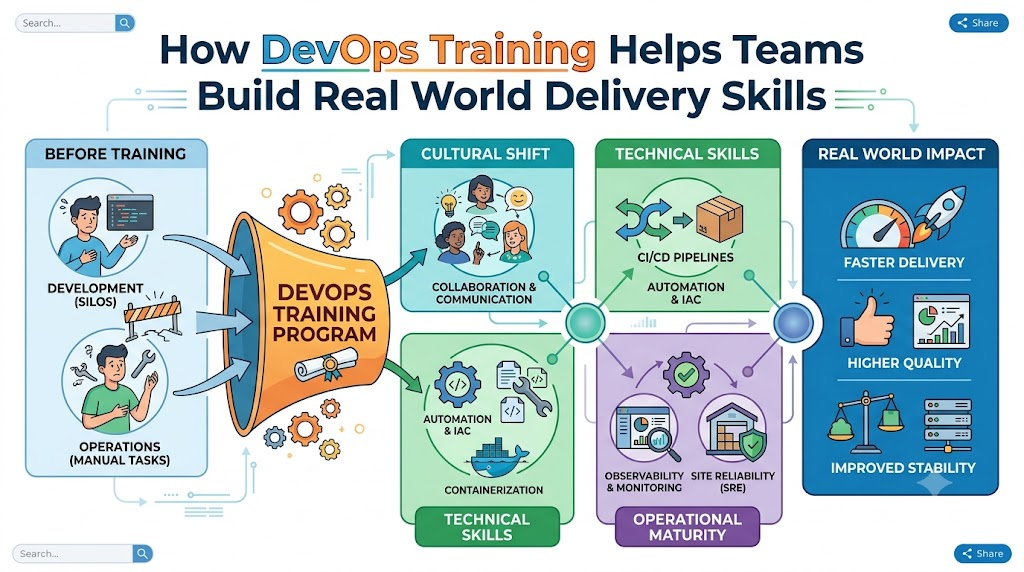
  • How DevOps Training Helps Teams Build Real World Delivery Skills

    Software teams want to build great apps fast. But building apps is hard work when coders and system helpers work alone. You can learn these modern teamwork skills at DevOpsSchool to ship software safely and quickly.

    Learning together helps everyone speak the same language. Coders write new features every day. Operators keep the servers running smooth and fast. Good lessons show both groups how to work as one happy team.

    When you learn these skills, you stop making slow manual mistakes. Instead, you build smart systems that check code automatically. Let us explore how these real skills transform tech teams.

    What Does DevOps Mean for Normal Teams?

    DevOps combines the words development and operations. Development means writing the computer code. Operations means running that code on real servers for people to use.

    In the old days, coders tossed their work over a tall wall. The operations team caught it and tried to make it run. Often, the program broke right away.

    Today, DevOps brings these two groups to the same table. They share tools and share goals. As a result, they build better products with much less stress.

    The Big Shift in Teamwork

    Teams used to blame each other whenever things broke down. Now, they solve problems together without pointing fingers.

    They write small updates instead of huge, scary changes. This makes finding bugs quick and painless. Everyone learns how the whole machine works from end to end.

    Key Operational Concepts You Must Know

    To run apps well, teams must master a few core building blocks. These ideas make modern computer systems run without stopping.

    Smart Version Control

    First, teams must store their code in a safe place. Think of version control like a giant undo button for your work.

    It keeps a clear diary of every single text change. So, if a new line breaks the app, you fix it in one second.

    • Track changes: You always know who wrote each piece of code.
    • Work together: Multiple people can edit files at the same time.
    • Roll back fast: You can return to yesterday’s good code anytime.

    Automated Testing Pipelines

    Next, teams build automated test tracks for their code. These tools run tests every time a coder saves new work.

    The pipeline acts like a strict security guard at the gate. It checks for errors and blocks bad code from going live.

    Because computers do the checking, humans do not get tired. Teams catch bugs early while they are cheap and easy to fix.

    Platform Implementation vs. Culture — What’s the Real Difference?

    Many companies buy fancy tools and think they are done. But tools are only half of the puzzle. You also need the right mindset.

    FeaturePlatform Implementation (The Tools)Team Culture (The Mindset)
    Main GoalSet up robots, servers, and automated pipelines.Build trust, share duties, and talk openly.
    Everyday WorkWriting scripts and configuring cloud dashboards.Helping teammates learn and sharing daily lessons.
    When Things BreakTools send alerts and restart broken machines.People run blameless reviews to fix root causes.
    Key BenefitFaster builds and smooth computer setups.Happy workers who love solving tough puzzles.

    Why Tools Need People

    A shiny new sports car cannot drive without a skilled driver. Cloud tools work the exact same way.

    If your team does not talk, fancy pipelines will not save you. But when you build trust, simple tools can do wonders. Real training teaches both the buttons and the human habits.

    Real-World Use Cases of Modern Operations

    Modern companies use these skills every day to stay ahead. Here are three clear examples you can picture easily.

    Online Banks Protecting Your Money

    Banks must move money safely every single second. They cannot allow errors or site crashes.

    With modern training, bank engineers build automated safety checks. The pipeline checks security rules before any new code goes live.

    So, customers can check their accounts and send money without worry. The bank updates its app weekly without any downtime.

    Big Shopping Sites on Sale Days

    Think about huge online stores during holiday sales. Millions of people try to buy toys at the same minute.

    Trained engineers set up rules that add more servers automatically. When shoppers leave, the extra servers turn off to save money.

    • Auto-scaling: Servers grow in seconds when crowds arrive.
    • Self-healing: Broken servers restart on their own right away.
    • Zero downtime: Shoppers keep buying even while updates roll out.

    Video Apps Streaming Cartoons

    Video streaming apps send movies to phones, TVs, and tablets worldwide. If the video stutters, viewers get sad and close the app.

    Engineers use live monitors to watch stream quality everywhere. If one server gets slow, the system routes data to another computer.

    Because the team practiced these drills, viewers never see a freeze. Everything plays smooth and clear on every screen.

    Common Mistakes in Operations Engineering

    Learning new habits takes time and patience. Many teams make these easy mistakes when they start out.

    1. Trying to fix everything on day one: Teams take on too much and get tired fast. Start with one small pipeline first.
    2. Ignoring team feelings and habits: Buying software without training your staff always leads to failure.
    3. Skipping tests to save time: Skipping tests always creates huge emergencies later in production.
    4. Blaming people for accidents: People hide mistakes when bosses get angry. Focus on fixing the broken system instead.
    5. Leaving security checks for the very end: Always check for locks while you build, not after you finish.

    How to Become an Operations Expert — Career Roadmap

    You can follow a clear, step-by-step path to master these skills. Take it one step at a time.

    +-------------------------------------------------------------+
    |               Simple Five Step Learning Path                |
    +-------------------------------------------------------------+
    | Step 1: Learn Basic Linux and Command Line Commands         |
    | Step 2: Write Helper Scripts with Python or Bash            |
    | Step 3: Package Apps Inside Clean Containers                |
    | Step 4: Automate Cloud Servers Using Text Files             |
    | Step 5: Watch Live Systems with Smart Dashboards            |
    +-------------------------------------------------------------+
    

    Essential Skills to Practice

    • Linux Basics: Learn how to move files and check running programs without a mouse.
    • Git Skills: Save your code work safely in clean online branches.
    • Docker Tools: Put apps in small virtual lunchboxes so they run anywhere.
    • Cloud Power: Learn how to rent computer power in the cloud as you need it.
    • System Monitors: Build colorful charts that show computer health at a glance.

    FAQ Section

    1. Can beginners learn these operations skills easily?Yes, anyone can learn these skills with steady practice, basic computer curiosity, and clear, simple lessons.
    2. Do I need to write code to work in operations?You do not need to build huge programs, but writing short helper scripts makes your daily job much easier.
    3. Why do teams love using containers for apps?Containers wrap the app and its helpers together, so the app runs the same on every single computer.
    4. How long does it take to learn these modern skills?Most learners build solid, job-ready skills in about six months of steady, hands-on practice.
    5. Does this training help coders and operators equally?Yes, it teaches coders how code runs live, and it teaches operators how code is made.

    Final Summary

    Learning modern delivery skills helps tech teams build better apps with far less stress. Coders and system helpers work together as one strong unit.

    They use automated tests, smart pipelines, and cloud tools to deliver features quickly. As a result, companies keep their systems fast, safe, and reliable for everyone.

    Start learning these skills step by step today. With practical lessons and patience, your team can deliver amazing software every single week.
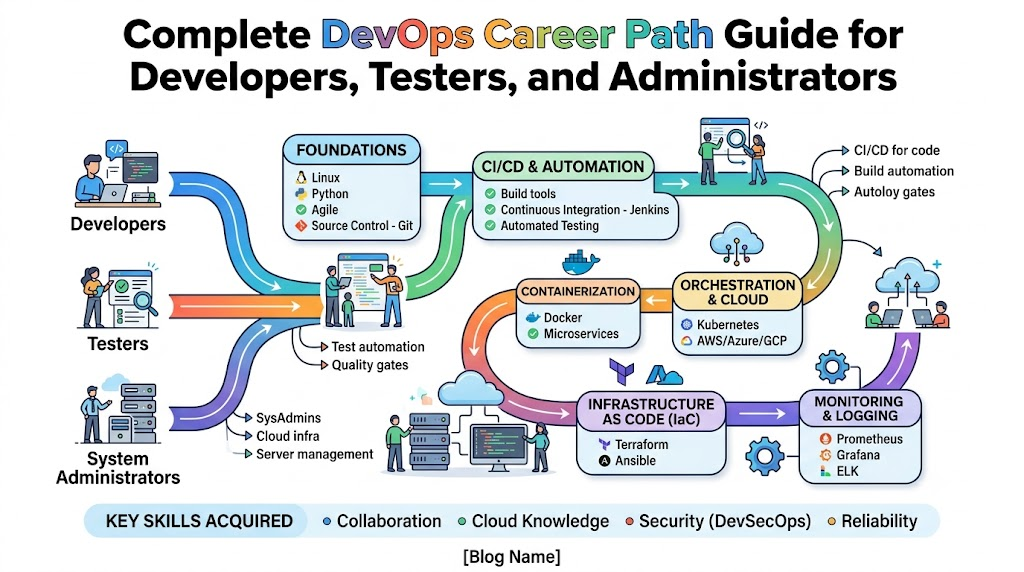

  • Complete DevOps Career Path Guide for Developers, Testers, and Administrators

    Modern software teams want to build fun apps and update them fast. Developers write code, testers look for bugs, and system admins run servers. When these teams work as one unit, they use an approach called DevOps.

    You can learn these skills through guided lessons at DevOpsSchool to grow your career. Their training helps you practice real tasks and build strong confidence. Soon, you will know how to ship software without errors.

    DevOps acts like a fast conveyor belt in a toy factory. The makers, painters, and box packers stand together. Because they talk every day, they build better toys much faster.

    What Is DevOps in Simple Words?

    DevOps brings two main groups together. The first group is development, which builds software. The second group is operations, which keeps computers running safely.

    In the past, these groups sat in different rooms. Developers wrote code and tossed it over a wall. Then, system admins had to fix every single broken piece.

    Today, both sides share the work from day one. They use automated robots called scripts to test and send code. So, apps update easily without making games or websites crash.

    Key Operational Concepts You Must Know

    To run apps smoothly, you must understand a few basic tools. These simple ideas help you fix problems early.

    Version Control Keeps Code Safe

    Think of version control as an unlimited undo button for your typing. It saves every change you and your friends make to a project.

    If someone makes a mistake, you just turn back the clock. Also, it helps everyone share files without overwriting each other’s work.

    Automated Testing Finds Bugs Fast

    Automated testing uses computer robots to check your work. These robots run tests on every new line of code right away.

    Because robots work day and night, they never get tired. Next, they send a quick message if they spot an error.

    Continuous Integration Brings Work Together

    Continuous integration means putting everyone’s code into one shared box every day. The box tests the code right after it lands.

    So, developers find mistakes in minutes instead of months. This habit stops big surprises before launch day.

    Infrastructure as Code Builds Servers

    In the past, admins plugged in big metal computers by hand. Today, engineers write simple text files to turn on new cloud computers.

    This practice is called Infrastructure as Code. You type a command, and ten new servers start in two minutes.

    Platform Implementation vs. Culture — What’s the Real Difference?

    Many teams think DevOps only means buying shiny new tools. But changing how people treat each other matters much more.

    Work AreaPlatform Implementation (The Tools)Team Culture (The Mindset)
    Main GoalSet up robots and cloud serversBuild trust and help teammates
    Daily TasksWrite code to run computer jobsShare ideas and learn together
    How to Fix ErrorsRun quick rollback scriptsTalk openly without blaming anyone
    Big WinSoftware moves fast to the cloudWork stays fun and stress-free

    Why Good Culture Wins Every Time

    Tools are just hammers and screwdrivers. If workers shout at each other, they will build a crooked house.

    A good culture means people share helpful tips without fear. When an app breaks, the team asks how the system failed, not who to punish.

    So, workers feel safe trying new ideas. Because they help each other, they solve hard problems with ease.

    Real-World Use Cases of Modern Operations

    Many popular apps that you use every single day need these smooth methods to run.

    Online Video Games Stay Online

    Popular online games push updates to millions of players at once. If their servers stop, players get mad and quit.

    Engineering teams use smart tools to update maps while kids keep playing. The system swaps in new servers quietly in the background.

    So, gamers never see a blank screen. Everyone keeps playing their favorite game without any pause.

    Streaming Apps Play Cartoons Smoothly

    Streaming video services send cartoons and movies to TVs across the whole world. On Friday nights, millions of families watch shows at the exact same hour.

    Smart systems spot the huge jump in viewers right away. Then, cloud computers launch extra server power within seconds.

    Later, when people go to sleep, the extra servers turn off. This quick shift saves power and keeps costs low.

    Common Mistakes in Operations Engineering

    Beginning engineers often make simple mistakes. Learn these early so you can skip the headaches.

    • Changing Settings by Hand: Never log into a server to edit files manually, because nobody can trace what you touched.
    • Skipping the Robot Tests: Always run automated tests, because lazy habits let nasty bugs slip into customer apps.
    • Buying Tools Without a Plan: Do not install ten apps when one tool does the job well.
    • Hiding Mistakes From the Team: Tell your team right away when something breaks, so everyone can fix it together.
    • Forgetting About Safety Checks: Build safety checks early, because patching holes at the end takes way too long.

    How to Become an Operations Expert — Career Roadmap

    Each tech role takes a slightly different road into this exciting field. Here is how you can jump in from your current job.

    Paths for Different Roles

    • The Developer Path: You already write clean code. Next, learn how cloud servers run your code, and practice setting up delivery pipelines.
    • The Tester Path: You already know how to break things. Now, learn Python to write automated test robots that run on their own.
    • The System Admin Path: You already know networks and Linux well. Next, stop setting up machines by hand and learn how to write setup code.

    Five Steps to Level Up

    1. Learn Basic Linux Commands: Practice moving files and checking memory inside a terminal window.
    2. Master Git for Sharing Files: Save your work often, create small branches, and share your code with others.
    3. Pack Apps Inside Containers: Learn how to box up an app so it runs identically on any computer.
    4. Use Cloud Servers: Set up virtual machines on the internet using text scripts.
    5. Watch System Health: Build simple dashboards with bright meters that show if your servers are happy.

    FAQ Section

    1. Can I learn these skills if I do not have a college degree?Yes, you can learn everything through online courses and hands-on labs at your own pace.
    2. Do I need to learn hard math to work in this field?No, you only## What Is DevOps?

    Think of building software like running a busy bakery.

    Developers invent recipes and mix the dough. Testers taste the cookies to make sure they taste right. System admins keep the ovens hot and pack the delivery boxes.

    In the old days, these teams sat in different rooms. They rarely talked to each other. Mistakes happened constantly.

    DevOps tears down those walls. It unites the creators and the operators into one team. Everyone works together so cool tech features reach real users fast and safely.

  • Bright Pathways for Picking Top Schools and Mentors with GurukulGalaxy

    Introduction

    A great tutor unlocks your true brainpower and makes learning feel effortless. Yet most families lose precious weeks asking around for reliable guidance.

    Parents worry constantly about hard homework sheets and giant college decisions. A friendly online education network called GurukulGalaxy brings quick relief to every home.

    This smart directory connects ambitious children with certified guides and modern classrooms. It lets you evaluate campuses, view fee plans, and track entrance tests right from your bedroom.

    Now, let us explore the smartest ways to boost your school success.

    Discover Caring Home Mentors in Your Area

    Some children study much better when an instructor sits right beside them. You can ask small questions freely without feeling shy before a crowd.

    You can find tutors near me by tapping a few simple buttons. These nearby teachers walk to your house and sit by your desk.

    They read your exact school textbook and spot where you need help. Because they live down the street, they fit your family schedule without any fuss.

    • Home study visits: Instructors help you right at your own study table.
    • School textbook match: Lessons follow your exact school syllabus every week.
    • Fast answers: You solve tricky homework puzzles on the spot.

    Meet Skilled Online Teachers from Across India

    Sometimes the best instructor for your target subject lives far away. The web breaks down these long distances in seconds.

    Students can find tutors online through easy search filters. You only need a laptop, a tablet, or a phone to begin your class.

    Many skilled online tutors India use bright digital boards and quiz games to explain tough ideas. A girl in a quiet village can master computer code with an expert in Bengaluru. This equal access gives every child a fair chance to shine.

    Locate the Strongest Coaching Centers Near You

    Studying in a lively classroom with peers pushes you to try harder. Group lessons make learning feel like a team game.

    GurukulGalaxy helps you track down verified coaching institutes near me in seconds. You can inspect photos of classrooms and check teacher degrees.

    You can also read honest reviews from older students who studied there before. These clear details stop your parents from making risky choices.

    Research the Nation’s Top Training Centers

    Famous coaching houses help thousands of teenagers enter dream careers. These large centers run deep mock test series and hand out well-tested revision notes.

    Families search for the best coaching institutes in India to train for major entrance battles. GurukulGalaxy displays these famous centers clearly with accurate batch hours and fee cards.

    You get solid facts to pick the right academy without trusting loud advertisements.

    Study OptionHome TutorsCoaching Centers
    Group SizeJust you (one-on-one)25 to 50 active learners
    Core GoalFixing daily homework doubtsTraining for large entrance tests
    Learning PaceMatches your personal speedFollows a strict batch schedule
    Doubt SupportInstant help on every stepDedicated hours after class

    Search Great Colleges for Your Dream Career

    Finishing high school opens exciting doors to higher studies and grown-up life. But picking the right college degree can make any head spin.

    A thorough college search India helps you inspect campuses all across the country. You can research degrees in computers, medicine, commerce, business, or fine arts.

    GurukulGalaxy lists verified college pages showing science labs, sports grounds, and safe hostels. This helps you select a welcoming campus for your future degree.

    Match Degrees and Campuses Side by Side

    Never pick a college just because your best friend plans to go there. Your own dreams and skills matter much more.

    The site lets you compare colleges and courses on a single clear screen. You can match tuition fees, teacher ranks, and past job offers side by side.

    Comparing real facts stops costly mistakes and gives your parents peace of mind.

    Decision PointCampus OneCampus Two
    LocationWide green campus with large labsModern city college near metro stations
    Annual FeesLow public university ratesHigher private institute rates
    Project FocusDeep focus on science lab experimentsDirect projects with software companies
    Hostel StaySecured rooms inside campus wallsRented student rooms across the street

    Master Big National Tests with Confidence

    Every year, millions of Indian youth sit for competitive tests. These big tests select bright students for top engineering and medical schools.

    Learners easily explore different competitive exams in India through plain guides. These articles cut out tricky words and tell you what each test demands.

    You read about age limits, question formats, and scoring rules long before you register.

    Build an Easy Daily Plan for Exam Practice

    Passing hard entrance tests does not require skipping meals or losing sleep. It only takes calm, steady practice every morning and evening.

    Smart competitive exam preparation starts when you spot your weak topics early. GurukulGalaxy shares organized study planners, past question papers, and sharp tips.

    These tools teach you how to finish your answers before the clock runs out. When you practice every day, hard tests feel simple.

    Review Exciting Test Paths After Twelfth Grade

    Finishing the twelfth board exam marks a giant milestone for you. Many fresh roads open up at the very same time.

    Ambitious students review competitive exams after 12th to find their favorite track. You can aim for engineering colleges, doctor degrees, design schools, or army officer training.

    Clear test maps show you opening dates and test cities so you always submit your papers on time.

    Real Success: How Kabir Beat His Science Fears

    A sixth-grade student named Kabir used to freeze during every science test. He could not understand how electric circuits and magnets worked together.

    His father opened GurukulGalaxy and picked an experienced teacher living three streets away. The tutor brought small copper wires, batteries, and bulbs directly to Kabir’s desk.

    Kabir wired the circuits with his own hands and understood the science in minutes. Within two months, his science score leaped from forty percent to ninety-two percent. Kabir now builds battery cars and loves explaining science tricks to his friends.

    The Four-Step “S-T-A-R” Selection System

    Use our simple four-step rule to make smooth learning decisions:

    • S – Set your target: Write down the exact subject or entrance exam you want to conquer.
    • T – Test your style: Choose between a quiet home tutor and an energetic group classroom.
    • A – Analyze the facts: Check verified ratings, teacher degrees, and course fees on GurukulGalaxy.
    • R – Request a demo: Join a trial class to see if the teacher explains lessons clearly.

    Wise Words from a Senior Academic Guide

    Mrs. Anita Desai, an experienced school counselor with twenty years of teaching work, shares her advice:

    “Children grasp lessons quickly when a teacher talks to them with warmth. Confusion only grows when students feel scared to raise their hand. Easy discovery platforms give every parent the power to find patient teachers who make learning exciting again.”

    Research shows that seven out of ten learners raise their test scores by twenty-five percent when they talk through problems with an active mentor. Honest feedback always builds strong and happy minds.

    Frequently Asked Questions About GurukulGalaxy

    Can GurukulGalaxy help me find mentors for specific school subjects?

    Yes, you can search for expert tutors across math, physics, biology, history, and language arts in seconds.

    Do online teachers offer live sessions across different time zones?

    Yes, you can pick morning, afternoon, or evening batches that match your daily family schedule.

    Are there extra charges to compare university programs on the portal?

    No, learners can compare courses, campus photos, and fee sheets completely free of cost.

    How do administrators verify private tutor credentials?

    The team checks college diplomas, government identity proofs, and past classroom experience before adding verification badges.

    Can two colleges have their admission requirements shown on one screen?

    Yes, the comparison tool displays eligibility criteria, cutoff marks, and campus amenities side by side.

    Does the platform explain registration dates for entrance exams?

    Yes, you get clear calendars showing application start dates, admit card rollouts, and exam days.

    Will a home tutor suit my child better than a classroom institute?

    Pick a home tutor if your child needs step-by-step homework help, or choose an institute for big competitive drills.

    Is it possible to request a sample lesson before committing to a teacher?

    Yes, parents can contact educators directly to discuss teaching styles and schedule a trial demo session.

    Are creative subjects like music and computer coding included on the site?

    Yes, the directory features qualified mentors for piano, drawing, web coding, chess, and public speaking.

    Where can twelfth-grade graduates find college admission details?

    The platform lists degree programs, entrance notifications, and vocational tracks specifically designed for students finishing high school.

    Moving Forward on Your Learning Adventure

    Stepping into a new school grade brings fresh challenges and endless wonder. A helpful guide lights the road ahead and clears away all your doubts.

    Leave behind the worry over difficult formulas and confusing college choices. Tap into verified neighborhood teachers, compare top campuses, and use clean study guides.

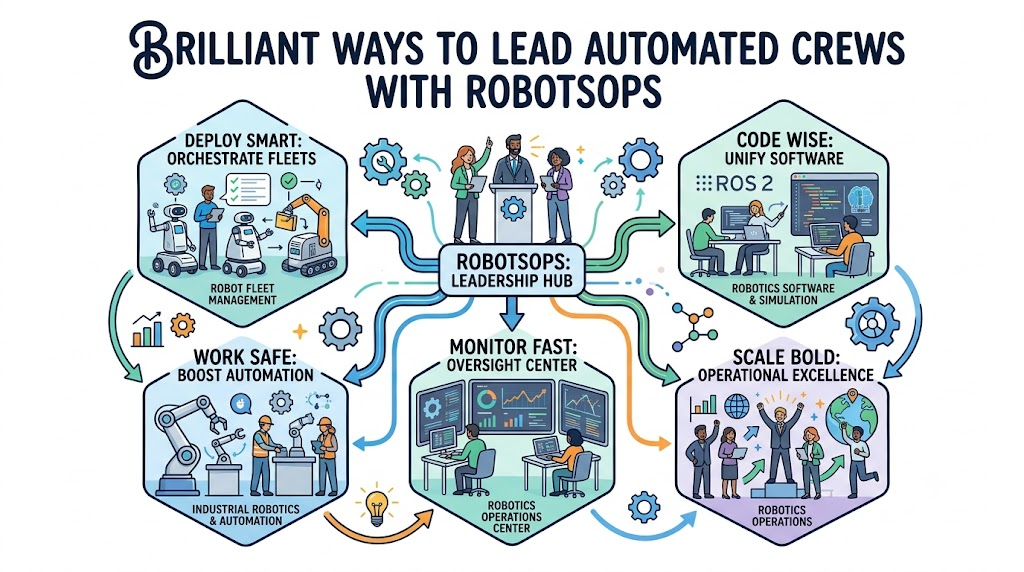
  • Brilliant Ways To Lead Automated Crews With robotsops

    Welcome To A Lively World Of Machine Teammates

    Walk into a modern warehouse and watch mechanical carts zip down wide lanes. These tireless helpers lift wooden crates and deliver parts on time. But even clever machines need human guidance so they do not bump into shelves.

    Engineers build special operating methods to direct these machine squads smoothly. We call this entire discipline RobotOps. It applies smart computer workflows straight to physical hardware.

    The learning platform robotsops shows you how to guide these mechanical squads. Beginners discover how to plan clear routes and fix motor glitches quickly. You can explore easy lessons that turn technical ideas into child’s play.

    Daily Care In Robotics Operations

    Every hardworking machine needs regular checkups to stay in top shape. Technicians call this ongoing maintenance Robotics Operations.

    Crews inspect rubber tires, clean camera lenses, and update system files. If a transport cart loses its signal, the whole packing floor might stop.

    The resource library on robotsops shows students how to clear these stops quickly. Industry data shows that regular checkups cut hardware pauses by seventy percent.

    Because human employees walk these same aisles, safety remains the central goal. Daily maintenance routines keep human workers out of harm’s way.

    Traffic Control Through Robot Fleet Management

    Think of an airport tower that directs planes to empty gates. Organizing dozens of rolling warehouse carts follows that same idea. Experts call this setup Robot Fleet Management.

    Supervisors send software updates across the air to many carts at once. They check battery levels, internal temperatures, and current speeds from one desk screen.

    The guides on robotsops show you how to build these tracking screens step by step. The breakdown below highlights how fleet tools change daily warehouse chores.

    Team TaskManual MethodsSmart Fleet Systems
    Software UpdatesPlug cables into each cartSend updates over the air
    Error HandlingWait until machines stopCatch heat warnings early
    Path SharingCarts block narrow hallsCarts yield and clear routes

    So, proper fleet tools save workers countless hours of manual repair labor.

    Heavy Work With Industrial Robotics

    Automobile factories depend on massive steel arms to weld frames and paint metal doors. We call these strong metal arms Industrial Robotics.

    These steel arms lift giant car frames that humans cannot pick up safely. But they must follow strict safety borders so they never bump into walls.

    On robotsops, learners explore arm joints, electronic controllers, and safety gates. An equipment maker used these methods and cut factory stalls by forty percent.

    Also, smart distance sensors tell the mechanical arm when someone steps close. The arm stops moving immediately to protect the human operator.

    Writing Brains Through Robotics Software

    A metal frame cannot move without smart instructions telling it where to go. Programmers call these core instructions Robotics Software.

    This software works like a nervous system that reads camera images and turns wheels. It plans smooth paths around fallen boxes and wet floor spots.

    The educational team at robotsops breaks down these software steps into clear lessons. You discover how cameras spot parts and how tiny chips pick travel lanes.

    Next, automated code tests help coders catch software errors before launch day. That means machines run smoothly from the very first minute.

    Safe Practice Inside Robot Simulation

    You should never test brand-new movement code on expensive factory hardware. Instead, smart programmers build and test everything inside a Robot Simulation.

    This digital simulator copies real gravity, floor friction, and wall boundaries. If a virtual cart crashes into a wall inside the program, nobody gets hurt.

    Lessons on robotsops show how to design digital testing zones on a home laptop. Field research proves that simulation tests lower setup expenses by more than half.

    Because digital trials cost very little money, engineers test dozens of floor layouts overnight. Then, they send the verified code to the real factory machines.

    Carrying Cargo With Autonomous Mobile Robots

    Self-driving delivery carts carry the formal name Autonomous Mobile Robots. They move warehouse bins, haul online orders, and support shipping yards.

    These carts move around without relying on painted floor tape or magnets. They shine invisible laser light to build detailed room maps on the fly.

    Through robotsops, you can read how rolling carts share hallways with walking workers. In modern hospitals, these rolling helpers deliver fresh medicine and linens to patient wings.

    Also, when battery power drops low, the cart drives to a charging bay on its own. It docks smoothly and returns to work once fully charged.

    Boosting Speed With Robotics Automation

    Logistics centers speed up their work by setting up Robotics Automation. Machines take on dull, repetitive chores so human workers can focus on creative tasks.

    For example, an automated sorter packs food boxes all day without feeling tired. This steady pace helps grocery stores keep their shelves stocked with fresh meals.

    The robotsops platform shares step-by-step guides so you can see how warehouses automate work. In a recent interview, an engineering director stated that automation shields workers from back strain.

    So, companies boost their daily output while creating a much safer workplace for everyone.

    The Big Desk In A Robotics Operations Center

    Space teams guide rocket flights from rooms filled with glowing screens. Industrial plants guide machine fleets from a Robotics Operations Center in a very similar way.

    Console operators sit at central desks to watch floor maps, camera views, and sensor readings. If a transport cart stops at a closed gate, an operator steers it away using hand controls.

    The authors at robotsops explain how teams build these central control rooms. The table below outlines common job roles inside a control space.

    Station RoleMain DutyPrimary Focus
    Fleet CoordinatorFollows live cart pathsClearing traffic jams
    Safety SpecialistWatches alert alarmsFast emergency stops
    System AnalystStudies battery and heat chartsPreventive maintenance

    Because these teams watch the monitors constantly, factory floors run smoothly day and night.

    Sharing Messages With ROS 2

    Machine hardware parts talk to each other using a popular framework called ROS 2. It acts like an instant telephone line between sensors, cameras, and motor drives.

    One computer program reads camera images, while another program turns the wheel motors. This modular setup lets different programs share real-time data without annoying delays.

    The tutorials on robotsops guide you through setting up this messaging framework on your computer. You learn how control signals travel across system circuits in a split second.

    Next, clear starter examples help beginners build working robotics projects without stress.

    The Five Step Strategy For Machine Fleets

    The team behind robotsops recommends a five-phase approach for running machines in production setups:

    • Step 1: Test In Simulation. Always check your navigation code inside a simulated room before touching real machines.
    • Step 2: Inspect Safety Hardware. Verify that physical stop buttons and optical range sensors work properly.
    • Step 3: Roll Out Updates In Stages. Deploy new software to a single machine before updating the rest of the fleet.
    • Step 4: Track Health Metrics. Watch motor temperatures, battery levels, and wireless links from a central screen.
    • Step 5: Replace Parts Early. Swap out worn wheels and loose belts before they cause costly floor pauses.

    Frequently Asked Questions About robotsops

    Can anyone learn modern robot management without hard math?

    Yes, you can pick up every core idea through clear explanations and practical starter guides.

    What primary goal does a fleet manager serve?

    A fleet manager balances travel assignments, keeps traffic flowing, and pushes software updates across all units.

    Why do modern warehouses rely on RobotOps?

    Warehouses use RobotOps to monitor machine health, schedule updates, and keep operations running safely.

    How do autonomous mobile robots avoid obstacles?

    They use laser rangefinders and optical cameras to detect unexpected items and steer around them.

    What job does ROS 2 perform inside a robot?

    ROS 2 acts as a software framework that lets motors, cameras, and computers exchange messages without delay.

    Why do engineers build simulation rooms first?

    Simulation provides a safe computer environment to test movement code without risking expensive physical hardware.

    Which activities happen inside an operations center?

    Operators sit at monitor banks to view route traffic, review error notifications, and steer stopped machines.

    How does predictive servicing help factories?

    It detects rising motor heat and component play so technicians can replace parts before assemblies jam.

    Which learning materials does robotsops provide?

    The site publishes instructional lessons, system workflows, and operational guides covering modern machine fleets.

    Do automated systems improve human safety at work?

    Yes, because machinery handles heavy, hazardous lifting and stops the moment a worker approaches.

    Closing Thoughts On Machine Teamwork

    Modern machines handle big jobs across shipping hubs, factories, and medical facilities. When we treat these machines with smart software habits, workplaces become much safer and faster.

    The educational materials on robotsops give curious learners the tools to understand this expanding world. Start exploring these friendly lessons today and discover how you can direct your own automated teams.

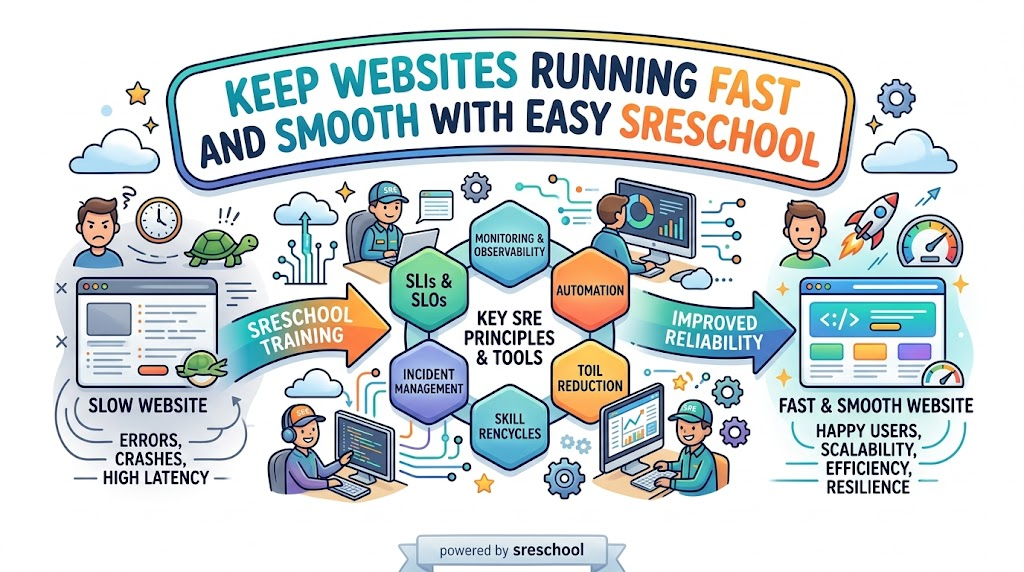
  • Keep Web Apps Running Without Crashes With SRESchool

    Introduction

    Think about your favorite online game suddenly freezing during a big match. Blank screens and loading wheels make players mad.

    Clever tech workers stop these sudden freezes before they ruin your fun. They use a powerful discipline called Site Reliability Engineering.

    This practice makes computers and phone apps run fast and stay strong. It stops servers from crashing when millions of users log in together.

    Anyone can learn these vital skills with easy practice. A hands-on training hub named SRESchool shows learners how to build unbreakable systems.

    What Makes This System Work So Well

    Let us look at how modern teams build better apps. Here are three key rules they follow every day:

    • Measure what matters: Track page load speeds using clear health numbers.
    • Automate dull chores: Build smart software scripts that handle routine maintenance.
    • Plan for surprise errors: Expect computers to glitch and prepare instant backup steps.

    Easy Words That Explain Big Systems

    Tech pros use short terms to describe server health. For example, an SLI acts like a speedometer that measures true website speed.

    Next, an SLO sets a clear goal for that speed. A shopping site might promise to run fast 99% of the time.

    Then, error budgets provide a safe cushion for fun tests. Coders use this wiggle room to roll out cool new features safely.

    Because numbers stay clear, team members never argue about updates. Everyone knows when to move fast and when to fix small errors.

    Build Real Skills With SRE Training

    Reading dry documents puts people right to sleep. Real mastery happens when you fix things with your own two hands.

    Structured SRE Training lets you control safe practice computers. You resolve fake server fires without hurting real users on the web.

    You learn how to spot glowing warning lights on computer screens. Also, you create smart robots that fix broken files all on their own.

    Because practice builds quick confidence, you solve hard puzzles easily. Soon, you can fix giant server hiccups without breaking a sweat.

    Five Steps To Stop A System Emergency

    When a web app breaks, smart engineers follow an easy rescue path:

    1. Spot the red light: Check the monitoring panel to find the broken server.
    2. Alert the crew: Send a quick note so helpful teammates join in.
    3. Turn off broken parts: Disable minor features to protect the main homepage.
    4. Fix bad code lines: Write clean instructions so the crash never returns.
    5. Write down notes: Share what happened so everyone learns from the mishap.

    Learn In A Site Reliability Engineering Course

    Structured classes show you how giant websites operate behind the scenes. A complete Site Reliability Engineering Course guides you through real production platforms.

    Helpful coaches walk you through realistic disaster drills step by step. You discover how to turn off noisy alarms and catch real trouble.

    Next, you install neat sensors that warn you before databases fill up. You learn to launch cool updates while keeping servers safe.

    This practical training turns complex network puzzles into simple ideas. You gain powerful skills that impress tech managers everywhere.

    Explore Quick Lessons In An SRE Tutorial

    Curious beginners can learn great skills at their own pace. A short SRE Tutorial breaks big ideas into quick weekend reads.

    These guides share simple sketches and code samples you can run at home. You never need to untangle messy math formulas.

    Each brief lesson tackles one small puzzle at a time. Next, you connect those pieces to build sturdy cloud systems.

    Because these guides stay short, learning feels like playing a fun game. You boost your tech skills with every page you read.

    Great SRE Tools Every Tech Team Needs

    Modern builders use special software helpers to watch their networks. They run clever SRE Tools that scan servers day and night.

    Some tools watch memory levels and flash warning lights before trouble starts. Other tools simulate safe server crashes to test emergency backup systems.

    Here is a quick look at the top tools in action:

    Tool GroupWhat It Does Every DayWhy It Helps Your Team
    ObservabilityWatches server speed and memory useCatches sneaky bugs before outages occur
    AlertingSends loud notifications during crashesBrings fast help to fix broken web pages
    AutomationRuns boring cleanups on a strict timerStops human mistakes during daily tasks
    Chaos TestingBreaks test systems on purposeCreates tough networks that survive surprises

    How Modern Methods Beat Old Habits

    Old computer workers often waited until things caught fire. Modern engineers prepare for hiccups ahead of time:

    Daily TaskOld Tech HabitsModern Reliability Habits
    Fixing OutagesFixes every crash by handWrites smart programs that heal servers instantly
    Boring ChoresRepeats dull steps manuallyRemoves repetitive work with clever code scripts
    System UptimeHopes machines never breakExpects failure and automates instant recovery
    New UpdatesDelays releases out of fearUses error budgets to launch updates safely

    Earn A Respected SRE Certification

    Showing your skills helps you land exciting jobs. An industry-backed SRE Certification proves your abilities to top employers.

    Tests verify that you know how to trace and fix sudden outages. They check your talent for creating safe rules for busy cloud networks.

    Companies hire certified pros because they protect valuable systems from breaking. A recognized badge shows everyone that you can handle large production platforms.

    Preparing for this test speeds up your career growth. You stand out as an expert who keeps systems running smooth and clean.

    Rise Up As A Certified Site Reliability Engineer

    Reaching this high rank changes your career journey completely. As a Certified Site Reliability Engineer, other builders ask you for helpful advice.

    You build tough cloud setups that survive huge crowds of online holiday shoppers. You teach junior coders how to write clean programs that resist bugs.

    Also, you guide big decisions for apps that millions of people love. Top technology companies value your rare talents and offer great pay.

    Fix Big Bottlenecks With SRE Consulting

    Sometimes a busy company needs outside help to clean up its cloud. Seasoned SRE Consulting solves these hard problems fast.

    Friendly experts look over your entire network layout with care. They track down hidden slowdowns before customers get upset.

    Next, they show managers how to set fair uptime targets. They train your workers to handle sudden alarms calmly and quickly.

    Because these pros have fixed hundreds of outages, they work fast. Your company enjoys smoother operations and happy customers.

    Protect Small Platforms With SRE as a Service

    Small companies rarely have big budgets to hire a full team. They pick SRE as a Service to get top protection on a friendly budget.

    Experienced specialists watch your servers round the clock. You pay only for the exact help your business requires.

    They patch security holes and balance web traffic without slowing down pages. If a server acts up at midnight, they repair it right away.

    This freedom lets your small crew build awesome new products. You grow your business while experts protect your digital home.

    Transform Enterprise Teams With Corporate SRE Training

    Large companies have hundreds of coders who must row in the same direction. Tailored Corporate SRE Training unites whole departments under clear safety habits.

    When software writers and system helpers share the same goals, projects ship smoothly. Coders stop tossing messy code over the fence for other people to fix.

    Instead, everyone shares the job of keeping the platform alive and well. Teams study mistakes calmly without pointing fingers at each other.

    As a result, companies save tons of money on preventable outages. Happy teams create superior products that users truly love.

    Who Should Pick Up These Valuable Skills

    Many bright workers can grow by learning these practices:

    • Software Coders: Write neat programs that handle sudden traffic spikes.
    • Cloud Architects: Construct safe networks that survive power blackouts.
    • System Helpers: Turn boring daily typing tasks into quick automatic scripts.
    • DevOps Leaders: Ship exciting features while keeping server health high.
    • Tech Bosses: Set clear performance targets that make customers smile.

    A Real Victory From The Field

    A growing ticket website used to crash whenever a famous singer dropped concert tickets. Mad music fans walked away, and the website lost thousands of sales.

    The company redesigned its setup using modern reliability rules. They installed smart traffic controllers and set up self-healing server groups.

    During the next mega sale, ticket buyers flooded the site without a single hiccup. Fans bought their tickets in seconds, while the engineering team smiled and relaxed.

    This win proves that good plans beat messy firefighting every single time. Smart planning keeps your favorite websites alive during huge traffic rushes.

    Frequently Asked Questions About sreschool

    Why do so many students join sreschool?

    Learners join because practical labs teach real troubleshooting skills instead of boring slide shows.

    Which jobs benefit the most from these classes?

    Programmers, cloud admins, support workers, and team leads gain direct skills to prevent website crashes.

    Can a total beginner take these courses?

    Yes, because simple words and step-by-step labs explain hard concepts clearly from the very start.

    Can business owners book custom workshops for their workers?

    Companies can request custom training modules crafted around their own private software stacks and tools.

    What practical tools do students test during labs?

    Students use real health dashboards, fast alarm systems, and automated cloud tools used across the tech world.

    Why do tech employers seek out reliability talent?

    Leaders pay top wages to engineers who keep web pages running fast during heavy traffic spikes.

    What is the real purpose of an error budget?

    It acts like a safe cushion that lets builders launch creative features without fear of tiny mistakes.

    Do students fix real computer issues during lessons?

    Every course module features safe practice labs where you fix simulated outages just like true professionals do.

    Can early-stage startups get help without hiring ten full-time workers?

    Small teams can hire flexible on-demand reliability specialists to guard their cloud platforms on a light budget.

    How do students earn an official graduation badge?

    You complete the video modules, solve every hands-on practice lab, and pass the final skill test.

    Moving Forward Toward Unbreakable Systems

    Modern society runs on digital networks, from school portals to money apps and hospital tools. Whenever a core website stops working, real people face real struggles.

    Mastering these easy habits turns you into a digital protector for everyone. You keep vital apps online, fast, and completely safe for millions of users.

    Whether you want to learn independently or hire expert guidance, SRESchool provides the exact steps to build unbreakable systems. Pick up your tools today, and build digital services that everyone can count on!

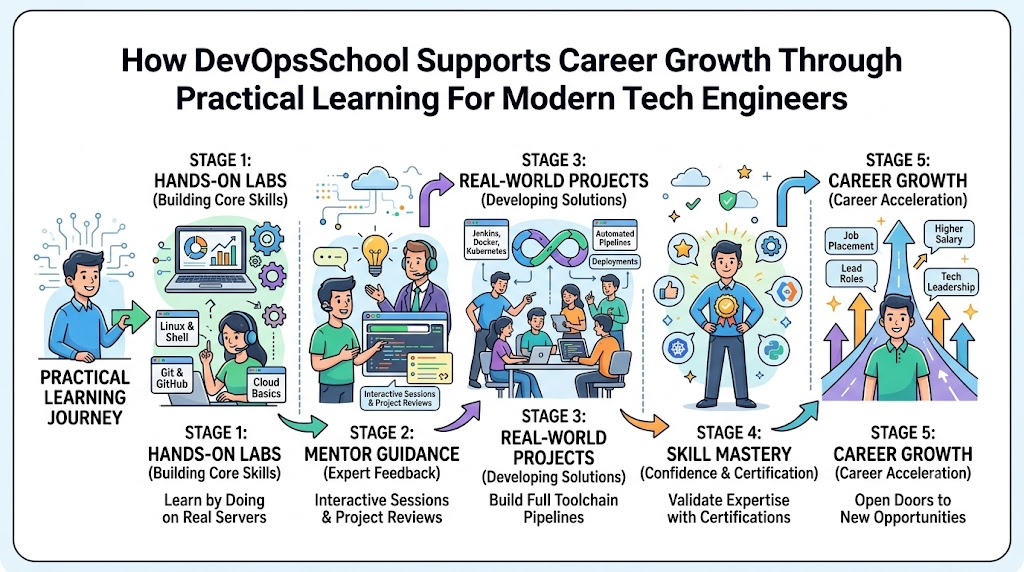
  • How DevOpsSchool Supports Career Growth Through Practical Learning For Modern Tech Engineers

    Learning modern operations skills opens big doors in the computer industry. Today, tech firms look for engineers who can build pipelines and keep cloud platforms healthy.

    You can grow your career fast with DevOpsSchool. Their friendly courses use live demos and labs to teach valuable skills. So, you gain deep confidence by practicing on real systems every day.

    Why Hands-On Practice Matters for Your Career

    Reading a textbook about computers will never make you an expert driver. Just like learning to ride a bicycle, you must steer the wheels yourself.

    When you practice on real servers, you see how errors happen. You also discover how to fix broken links quickly.

    Therefore, hands-on tasks prepare you for real company challenges. Employers love hiring workers who already know how to solve tough platform issues.

    +--------------------------------------------------------------------+
    |                  The Practical Learning Journey                    |
    +--------------------------------------------------------------------+
    |  1. Watch a Demo  -->  2. Try the Lab  -->  3. Fix Real Errors     |
    |         ^                                            |             |
    |  6. Build Job Projects  <--  5. Review Feedback  <-- 4. Save Code  |
    +--------------------------------------------------------------------+
    

    Key Operational Concepts You Must Know

    To grow in your daily work, you must understand a few core rules.

    Clear Code Saving and Project History

    First, engineers save their project files inside version control systems like Git. This tool works like a camera that snaps pictures of your work.

    If a new update breaks your app, you can roll back right away. So, your team stays safe from losing valuable progress.

    • Git: This program tracks every text change in your project folder.
    • GitHub: This service stores your project online so teammates can help.
    • Commits: These are saved points that explain what you just added.

    Fast Assembly Lines for Apps

    Next, engineers create delivery pipelines to build and test their apps automatically. We call this continuous integration and continuous delivery.

    A friendly robot checks the code for mistakes as soon as you finish. Then, it packs the app and tests every single button.

    Because robots handle this testing, human workers save hundreds of hours. That means updates reach happy users much faster!

    Digital Boxes and Container Tools

    Also, engineers pack their software inside digital boxes called containers. Tools like Docker keep all necessary parts together in one tight spot.

    Because of this, an app runs anywhere without missing tiny files. It works on your laptop just like it runs on cloud computers.

    Platform Implementation vs. Culture — What’s the Real Difference?

    Many teams believe buying expensive software solves every office problem. But real progress needs both great tools and great team spirit.

    Focus AreaPlatform Implementation (Tools)Company Culture (People)
    Main GoalSet up servers, pipelines, and cloud dashboards.Help workers share ideas and support one another.
    Daily TasksWrite code scripts and configure cloud networks.Talk openly, review code kindly, and share tips.
    Success SignsDeploy apps quickly with zero server downtime.Team members trust each other and feel happy.
    Handling BugsTools trigger sirens and restart bad machines.The group studies the cause without blaming anyone.

    Teamwork Multiplies the Value of Tools

    Giving a fast car to a driver who cannot steer will not win races. Tools simply follow the orders that people give them.

    When teammates talk and help each other, they solve problems quickly. As a result, projects finish early and users get better software.

    Real-World Use Cases of Modern Operations

    Practical learning prepares you for actual tasks that large companies handle every day.

    Massive Online Gaming Launches

    Imagine your favorite multiplayer game launching a huge new map today. Millions of players log in at the very same minute.

    Automated tools detect this sudden wave and spin up new servers. Then, the servers handle the crowd so nobody gets disconnected from the fun.

    Hospital Patient Record Systems

    Hospitals need computer files to stay open and safe day and night. Doctors cannot wait for slow computers during an emergency.

    Engineers use automated backups and testing to keep systems running smoothly. So, patient records stay safe, private, and available at all times.

    Quick Delivery Shopping Apps

    Food delivery apps process millions of hungry lunch orders every single afternoon. If the app slows down, people order lunch from another store.

    Engineers build small, quick updates to fix app bugs right away. Because of these quick updates, the app stays super fast and reliable.

    Common Mistakes in Operations Engineering

    New learners often make a few classic mistakes when setting up their systems.

    • Doing Tasks by Hand: Repeating clicks manually wastes valuable study time and creates errors.
    • Skipping Pipeline Tests: Pushing code without automatic tests sends bad bugs into production.
    • Ignoring Cloud Costs: Leaving huge cloud servers running overnight burns up valuable project money.
    • Working in Secret Silos: Hiding your code from teammates slows down the entire project.
    • Fearing Small Failures: Running away from errors stops you from learning how systems actually work.

    How to Become an Operations Expert — Career Roadmap

    You can follow a clear, step-by-step path to move from beginner to pro.

    +--------------------------------------------------------------------+
    |                      Your Learning Stepping Stones                 |
    +--------------------------------------------------------------------+
    |  Phase 1: Terminal Basics  --> Learn Linux shell and basic text commands |
    |  Phase 2: Code Tracking    --> Save your project history using Git   |
    |  Phase 3: Digital Boxes    --> Pack programs with Docker containers   |
    |  Phase 4: Cloud & Tools    --> Deploy apps on clouds using Terraform |
    |  Phase 5: Monitoring       --> Watch systems with Prometheus dashboards |
    +--------------------------------------------------------------------+
    

    Roles and What They Do

    Career RoleDaily ResponsibilitiesTop Skills Needed
    Junior Cloud AssistantCheck server alerts and run routine backup scripts.Linux commands, basic Git, simple shell scripts.
    Release Automation HelperBuild automated pipelines and test new application code.Pipeline tools, Python, container basics.
    Platform EngineerDesign internal systems so developers can deploy safely.Docker, Kubernetes, Terraform, cloud networks.
    Site Reliability ExpertKeep large web systems running without downtime or data loss.System metrics, alerts, troubleshooting, incident care.

    Helpful Next Actions

    • Spend thirty minutes every day typing terminal commands.
    • Build a tiny website and store the files inside Git.
    • Ask mentors questions whenever you hit an error you cannot solve.
    • Share your lab projects online so hiring teams can see your work.

    FAQ Section

    1. Why is practical training better than only reading books?Reading gives you ideas, but hands-on labs teach you how tools really work. You learn by doing, testing, and fixing mistakes yourself.
    2. Can beginners without a coding background learn these skills?Yes, anyone can learn these tools if they start with simple basics. Step-by-step guidance helps you build real confidence week after week.
    3. What is the most helpful tool to learn first?Git is the best tool to start with today. It teaches you how to save code and collaborate with other learners.
    4. How do hands-on projects help in job interviews?Employers want proof that you can handle real production servers. Showing real lab projects proves you have practical engineering skills.
    5. Do I need a powerful computer to practice these labs?No, you only need an everyday laptop with an internet browser. Most labs run inside remote cloud servers that do the heavy lifting.

    Final Summary

    Learning through real practice transforms curious students into capable platform engineers. By practicing with version control, container tools, and automated pipelines, you prepare yourself for top technology roles.

    Always stay curious, ask questions, and test your own code every day. With steady practice and supportive mentors, you will build an exciting and rewarding career in tech!

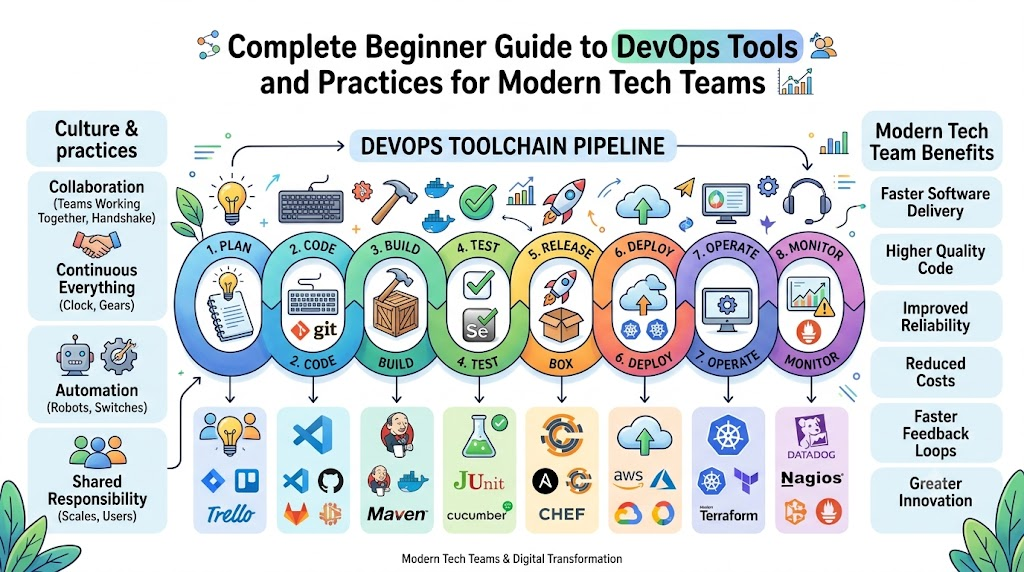
  • Complete Beginner Guide to DevOps Tools and Practices for Modern Tech Teams

    DevOps brings two main computer teams together to build awesome apps. First, developers write code to create new software games and helpful tools. Next, operations helpers run big cloud servers so these apps work smoothly every day.

    You can learn these skills step by step with DevOpsSchool. Their friendly mentors show beginners how to use cool tools to deliver software fast. Therefore, learning these basic steps will help you build, test, and ship your ideas safely!

    devopsschool.cn

    What Is DevOps and Why Do Teams Need It?

    Long ago, coders and server keepers worked in separate rooms. Coders wrote programs and tossed them over a tall wall. Then, the server keepers had to figure out how to run them.

    Because the two teams did not talk, apps broke often. Users got mad because games crashed and took months to update. So, smart workers decided to join forces and work as one happy team.

    Now, DevOps lets teams build and share new computer programs quickly. Everyone shares the work and helps each other fix small mistakes right away.

    +--------------------------------------------------------------------+
    |                      The Simple DevOps Loop                        |
    +--------------------------------------------------------------------+
    |  1. Plan App  -->  2. Write Code  -->  3. Test Program             |
    |       ^                                     |                      |
    |  6. Check Bugs  <--  5. Watch App  <--  4. Ship to Users           |
    +--------------------------------------------------------------------+
    

    Key Operational Concepts You Must Know

    To keep modern software running fast, beginners must learn a few easy ideas.

    The Big Magic Notebook for Code

    First, coders use a system named version control to save their daily work. Think of it like a magical notebook that remembers every single word you write.

    If you make a silly mistake, you can flip back to an older page. As a result, you never lose your work or ruin the whole program.

    • Git: This free tool records every line of code you change.
    • GitHub: This website stores your code online so friends can work together.
    • Branches: These are separate workspaces where you try new ideas safely.

    The Friendly Assembly Line

    Next, teams build an automated assembly line for their software. In tech speak, we call this continuous integration and continuous delivery.

    When you finish writing your code, a robot helper tests it right away. If the robot finds an error, it sends you a message immediately.

    +--------------------------------------------------------------------+
    |                   The Software Assembly Line                       |
    +--------------------------------------------------------------------+
    |  Step 1: Save code to the shared project folder.                   |
    |  Step 2: A robot checks the code for spelling mistakes.            |
    |  Step 3: The robot runs tests to make sure games run fast.         |
    |  Step 4: The system puts the finished game on the web.             |
    +--------------------------------------------------------------------+
    

    Neat Lunchboxes for Software

    Also, modern engineers pack their apps into neat digital boxes called containers. Just like your school lunchbox keeps your sandwich safe, containers hold everything an app needs.

    Because of this, the app runs the same way on your laptop as it does on huge cloud computers. You never have to worry about missing files or broken system settings.

    Platform Implementation vs. Culture — What’s the Real Difference?

    Many companies buy fancy computer programs and expect instant success. But shiny tools alone do not make a great team.

    What We Look AtSetting Up Tools (The Tech Box)Building Culture (The Team Spirit)
    Main GoalSet up robots, servers, and automated pipelines.Help people talk nicely and work together every day.
    Key HelpersCode scripts, dashboards, and cloud storage systems.Friendly chats, team support, and shared goals.
    How to MeasureCount how fast updates reach user phones.Check how much team members trust and help each other.
    When Things BreakRobots restart servers and sound quick warning alarms.The team meets to fix the issue without blaming anyone.

    Tools Are Only Toys Without Teamwork

    You can buy the best soccer ball in the world. But if players never pass the ball, the team will still lose the game.

    Culture means people share goals and help each other learn new tricks. When coders and server helpers trust each other, they solve tough problems fast.

    Real-World Use Cases of Modern Operations

    Many popular apps you use every day rely on modern operations practices.

    Online Video Streaming Services

    Think about your favorite cartoon streaming site on a busy Saturday morning. Millions of kids log in at the very same time to watch new shows.

    Smart systems spot the huge crowd and start up more servers right away. Then, when night comes and kids go to sleep, the extra servers turn off to save money.

    Mobile Game Update Days

    Have you ever played a mobile game that updates every single week? In the past, companies stopped the game for hours to fix bugs.

    Now, teams send small updates to user phones while people play. The new features slip into the game quietly without stopping your fun.

    Bank and Store Websites

    Online stores get very busy during holiday sales events. Shoppers rush to buy toys and shoes before the items sell out.

    DevOps tools test the checkout page thousands of times before the rush begins. So, parents can buy gifts quickly without the shop page freezing up.

    Common Mistakes in Operations Engineering

    Beginners often make a few easy-to-fix mistakes when they start their learning journey.

    • Doing Every Task by Hand: Click-happy workers waste hours clicking buttons when a simple script can do the job.
    • Buying Too Many Tools at Once: Using ten complex tools on day one confuses everyone and slows down the work.
    • Forgetting to Test Early: Skipping quick tests lets nasty bugs sneak directly onto user screens.
    • Blaming People for Mistakes: Pointing fingers hurts feelings and stops people from speaking up when things break.
    • Ignoring System Alarms: Turning off warning bells means you will not notice when your app runs out of memory.

    How to Become an Operations Expert — Career Roadmap

    You can grow from a curious beginner into an expert engineer with steady practice.

    Step 1: Learn Basic Computer Commands

    First, learn how to talk to computers using simple text commands. Linux is the operating system that runs most of the internet today.

    So, practice typing short words to make folders, move files, and read system notes. Once you feel comfortable typing commands, you can manage any big server.

    Step 2: Pick Up a Simple Code Language

    Next, learn a beginner-friendly programming language like Python. Python reads almost like plain English books.

    You can write short scripts to do your daily chores automatically. For example, your script can back up your files every day at dinner time.

    +--------------------------------------------------------------------+
    |                      Your Friendly Learning Steps                  |
    +--------------------------------------------------------------------+
    |  Level 1: Master Linux commands and Git file saving.               |
    |  Level 2: Write small Python scripts to do simple chores.          |
    |  Level 3: Pack apps inside Docker containers.                      |
    |  Level 4: Run apps on cloud servers like AWS or Google Cloud.      |
    |  Level 5: Set up watchtower alerts to catch broken parts fast.     |
    +--------------------------------------------------------------------+
    

    Step 3: Pack Apps and Send Them to the Cloud

    After you learn basic code, start playing with container tools like Docker. Build a small website and pack it into a digital container.

    Next, rent a tiny cloud server online and launch your container there. You will feel proud when your friends open your website on their phones!

    FAQ Section

    1. Do I need to be a math genius to learn these tools?No, you do not need hard math skills to work with these tools. You only need to think clearly, solve puzzles, and follow simple step-by-step instructions.
    2. What is the first computer tool I should install on my laptop?You should install Git first because it teaches you how to save and track your work. It protects your practice projects from getting lost or accidentally deleted.
    3. How is a container different from a regular computer program?A regular program needs specific software pieces already installed on your machine to work. A container carries all its own pieces inside, so it runs anywhere without extra setup.
    4. Can I practice these tools for free at home?Yes, almost all core tools like Linux, Git, and Docker are completely free to download. Many cloud companies also offer free practice accounts for new learners.
    5. How long will it take to build my first software pipeline?Most new students can build their first simple automated pipeline in just a few weeks. Taking friendly classes helps you practice the right steps quickly and safely.

    Final Summary

    Modern software delivery works best when people team up and use smart tools. By saving code with Git, packing apps into containers, and running automatic tests, you can build reliable platforms.

    Always remember that working kindly with your team matters just as much as learning complex tools. Keep practicing your steps every day, stay curious, and enjoy building the next generation of amazing computer apps!

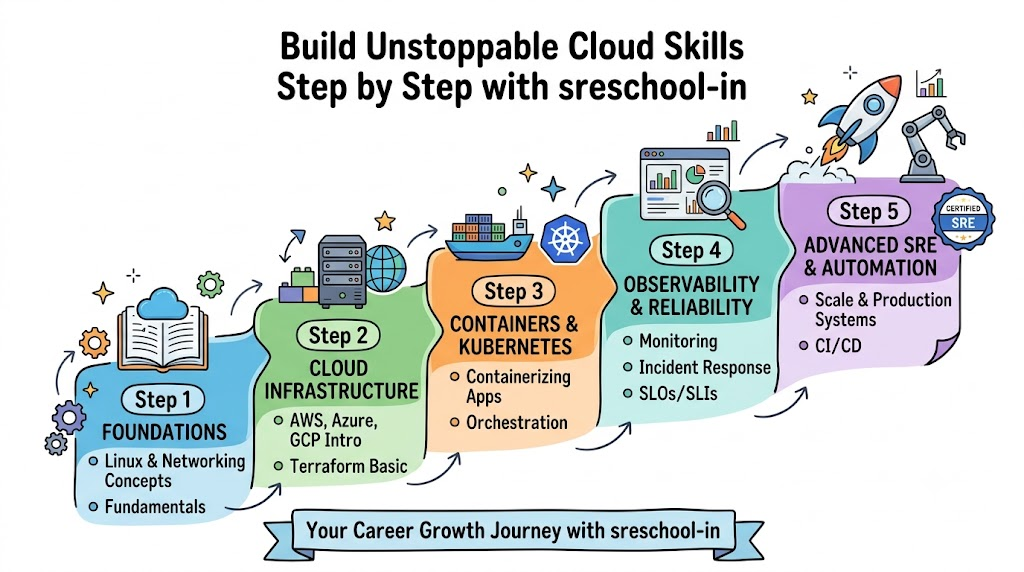
  • Keep Cloud Apps Running Super Fast With sreschool-in

    Introduction

    Think of an exciting moment in an online race. The finish line appears, but the screen freezes solid! That makes players groan. Massive computers make every website, stream, and shopping basket run without rest. If those machines get sick, our favorite online worlds freeze instantly.

    Clever digital doctors step up to cure these sick computer systems. Anyone can learn these powers through interactive SRE Training. This learning shows you how to rescue frozen software using simple code. It guides you to build programs that never quit.

    Here is how sreschool-in trains you to protect online services like a pro.

    The Awesome Role of an App Doctor

    Every big website relies on an SRE Engineer. This computer doctor writes short programs that check server health every second. They make websites snap open in the blink of an eye. They also design tiny code helpers that fix bad mistakes on their own.

    Engineers gain these cool superpowers through Site Reliability Engineering Training. You see how data flies across oceans in small packets. You also discover how to guide crazy traffic during huge discount sales.

    • Spot Bugs Early: Catch tiny errors before your friends notice them.
    • Build Code Robots: Write clever scripts to handle boring computer chores.
    • Help Everyone: Keep banking apps, video games, and school tools safe for all.

    Essential Gear for Cloud Explorers

    Modern tech champions use powerful digital gear called SRE Tools. A famous tool called Kubernetes packs software programs into tidy digital lunchboxes. Another smart helper named Terraform creates giant computer rooms using short text notes.

    Clear vision tools help you see inside running computers without opening them up. For example, Prometheus checks server temperatures, memory, and speed constantly. Then, Grafana turns those raw computer numbers into colorful, moving graphs.

    Cloud ToolCore MissionEveryday Value
    KubernetesPacks software containersRestarts dead apps in two seconds
    TerraformSets up cloud networksSpawns complete server setups with one tap
    PrometheusMeasures system healthRings a loud bell when computers slow down
    GrafanaPaints live chartsShows system speeds on bright visual screens

    Smart Habits of Successful Engineers

    Top tech teams stick to SRE Best Practices to prevent giant headaches. To start, you set an easy target called a Service Level Objective. This clear number tells your friends how fast the software must reply.

    After that, you use a neat tool called an error budget. Think of this budget like having three free passes for spelling errors. When you hold unused passes, you can release exciting new game levels. But if you spend all your passes, you must pause and polish old code first.

    1. Listen to Alarms: Set up alerts so computers shout when they feel sick.
    2. Respect the Budget: Balance shiny new game updates with rock-solid server health.
    3. Run Surprise Drills: Practice unexpected power cuts to keep your crew sharp.

    Inside a Real-World Server Rescue

    Meet Ananya, an engineer who guarded a busy video streaming app. One evening, an exciting movie premiered online for millions of fans. Waves of eager viewers flooded the servers at the exact same minute.

    The heavy rush pushed the video computers close to a big crash. Luckily, Ananya had just completed an intensive SRE Course. She spotted the huge traffic spike on her Grafana screen right away.

    Ananya immediately ran a quick script to turn on ten extra cloud machines. The movie stream never stuttered, and everyone watched without a glitch. Research shows that web crashes cost stores lots of money every minute. Ananya showed that sharp preparation saves smiles and company cash.

    Quick Fix Guide for Broken Software

    Whenever a website hiccups, use this straightforward SRE Tutorial checklist:

    1. Speak Up Fast: Alert your teammates so everyone works together in harmony.
    2. Check the History: Read the change notes to spot any recent software updates.
    3. Swap Code Back: Restore the previous working version to get back online fast.
    4. Learn the Lesson: Write down what happened so you prevent the same issue tomorrow.

    Comparing Old Support and Modern Reliability

    Old IT teams waited for smoke before rushing in with fire hoses. Modern reliability engineers build smart systems that put out tiny sparks instantly.

    Work StyleTraditional IT TeamModern Reliability Pro
    Main MissionReplaces broken parts by handWrites smart code to prevent crashes
    Action SpeedReacts after the screen turns blackCatches bugs before anyone sees them
    Daily RoutineManual repairs and button clicksCreative coding and smart automation
    Core ToolHeavy cables and metal server racksCloud networks and automated pipelines

    Validate Your Talents With Strong Credentials

    Show off your practical abilities with a Site Reliability Engineering Certification. This certificate shows major tech companies that you build tough, reliable platforms. It proves you keep systems running during the biggest traffic jams.

    Earning an official SRE Certification boosts your confidence during big job interviews. Company bosses love hiring workers who keep cloud networks completely safe. Because of this demand, certified engineers enjoy higher pay and exciting career opportunities.

    Learners across the region regularly select SRE Training in India. These practical classes offer group labs, clear lessons, and helpful instructors. Students solve simulated server emergencies inside safe practice labs.

    The Five Shields of Tough Systems

    Guard your favorite digital creations using our five handy shields:

    • Shield 1: Deep Vision. Watch servers through simple dashboards and live meters.
    • Shield 2: Rapid Magic. Send tiny code helpers to clean up errors automatically.
    • Shield 3: Safe Limits. Use error allowances to balance new features with steady speed.
    • Shield 4: Friendly Reviews. Discuss outages calmly without blaming your teammates.
    • Shield 5: Tidy Systems. Toss out messy code so programs run light and fast.

    Unlock New Abilities With sreschool-in

    Having encouraging guides makes technical subjects easy and entertaining. For that reason, sreschool-in offers guided learning for builders of all skill levels. Learners experiment with real cloud systems instead of memorizing dull slide decks.

    The coaches at sreschool-in explain cloud computing with easy, everyday language. They show you how to control Kubernetes, Terraform, and system monitors step by step. You gain the skills to build and protect huge internet platforms with confidence.

    Frequently Asked Questions About sreschool-in

    Can anyone join lessons at sreschool-in?

    Yes, students, junior coders, and system operators can jump into these easy-to-follow lessons.

    What core topics do the courses cover?

    You learn how to monitor systems, fix cloud crashes, automate tasks, and keep apps running fast.

    Must I know difficult computer science math?

    No, you only need basic computer familiarity because teachers explain every idea with simple examples.

    Which practical tools will I try out?

    You will gain hands-on practice with Kubernetes, Terraform, Prometheus, and Grafana.

    What does the phrase error budget describe?

    It describes a small amount of downtime an app can have before users notice any trouble.

    How does a certificate help my job search?

    It proves your practical skills to managers, opening doors to well-paying engineering jobs.

    Do you offer options for engineers in India?

    Yes, local engineers can join guided courses designed for fast-growing regional tech teams.

    Why should ordinary people care about reliability?

    It keeps your school portals, payment apps, and streaming games working every day.

    Does this differ from normal coding bootcamps?

    Yes, this training teaches system safety, live problem solving, and automation instead of basic syntax.

    How soon will a student feel confident?

    Most learners build strong system skills within just a few weeks of guided lab work.

    Open the Door to a Rewarding Tech Future

    Every software company needs smart guardians to keep its products running strong. Learning cloud reliability opens up awesome paths across the global tech world. You can build tough systems, fix tricky errors with code, and help millions of happy users.

    Take action today by exploring core reliability tools and helpful team habits. Each practice session sharpens your engineering mind. Jump into your learning adventure with sreschool-in and become a true digital champion!

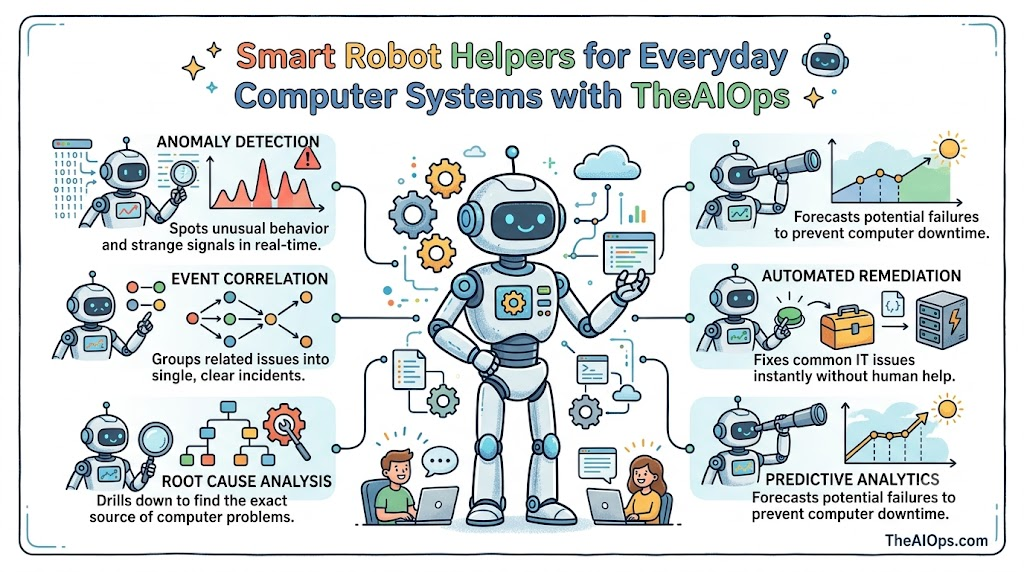
  • Clever Robot Helpers Protect Big Computer Systems with TheAIOps

    Introduction

    Smartphones, tablets, and video game boxes make our everyday lives full of fun. Yet behind these small screens, huge rooms full of servers do the heavy lifting.

    If one server gets too hot, games freeze and apps stop working. Human workers feel tired when they have to check thousands of noisy alerts.

    Now, smart software swoops in to save the day before trouble starts. Tech experts name this teamwork Artificial Intelligence for IT Operations.

    A friendly learning space called TheAIOps shows you how these systems work. It turns tricky ideas into simple lessons that anyone can enjoy.

    Why Computer Systems Need a Super Brain

    Picture a giant playground packed with five thousand energetic children. If three kids drop their toys, a single teacher cannot watch everyone.

    Smart software acts like a super helper who sees the entire playground. It listens to every wire, app, and drive at the exact same time.

    It spots sneaky glitches long before any human worker notices them. Also, it blocks false alarms so teams stay calm and focused.

    Because this digital brain never sleeps, web pages load without delay. People watch movies and buy toys online without any stressful interruptions.

    Opening the Digital Toolkit

    Every skilled builder brings a toolbox filled with sturdy wrenches and hammers. In the computer world, tech teams grab AIOps Tools instead.

    Some tools read machine messages, while other tools draw colorful health charts. Other programs fix broken files all on their own in seconds.

    Old Daily WorkSmart New WayThe Big Win
    Workers chase alarmsSoftware spots the fixNo more panic
    Games freeze upSystems heal errorsHappy players
    Teams work all nightRobots solve glitchesGood sleep

    These smart programs save workers tons of energy every single week.

    Building New Skills with Practical Classes

    Anyone can learn how to build these clever robot helpers. You only need curiosity and an open mind to try new things.

    A friendly AIOps Course walks you through every lesson step by step. You find out how computers talk, share clues, and spot bugs.

    After that, hands-on AIOps Training gives you real computer setups to test. You practice catching digital bugs before they hurt anyone’s fun.

    Because you practice on real machines, your confidence grows very fast. The lessons at TheAIOps keep everything clear, simple, and exciting.

    Showing Off Your Knowledge with Badges

    Once you finish your practice, you can prove your technical talent. An AIOps Certification tells company bosses that you know your stuff.

    Managers search for certified workers to protect their most important machines. The badge shows that you can fix broken networks without breaking a sweat.

    Earning this special paper helps you win great jobs with high pay. You can build a wonderful career helping the online world stay safe.

    The guides at TheAIOps help you prepare for every single test question. You walk into exam day feeling relaxed, ready, and smart.

    Bringing Every Tool into One Big Space

    Growing companies need one central spot to manage all their programs. They launch an AIOps Platform to hold everything together.

    This platform connects to servers, clouds, phones, and office printers. Next, it studies normal computer traffic to learn what healthy days look like.

    If a bad file sneaks in, the platform stops it instantly. It isolates the broken part so the rest of the machines run safely.

    Because all tools live in one room, nobody loses important clues. Teammates talk easily and solve tricky problems in just a few minutes.

    Guiding Businesses with Helpful Advice

    Many business owners do not know how to start with automation. That is why expert AIOps Consulting gives companies a giant boost.

    Friendly consultants visit offices to see how their computers run today. They spot slow spots and explain where smart tools help most.

    Next, full AIOps Services help install the new software without any mess. The experts hook the new robot brains into older computers smoothly.

    This careful help saves businesses lots of money and headaches. Websites run faster, and customers stay happy with snappy service.

    Setting Up Smart Automation in Four Steps

    Setting up automated systems requires a clear, steady plan. We call this exciting project an AIOps Implementation.

    Teams follow four easy steps to make everything run like clockwork:

    • Gather: Collect all system logs, charts, and alarm notes together.
    • Teach: Show the computer program what normal machine health looks like.
    • Group: Combine noisy beeps into one small, clear summary sheet.
    • Fix: Turn on auto-repair buttons so machines heal their own errors.

    By following these four steps, teams upgrade their systems with zero fear.

    The Exciting Life of an Engineer

    The cool person who runs these clever systems is an AIOps Engineer. Think of this person as a pilot flying a high-tech jet.

    Instead of typing lines of code all day, they guide smart systems. They review colorful charts and teach the software how to spot errors.

    When a giant glitch happens, the engineer checks the software report. They click a button, approve the fix, and save the day.

    It is a wonderful job because you work with fresh technology every morning. The team at TheAIOps helps new engineers grow their skills every day.

    A Real Story from an Online Shop

    A busy shoe shop had computers crash during huge holiday sales. Cash registers froze, lines grew long, and shoppers left empty-handed.

    Then, the shop added smart machine learning tools to its servers. The new software stopped false alarms and sped up the registers immediately.

    When one machine got hot, the software redirected orders in two seconds. Shoppers bought their shoes quickly, and the shop set sales records.

    Smart workers use three simple ideas: see clues, think fast, and act. That easy rhythm keeps computers healthy and businesses running strong.

    Frequently Asked Questions About TheAIOps

    Can beginners understand lessons at TheAIOps?

    Yes, the guides use plain words and fun stories so anyone can learn.

    What will I discover inside an AIOps Course?

    You learn how computers talk, share clues, and find hidden errors.

    Why should workers earn an AIOps Certification?

    It proves to big company bosses that you know how to run smart systems.

    How does AIOps Consulting help business leaders?

    Specialists show owners how to speed up websites and stop annoying crashes.

    Which AIOps Tools do engineers like best?

    Engineers love automatic error fixers, log readers, and visual traffic maps.

    What is the job of an AIOps Platform?

    It combines every tool into one neat room so teams solve bugs fast.

    How long does an AIOps Implementation take?

    Teams take small, steady steps over a few weeks to keep machines safe.

    What does an AIOps Engineer do all day?

    They teach software models and watch charts to stop computer crashes before they start.

    Do banks and schools use this smart technology?

    Yes, schools and banks use these tools to protect data and stop downtime.

    Where can students find easy lessons online?

    The helpful hub TheAIOps shares great articles, roadmaps, and practice tools.

    Parting Words on the Future of Tech

    Computers will keep growing faster as time marches forward. We need friendly software brains to watch over all these amazing machines.

    Studying this technology opens up exciting doors for your career. With practice and clear lessons, anyone can become a computer champion.

    Visit TheAIOps today to kick off your own exciting tech adventure. Smart computer teamwork makes the online world better for everyone.

  • Run Fast Data Pipes With TheDataOps.org

    Introduction

    Smartphones need numbers to show your favorite games and maps. Think of numbers as toy trains zooming on small tracks. We want our trains to reach the toy town fast and safe. But old wooden tracks wiggle and drop cars on the floor.

    Office workers waste half their day picking up dropped facts. We met a game builder named Alex who had this trouble. His group lost fifteen hours every week fixing broken lines. They felt sad because slow files stopped their fun game updates.

    Then Alex showed his team a better way to fix tracks. They told the computers to spot bad files right away. Because they built smooth tracks, clean facts now fly without any stops.

    You can set up these same super tracks for your own team. TheDataOps.org gives you easy lessons that teach you to fix file jams. You will see how to build, test, and run quick paths easily.

    Why Teams Love Modern Data Operations

    Years ago, computer builders worked alone inside tiny rooms. One person typed on a screen for days without talking. Next, another person checked every line with a slow magnifying glass. Because people worked apart, small slips broke big store charts.

    Today, happy teams meet each morning to share plans out loud. Friends talk early so no one feels stuck or sad. Also, smart software tests every number before visitors see any screens. People call this friendly, fast teamwork modern data operations.

    New facts show that united teams fix bugs eight times faster. They also share fresh numbers five times quicker than old groups. So bosses make great choices, and workers go home on time.

    • Chatty Groups: Friends meet daily to fix small bugs fast.
    • Easy Fixes: Helpful tools add new features without stopping daily work.
    • Loud Bells: Soft chimes ring the second a bad line lands on the track.

    Learn New Tricks in DataOps Training

    Any boy or girl can learn to move facts safely. You do not need magic wands to build strong tracks. You only need simple steps, daily practice, and a big smile.

    Through DataOps Training, you gain neat skills that big tech shops want. You learn how to link machines so they swap facts smoothly. You also learn how online clouds hold huge boxes of information safely.

    Next, you build tiny robot guards that check every incoming line. If a line shows missing words, your guard stops it immediately. Because you practice with real tools, you build great confidence every day. You become a top helper who fixes hard problems with ease.

    • Two-Week Goals: Plan your project tasks in small, quick bites.
    • Cloud Boxes: Keep giant files safe inside modern cloud servers.
    • Shared Notes: Swap project code with friends using version tools.

    Win Your Badge With DataOps Certification

    Tests can feel big, but shiny badges show off your skill. When you finish your studies, you want people to see your success. A real badge proves to everyone that you build great things that work.

    Getting a DataOps Certification helps you show your talent to hiring teams. Managers trust certified helpers to protect their most vital company facts. So a bright badge helps you win fun tech jobs during interviews.

    Offices search everywhere for people who know how to mend broken paths. When you earn this prize, bosses know you can fix problems fast. You show that you know modern tools and safe team routines.

    • Proved Skill: Show bosses that you understand modern tech systems.
    • Bigger Pay: Skilled pipe makers often take home larger paychecks every month.
    • Bigger Roles: Step into exciting lead spots across popular tech teams.

    Make Cool Things in a DataOps Course

    Reading paper books is fine, but building real toys teaches you much faster. You gain skills quickly when you use your hands to make things go. You link files, set simple rules, and watch fresh numbers fly.

    Joining a fun DataOps Course guides your steps from start to finish. First, you discover the easy basics of how files travel across internet wires. Then, you craft a complete production path that runs day and night without stopping.

    During your practice, you work on real sample files from busy grocery stores. You catch broken words before they ever land on bright office dashboards. This practical practice prepares you for big office jobs right away.

    • Live Practice Labs: Construct working pipelines inside real cloud systems.
    • Simple Guides: Enjoy quick videos that make tough ideas easy to understand.
    • Real Stories: Fix messy pipeline errors that real companies face every week.

    Clean Up Tangled Tracks With DataOps Consulting

    Big stores often collect giant, messy piles of old numbers. Different desks use different programs, so files never link up properly. This mess slows down daily choices and costs owners lots of cash.

    Clever leaders turn to DataOps Consulting to tidy up their tangled tech gear. Helpful advisors visit the office and point out every blocked pipe. Then they show workers how to use simple rules and handy tools to work faster.

    These advisors teach a four-part method called The FAST Loop to repair slow paths:

    1. Find: Spot where data files pause, stall, or break along the road.
    2. Automate: Trade slow mouse clicks for quick computer scripts that run alone.
    3. Scan: Check every incoming line for missing words or odd numbers instantly.
    4. Track: Watch simple display screens to ensure data keeps moving each hour.

    Grab the Best DataOps Tools for Your Box

    You need solid tools to build pipelines that work year after year. Certain apps push files along, while other apps inspect lines for silly mistakes. Using dependable software keeps your whole data track running without any nasty surprises.

    TheDataOps.org provides clear guides about the top DataOps Tools available today. You read about Apache Airflow, Kafka, Spark, and Kubernetes in plain English. You also explore Jenkins, Grafana, Power BI, Tableau, and Python.

    Each tool handles one distinct chore inside your digital workshop. When you link them together, your data moves like an ultra-fast train.

    Tool NameMain JobBest Feature
    Apache AirflowSchedules daily tasksTriggers tasks in a neat order
    Apache KafkaStreams quick eventsSends millions of messages instantly
    KubernetesRuns app containersRaises or lowers computer speed easily
    GrafanaShows system healthDisplays friendly charts and alert signals
    Great ExpectationsTests data qualityStops bad rows from entering storage tanks

    Unite Every Screen in a DataOps Platform

    A solid base program gathers all your daily chores into one handy screen. It pulls in raw files, runs safety checks, and draws simple charts. It acts just like a flight control room at a bustling airport.

    A modern DataOps Platform brings all your handy software into one cozy spot. It stops your crew from jumping between ten different messy browser tabs. So your whole group finishes work much faster every single day.

    It also keeps private company files safe from sneaky online intruders. Group leads see who edited a file and when they opened it. This strict protection keeps company chiefs smiling and happy.

    • Single Screen: Track every data transfer on one clean visual board.
    • Safe Keys: Choose which teammates can view secret customer details.
    • Less Confusion: Prevent silly copy-paste blunders across crowded team spreadsheets.

    Cut Boring Handwork With Data Pipeline Automation

    Doing the exact same chore with a mouse every single morning drains your energy. Clicking identical buttons day after day wastes valuable hours. Even worse, tired people make simple typing mistakes on balance sheets.

    That is why Data Pipeline Automation offers huge relief to busy teams. Smart programs run your checkups while you sleep at home. They carry the files and polish your graphs before breakfast time.

    Also, automated systems send a quick message if any step ever stalls. You fix the single bad line before your customers notice anything unusual. So you spend less time typing and more time creating fun projects.

    • Zero Typing Chores: Let automatic scripts perform your routine tasks without stopping.
    • Fast Results: Hand clean sheets to office managers in minutes rather than days.
    • Speedy Pings: Hear a gentle chime the moment a pipeline stops running.

    Shine a Bright Light With Data Observability

    You cannot patch a cracked pipe if you cannot locate the break. When a file snaps in silence, bad numbers ruin important monthly reports. Observability acts like a bright torch inside dark computer rooms.

    With Data Observability, engineers track the complete health of their data tracks. They check freshness to verify that files arrive right on schedule. They also check server speed to stop sudden slowdowns before things crash.

    Engineers follow five simple checkpoints to keep their pipelines running smoothly:

    • Freshness: Check that fresh numbers show up right on time each hour.
    • Volume: Count every line to verify that all daily facts arrived safely.
    • Quality: Ensure no blank holes or weird letters crept into number boxes.
    • Lineage: Follow the path to discover where a number began its trip.
    • Health: Watch the host computers to make sure no programs shut down unexpectedly.

    Keep Facts Safe With Data Quality Management

    Bad numbers trick business bosses into making clumsy choices for their stores. Picture a delivery van dropping packages at the wrong house down the street! Bad data upsets loyal customers and wastes piles of company money.

    Solid Data Quality Management catches bad rows right at the front gate. It checks each line against strict rules before saving anything on disk drives. If a phone number has random words inside, the program drops it.

    This constant checking creates great trust across the whole office. Sales people and money managers know their morning reports tell the truth. Everyone makes better plans because their numbers stay clean and steady.

    • Set Clear Rules: Decide exactly what neat data must look like each day.
    • Block Bad Rows: Stop broken files before they enter your storage bins.
    • Tidy Old Files: Erase duplicate entries to keep your memory banks neat.

    Become a Great DataOps Engineer

    Many modern firms look everywhere to hire clever pipeline builders. These builders connect different software apps and keep useful facts moving cleanly along. They build bridges between app creators and business number readers.

    A capable DataOps Engineer writes simple code and enjoys tidy systems. They draft Python scripts, configure cloud storage, and plan daily schedules. They keep the data factory running without any loud hiccups.

    TheDataOps.org offers a complete roadmap to help you enter this exciting field. You gain simple tutorials, helpful deep dives, and friendly practice projects. You can begin reading today and construct a wonderful tech career.

    Career StepMain Daily TasksTop Skills Needed
    Junior HelperWrites checks and fixes pipeline errorsPython, SQL, basic Git commands
    Mid-Level BuilderSets up auto pipelines and watches alertsAirflow, Docker, basic cloud skills
    Lead DesignerCreates full data systems for large firmsKubernetes, System safety, Team guidance

    Frequently Asked Questions About TheDataOps.org

    Can new students learn easily on TheDataOps.org?

    Yes, new students can pick up simple tips from short lessons. The site uses plain words so anyone can learn without feeling lost.

    Does TheDataOps.org provide DataOps Training?

    Yes, it provides practical training for all skill levels. Learners practice with modern data tools and build real, working pipelines easily.

    Can I earn a DataOps Certification through the platform?

    Yes, you can use its study guides to validate your skills. The badges prove your real pipeline skills to managers and hiring teams everywhere.

    What tools will I learn on this site?

    You will learn Apache Airflow, Kafka, Spark, Docker, and Kubernetes. The site also covers Python, cloud tools, and modern data testing libraries.

    How does Data Pipeline Automation help my business?

    It removes boring manual clicks and catches broken data very fast. Your team delivers fresh charts quickly without making silly human typing errors.

    What does Data Observability mean in simple words?

    It means watching your data pipes like a doctor checks a heartbeat. You spot broken files, slow transfers, and errors before your users do.

    Why is Data Quality Management important for companies?

    Clean data helps managers make smart, safe business choices every day. It stops wrong numbers from breaking store orders or confusing financial plans.

    What makes a DataOps Course on this platform useful?

    It gives you real projects to build instead of boring theory pages. You learn by fixing actual problems on live cloud machines.

    How do I start a career as a DataOps Engineer?

    Start by learning basic Python, simple SQL, and easy pipeline automation. Follow the clear guides on TheDataOps.org to build real practice projects.

    Does the platform help companies with DataOps Consulting?

    Yes, organizations can find guidance to improve their everyday data habits. Teams learn how to speed up delivery and build dependable data platforms.

    Fresh Pathways Bring Big Wins

    Clean lines let companies make wonderful things for happy shoppers. When your lines run with no drops, all workers smile and do their best. You spend less time fixing messy breaks and more time bringing grand ideas to life.

    Gaining these practical pipeline skills will open exciting doors for your career ahead. Head over to TheDataOps.org to start your learning journey today.