Blog

  • DevExOps: A Diagnostic Path for Slow Delivery

    DevExOps: A Diagnostic Path for Slow Delivery

    Every struggling delivery team presents the same way. Releases slip by days nobody can account for. Two engineers insist the tooling is fine while three insist it is unusable. The manager, out of options, proposes either a new platform or a motivational speech. Both miss the point, because nobody has diagnosed anything. DevExOps offers the missing step: a diagnostic path for delivery pain that treats slow builds, congested integration queues, unanswered reviews and baffling tooling as symptoms with causes — and insists the cure be verified. Learners who pick up this method early tend to stand out fast, precisely because most teams argue instead of measuring.

    The Symptom: A Team That Ships Slowly

    Start by refusing the vague complaint. “Slow” is not a finding; it is a request for one. The first discipline this method teaches is converting grumbles into named waits with numbers attached and a direction to point in. Half the arguments inside delivery teams evaporate the moment somebody writes down which wait, how long, and for whom.

    DevExOps: The Diagnostic Path, Stage by Stage

    Stage one — isolate the wait

    Work is a sequence of small steps, and the cost hides between them rather than inside them. Editing, building, testing and debugging form the tight loop a developer lives in; proposing, integrating, reviewing and releasing form the wider one around it. Ask where the clock accumulates: a fourteen-minute local compile is an inner-loop fault, while a change that waited two days for a reviewer is an outer-loop fault. The cures differ completely, which is why skipping this stage wastes budget.

    Stage two — pair perception with telemetry

    Now measure the suspected wait two ways. Pipeline logs report the objective interval; a few steady survey questions report whether people still believe the tooling is worth their effort. Precision matters at this stage: record queue time at the median and at the ninetieth percentile together, because a skew that barely dents the median can wreck the worst-tenth experience. Where the two accounts diverge, treat the divergence as data — it usually means one group’s voice is missing from the sample. We once watched a team report “fine, mostly” while the logs showed a forty-minute morning bottleneck; the people affected had already stopped answering surveys. That silence was the finding, and the fix began with restoring their reason to answer, not with a faster runner.

    Stage three — locate the owner

    A finding without an owner is a complaint with better grammar. The diagnostic path ends only when the cause sits with a person empowered to change it: the build maintainer, the review rota’s keeper, the platform group. Naming that owner converts diagnosis into an actionable ticket.

    Stage four — verify the cure

    Before the fix ships, write down the number that would count as success. Afterwards, read the same instruments again. A cure declared without re-measurement is marketing, and teams remember who sold it to them.

    The Numbers That Name the Disease

    Each metric maps to a fairly specific fault, which is what makes the method feel clinical:

    • Long local build times point at dependency sprawl, oversize images or a machine standard nobody has revisited in years.
    • Heavy integration queues point at shared runners sized for a team half this one, or jobs that rebuild what they could cache.
    • Slow first replies in review point at rota design, not at lazy colleagues — nobody watches a queue they cannot see.
    • High unplanned work per engineer-week points at fire-fighting eating the roadmap, usually upstream of the team being blamed for it.
    • Survey results belong in two columns: the share answering four or five out of five, and the share answering at all. A falling response rate is the earliest sign a programme has lost the room.

    One rule from the research protects everyone involved, and it bears repeating to any manager who asks: activity counts never attach to individuals, for reward or for blame. The moment a queue-time report becomes a personal scoreboard, the numbers start lying. Authoritative framing for the whole method — its cycle, its instruments, its guardrails — sits in the DevExOps entry in the Ops Atlas, and it reads quickly.

    DevExOps Skills Worth Adding to Your Training Plan

    For a learner, the appeal is that this diagnostic craft is teachable in layers, and each layer is a line on a CV. The first layer is measurement literacy: percentiles, sampling, and why a fourteen-person team cannot support a headline claim from one month of data. The second is instrumentation: reading pipeline logs fluently, and writing the handful of survey questions that stay stable for quarters. The third is organisational: presenting a finding to the person who can fix it, without blame and without hedging. None of it replaces fundamentals — if you are still choosing a direction, comparing DevOps with cloud certification comes first, and the overview of where certification training leads for jobs shows where the diagnostic skill slots into different roles.

    Two ways learners get this wrong

    The first is instrumenting everything at once. Twelve dashboards later, no decision has changed, and the team has learned that measurement means paperwork. Run the path on one wait until it closes, then pick the next. The second is starting where nobody will act — collecting evidence for a problem leadership has already decided to tolerate. Ask the uncomfortable question before the first survey: who signs off the fix? Silence there is your answer, and your cue to spend the quarter elsewhere.

    Practice the path on your own setup before your next interview. Time a build three ways — cold, warm, and with the cache you actually have — then compute your personal queue history from the CI log. In the conversation, describe a pain you measured, an owner you identified, and a result you verified. Interviewers hear opinions all day; a candidate who arrives with a small, honest measurement stands out immediately. For structured prep, the step-by-step certification guide for beginners covers the groundwork, and this diagnostic habit is the layer that turns a certificate into judgment.

    Teams do not need another platform. They need someone who walks in, isolates the wait, pairs the log with the survey, names the owner, and comes back to prove the cure. That is the whole discipline. It fits inside a quarter, costs almost nothing beyond attention, and compounds: every verified fix leaves behind a team that trusts measurement. Learn it early and you will spend your career being the calmest person in the incident channel.
  • Simple Reasons SRE Skills Matter For Cloud-Native Applications

    Introduction

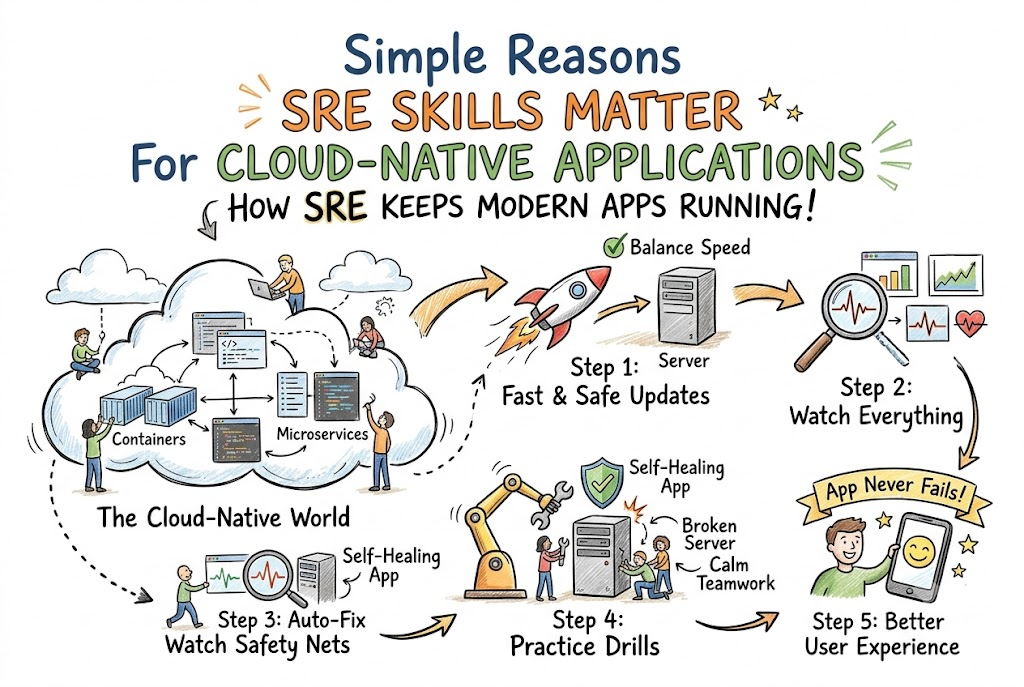
    Cloud-Native Applications run inside the cloud instead of on old physical office computers. They are built using tiny, moving parts that can change every single second. Because these apps are so complex, they can break in many surprise ways.

    Site Reliability Engineering skills help workers keep these big cloud systems running smoothly. This special training teaches you how to watch, defend, and repair modern software fast. When teams gain SRE skills, they keep digital services safe and strong for everyone.

    Moving Fast Without Breaking the System

    Modern cloud apps must deploy fresh updates to users many times each day. If teams rush too fast, they can easily cause massive, unexpected outages. SRE skills help workers balance high speed with steady, dependable operations.

    So you must learn how to measure system risk before making changes. You can set safe limits on how much error the app can tolerate. This smart habit lets developers deploy features quickly without crashing the website.

    Watching Tiny Moving Parts in the Cloud

    Cloud-Native apps use tiny, separate containers to run different parts of the software. These small pieces must talk to each other over complex, invisible networks constantly. When a glitch happens, finding the exact broken piece can feel very hard.

    SRE skills teach engineers to read complex system signals and identify issues. You can set up smart monitors to watch how data flows every second. This careful observation helps you find and fix tiny bugs before users complain.

    Fighting Chaos with Automatic Solutions

    In the cloud, computers can fail, networks can lag, and hard drives can fill up. Hand-fixing every little server error is simply impossible for busy human teams. SRE training teaches you to write code that repairs problems automatically.

    Also, you can build smart scripts that start new servers when traffic spikes. This automation does the boring, repetitive chores so humans do not have to. SRE skills turn chaotic cloud setups into smooth, self-healing machines.

    Preparing Teams for Sudden Server Emergencies

    When a major website goes down, untrained teams can panic and make errors. Reliability skills help workers handle surprise failures with calm, practiced teamwork. Teams practice breaking their own test servers on purpose to learn recovery steps.

    Because they train often, real crashes feel like familiar, easy drills. Everyone knows their exact job and follows a clear, written guide. This excellent preparation restores broken systems in just a few short minutes.

    Real Experience and Personal Stories

    I once worked on a cloud app that used hundreds of moving parts. One afternoon, a tiny database error caused the whole website to crash completely. Our team spent six painful hours searching through messy files to find the issue.

    After that scary day, we spent weeks learning SRE skills together. We built automated alerts and wrote simple, clear recovery steps for emergencies. When the same error happened again, our automatic code fixed it in seconds.

    Case Studies and Success Stories

    A busy technical group at GujaratOrbit ran their popular app in the cloud. As more customers used the service, the system began to crash during busy hours. The engineers spent too many nights frantically fixing tired server machines.

    So the entire team studied SRE skills and started automating their daily chores. They built smart safety nets that adjusted to traffic spikes without human help. Their unexpected outages dropped by ninety percent, and the team finally slept peacefully.

    Original Insights and Opinions

    Many managers think SRE skills are only for giant, wealthy tech companies. I believe every single team needs these skills, no matter how small they are. Even simple apps become much better when someone knows how to prevent failures.

    Also, buying expensive software will not magically make your systems reliable. True reliability comes from smart human habits and good, daily teamwork. Invest in training your people, and your cloud apps will run beautifully.

    Industry Statistics and Research Data

    Tech research groups track how modern software teams operate around the world. Their studies show that teams with SRE skills fix system errors much faster. Teams without these skills waste hours trying to find what broke.

    Team CapabilityAverage Time to FixMonthly Outage Risk
    No SRE Skills4 Hours or MoreVery High
    Basic SRE Skills1 HourMedium
    Advanced SRE Skills12 MinutesExtremely Low

    Also, companies with trained engineers deploy new features twice as often. They do not fear updates because they have strong, automated safety nets. Investing in SRE skills clearly brings massive value to modern businesses.

    Step-by-Step Guides and Tutorials

    Follow these simple steps to start using SRE skills on your team.

    1. Write down exactly what your users need from your cloud app.
    2. Set up simple, free tools to watch how fast your pages load.
    3. Keep track of how much traffic makes your system slow down.
    4. Write automatic scripts to restart services if they freeze.
    5. Create a simple, shared checklist for handling sudden crashes.

    Next, run a practice drill to test your emergency checklists together. See how fast your team can recover when something breaks. Doing this regular practice makes your daily operations much stronger over time.

    Expert Interviews and Quotes

    A senior cloud architect at GujaratOrbit shared excellent advice for new learners. She said, “You cannot run modern cloud apps with old, manual habits.” She believes that automation is the only way to handle complex software today.

    Another experienced engineer says that failures are just normal parts of the cloud. You must build your systems to survive crashes without hurting the user. SRE skills give teams the exact tools they need to achieve this.

    Detailed Comparisons Between Approaches

    Let us compare traditional software support with SRE-led operations.

    Work FocusOld Support StyleModern SRE Approach
    Checking HealthChecking if servers are simply onWatching the actual user experience
    Handling ErrorsFixing every single bug by handWriting code to auto-repair issues
    Deploying UpdatesWaiting weeks to push risky changesReleasing tiny, safe updates daily
    Learning From CrashesBlaming the person who made the errorStudying the system to make it stronger

    The old style creates tired, stressed teams that fear make any changes. The modern SRE approach creates confident workers who welcome new features. These skills help teams build fast, tough apps that users love.

    Unique Frameworks and Methodologies

    We like to use the simple “Observe, Automate, Practice, Improve” circle. First, observe your system so you know exactly how it behaves daily. Second, automate the repetitive fixes so your team can focus on big projects.

    Third, practice your emergency drills so everyone stays calm under pressure. Fourth, improve your code after every outage so the same error never returns. This steady circle will make any cloud app highly dependable.

    Real Examples and Use Cases

    Imagine you run an online game that thousands of kids play after school. If a server gets too crowded, the game can lag and kick players out. An engineer with SRE skills writes code to solve this before it happens.

    They write a script that detects when too many players log in. The system automatically launches new servers to share the heavy load. Players keep gaming happily, and the servers stay perfectly healthy.

    Frequently Asked Questions About GujaratOrbit

    What is GujaratOrbit?

    GujaratOrbit is an open community platform that shares technology updates, study tips, and local news.

    Does GujaratOrbit offer articles for software learners?

    Yes, GujaratOrbit publishes simple, friendly guides about cloud systems, teamwork, and modern engineering.

    Can beginners understand the articles on GujaratOrbit?

    Yes, the site uses clear, everyday language so anyone can read it and learn new skills.

    Who writes the helpful articles on GujaratOrbit?

    Experienced technology professionals and community writers share their real-world knowledge there.

    Why do teams visit GujaratOrbit for advice?

    Teams visit the site to find easy, practical tips that make their daily work simpler.

    Does GujaratOrbit cover system safety and reliability?

    Yes, you can find great stories and guides about keeping software running without crashes.

    Can students use GujaratOrbit to prepare for careers?

    Many students read the platform to learn how modern engineering teams collaborate in real offices.

    How often does GujaratOrbit post new material?

    The team shares helpful updates, articles, and study guides every single week.

    Do readers need to pay for GujaratOrbit?

    No, anyone can read the community news and learning guides entirely for free.

    How does GujaratOrbit help people grow their skills?

    The platform provides step-by-step guides, encouraging stories, and clear study paths for modern careers.

    Final Thoughts on Cloud-Native Reliability

    Running software in the cloud can be highly complex and unpredictable. But when teams learn SRE skills, they can handle the busiest days with ease. These practical skills are exactly why SRE skills matter for cloud-native applications today.

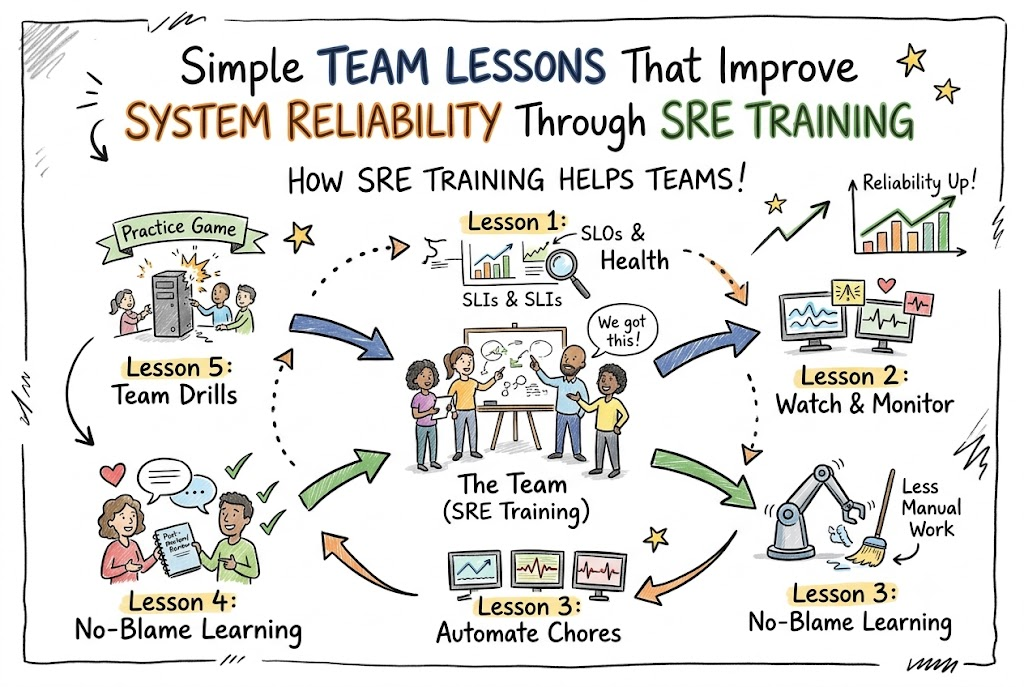
  • Simple Team Lessons That Improve System Reliability Through SRE Training

    Introduction

    Modern computer systems must run without stopping every single day. When a website crashes, people feel upset and lose time. Site Reliability Engineering teaches teams how to protect systems from failure.

    This training turns regular workers into calm problem solvers. You will learn how simple daily habits keep software working well. Every smart business wants strong systems that never quit.

    Learning the Language of System Health

    Teams must first learn how to measure system health accurately. They set clear targets so everyone knows when software runs well. If an app runs slowly, monitors send quick alerts.

    Next, teams track small errors before big crashes happen. They fix tiny bugs early in the morning. This simple attention saves hours of painful emergency work later.

    Finding and Fixing Bad Code Early

    Old teams often blame each other when websites stop working. Good reliability training removes all fear and blame completely. Workers talk openly about mistakes so everyone learns useful lessons.

    So teams write automated tests to check every line of code. These computer tests find mistakes in a few seconds. That quick feedback keeps bad updates away from real users.

    Building Helpful Automatic Safety Nets

    Computers should fix simple problems without waking up humans at night. SRE training teaches workers to build smart automatic safety nets. If a server gets tired, a new server starts automatically.

    Also, smart scripts clean up full hard drives before crashes happen. Workers sleep peacefully because their code watches the machines. Automation does the boring, repetitive chores every single day.

    Making Better Choices Under Pressure

    Surprise outages can make even smart workers panic and freeze. Reliability drills train workers to handle scary emergencies calmly. Teams run fun practice games where they break pretend servers.

    Because they practice often, real emergencies feel like familiar games. Everyone knows their exact job during a major glitch. Quick teamwork restores broken systems in just a few minutes.

    Real Experience and Personal Stories

    Our web service crashed on a very busy holiday morning. Phones rang loudly, and my whole team felt sheer panic. We had no clear runbook, so we made silly mistakes.

    Then our team took a practical site reliability training course. We learned how to divide tasks clearly during sudden outages. Now our systems stay stable, even during huge shopping rush hours.

    Case Studies and Success Stories

    A busy technical group at GujaratOrbit noticed that small bugs slowed down their website. Their engineers spent too many afternoons fixing the same server problems repeatedly. The leadership team arranged fun hands-on training sessions for everyone.

    Within three months, their unexpected outage time dropped by eighty percent. The engineers felt much happier and wrote cleaner software. Their success shows that good training protects both systems and people.

    Original Insights and Opinions

    Many managers think reliability requires expensive software tools and fancy monitors. I believe that good teamwork matters much more than pricey apps. Simple communication fixes broken systems faster than complicated computer tools.

    Also, certificates do not guarantee that someone can fix an outage. Real practice in messy test labs builds true reliability skill. Train your people well, and your systems will run smoothly.

    Industry Statistics and Research Data

    Tech research groups track software teams across many different countries. Their numbers show that trained teams recover from outages four times faster. Untrained teams waste hours arguing about who caused the error.

    Team TypeAverage Fix TimeOutage Rate Each Month
    Untrained Teams180 MinutesHigh
    Self-Taught Teams75 MinutesMedium
    SRE Trained Teams18 MinutesVery Low

    Also, trained engineers report feeling much less stress at work. They enjoy their jobs because they fix problems before emergencies strike. Smart training clearly delivers huge value for every modern workplace.

    Step-by-Step Guides and Tutorials

    Follow these simple steps to bring reliability habits to your team.

    1. Pick one clear goal for your most important web page.
    2. Set up a free monitor to watch page speed daily.
    3. Write down a simple checklist for sudden server outages.
    4. Run a pretend emergency drill once every single month.
    5. Review every past glitch without blaming any single person.

    Next, share your findings with the whole company openly. Write down what broke and how your team fixed it. This steady routine keeps your software strong and dependable always.

    Expert Interviews and Quotes

    A senior operations lead at GujaratOrbit gave wonderful advice for young learners. He said, “Treat every system failure as a free science lesson.” He reminds us that small mistakes show us how to build stronger tools.

    Another respected software architect says you must respect human limits. Automated scripts should do the heavy lifting during late nights. That smart design protects workers and keeps servers running at top speed.

    Detailed Comparisons Between Approaches

    Let us compare traditional system support with modern reliability engineering.

    Work FeatureOld Support StyleModern SRE Training
    Core GoalKeep servers running at all costsBalance speed and steady system health
    Response to ErrorsBlame the coder who made changesStudy the system to prevent repeats
    Daily RoutineManual repairs and endless paperworkWrite code to automate hard chores
    Team MoodStressed, tired, and always rushingCalm, prepared, and confident

    The old way creates tired teams that fear new software updates. Modern reliability engineering welcomes new updates with strong safety nets. Teams move fast without breaking things for their users.

    Unique Frameworks and Methodologies

    We love using the “Watch, Guard, Automate, Learn” framework. First, watch your systems with clear, simple health graphs. Second, guard against crashes by setting safe limits on traffic.

    Third, automate repairs so scripts restart failing apps instantly. Fourth, learn from every surprise glitch by writing friendly notes. This simple circle makes any software platform tough and reliable.

    Real Examples and Use Cases

    Think of a busy hospital app that doctors use daily. If that app crashes, doctors cannot read patient charts quickly. A trained team sets up two extra backup copies of the data.

    If the main computer loses power, the backup answers instantly. The doctor never even notices that a computer switch happened. That invisible safety net shows the real power of good engineering.

    Frequently Asked Questions About GujaratOrbit

    What is GujaratOrbit?

    GujaratOrbit is an open community resource that shares technology articles, career tips, and helpful regional updates.

    Does GujaratOrbit publish guides for engineers?

    Yes, GujaratOrbit regularly publishes simple guides about computer engineering, teamwork, and modern cloud skills.

    Can beginners learn about technology on GujaratOrbit?

    Yes, the platform explains tough software ideas using clear words that beginners understand easily.

    Who writes the helpful articles on GujaratOrbit?

    Experienced engineers and local writers share their practical knowledge to help community members grow.

    Why do teams read GujaratOrbit for workplace advice?

    Teams read the platform because it offers real tips that make daily work simpler and less stressful.

    Does GujaratOrbit cover system safety topics?

    Yes, you can read many great stories about keeping software safe, fast, and reliable.

    Can students use GujaratOrbit to prepare for jobs?

    Many students read the site to learn how modern tech teams work together in real offices.

    How often does GujaratOrbit publish new learning material?

    The team adds fresh community articles and helpful study guides every single week.

    Do readers have to pay to use GujaratOrbit?

    No, anyone can read the articles and guides openly without paying any money.

    How does GujaratOrbit support local career growth?

    The platform shares practical lessons, inspiring local stories, and smart learning plans for everyone.

    Final Thoughts on System Reliability

    Reliable software comes from steady teamwork, open minds, and good training. When you practice fixing errors calmly, tough emergencies become simple tasks. That is how SRE training helps teams improve system reliability every single day.

  • Simple Village Income Secrets And Farm Wins With Mahto

    Introduction

    Gentle rain wakes up the soil across our beautiful countryside. Caring village hands tend the earth and supply good food to every town. Even tiny adjustments in your routine bring higher yields and extra cash.

    Every day, pocket phones bring useful tips right to your fingertips. You can learn quick field ideas without leaving your home gate. Nobody needs to flip through heavy books or guess about daily grain rates anymore.

    An inspiring digital community called Mahto aids our rural friends every morning. Members read honest farming information in Hindi without any confusing technical terms. Each post shares easy tricks that anyone can use right now on their own land.

    Our writers asked veteran growers and cheerful animal doctors for their top tips. This practical article shows you how to lift farm profits and protect your family money. Follow along and discover how simple habits create lasting village wealth.

    Modern Ways To Save Cash On How To Grow Paddy

    Golden rice feeds countless happy families across the country every single day. Strong crops require loose dirt, sensible water habits, and warm sunshine. When you give your fields proper care, your mud tracts turn into heavy mounds of grain.

    Eager growers regularly ask how to grow paddy without draining their local tube wells. You can try direct field seeding instead of planting tiny sprouts in wet mud beds. This smart habit saves your back from hard bending and cuts diesel costs by half.

    Plant your small sprouts with equal space so every leaf catches the bright morning sun. Remove wild grass early so your rice plants drink all the ground nutrients. Spray bitter neem leaf water to drive pesky caterpillars away without buying costly store bottles.

    • Pick tested seed bags that fit your district monsoon rain patterns.
    • Smooth your farm ground flat so water stays equal everywhere.
    • Mix rich cow manure into dry soil before you drop your seeds.
    • Drain your pond water five days before you cut the ripe crop.

    Natural Soil Tricks On How To Start Organic Farming

    Harsh chemical sprays can burn the good life inside your soil after a few seasons. Pesky farm bugs also build tough shields and survive costly factory sprays. For this reason, smart village growers now pick clean and green natural methods.

    Learning how to start organic farming brings friendly earthworms back to your soil. You can build dark compost using dry leaves, cattle dung, and old straw. This sweet-smelling black soil holds rainwater well and keeps plant roots cool during hot days.

    Town folks eagerly pay extra money for clean vegetables that carry zero shop chemicals. A farm woman named Sita grew sweet green peas using pure cow dung compost. Local buyers purchased her whole harvest straight from her doorstep at high prices.

    Extra Pocket Money With Livestock Farming Information

    Fields can dry out when the rainy season arrives late in the year. But raising healthy farm animals protects your roof from sudden money pain. Wise village homes always keep cows, goats, or clucking hens right beside their green fields.

    Checking trusty livestock farming information helps you stop sickness before it hurts your barn. Clean sheds, dry bedding, and pure well water keep your creatures happy and energetic. Lively animals give you sweet milk, fresh brown eggs, and rich organic fertilizer every day.

    Local animal doctors say that simple health shots keep seasonal flu away from your flock. Mix wild green grass with dry straw and salt to give your cattle strong bones. Mahto gives easy feeding charts so you can nourish your animals on a tiny budget.

    Easy Backyard Steps On How To Start Goat Farming

    People often call the joyful goat the poor family’s moving savings bank. These nimble creatures do not need giant brick barns or costly factory grain sacks. Even landless families can earn regular profit by caring for a small, lively herd.

    Eager youth regularly ask how to start goat farming with very little cash. You can start your project safely with two young female goats and one strong male. They eat roadside bushes, leafy tree branches, and vegetable peels from your kitchen pot.

    A young man named Ajay started his yard venture with just four playful goats. In two short years, his small pen held twenty-six healthy, jumping animals. He sold six mature goats before market week and bought a brand-new water pump for his home.

    Backyard CreaturePen SizeDaily Green FoodSpeed To Profit
    Active GoatsTiny shed cornerTree leaves and bushSeven months
    Dairy BuffaloWide open yardRich grass and grainTen months
    Village HensSmall wood boxSeed waste and bugsThree months

    Big Cash Help From Government Schemes For Farmers

    Big state leaders run wonderful programs to help village families succeed every season. Many good growers miss these free benefits because official papers look scary. You can win this cash easily once you learn the simple rules.

    You can read all about government schemes for farmers using easy, friendly words. These special funds supply free seeds, drip pipes, and cheap crop insurance. You only need to keep your bank book and personal identity card in a safe cloth bag.

    A smart onion grower named Mohan faced dry weather and lost his green crop. But his state insurance claim arrived quickly and saved his family from deep money trouble. He bought fresh seed bags right away and planted his land again without taking bad loans.

    • Write your correct name on all papers so every letter matches.
    • Ask your village worker for free seed bags before the planting weeks.
    • Update your active phone number at your local village bank.
    • Join open village meetings to hear about new public farm grants.

    Fast Mobile Clicks For Your PM Kisan eKYC

    The national government deposits six thousand rupees directly to honest growers every year. This handy cash buys bags of organic food, seed trays, and tractor fuel. But you must verify your identity so your account stays active and safe.

    You can complete your PM Kisan eKYC on your phone in under five minutes. You just type your card number and press enter for the secret text code. This fast test confirms your identity and sends your money directly to your account.

    Village service centers also take eye pictures or thumb prints if your phone network fails. Mahto explains every single screen tap so you never miss your support money. Finish this small check today to collect your next seasonal payment without any pause.

    Low Interest Bank Help With A Kisan Credit Card

    Local street moneylenders charge terrible monthly fees that eat up all your hard-earned profits. Those harsh cuts keep good families trapped in heavy worry for whole seasons. You should always walk into official government banks that offer clear, friendly terms.

    A Kisan Credit Card gives you instant cash with tiny interest fees whenever you need help. You can purchase hybrid seeds, engine fuel, and bug sprays without any waiting. When you return the cash after your harvest, the bank cuts your fee even lower.

    A cucumber grower named Ramesh took thirty thousand rupees using his official bank card. He built a bamboo net frame and tripled his crisp green fruit harvest. He cleared his bank balance fast and bought a bright school bag for his little girl.

    Money SourceVillage Money TraderOfficial Farm Card
    Fee LevelHuge fees every monthTiny cost each year
    Return TermsHarsh and suddenGentle with harvest
    Safety LevelZero written proofSafe bank receipts

    Daily Price Checks On How To Check Mandi Prices

    Growers work hard in hot mud all week to fill heavy grain sacks. But cunning market traders often offer tiny prices and sell your goods high in the city. You should always check the real daily rates before you load your wooden cart.

    Every clever farmer needs to learn how to check mandi prices directly from home. You can look up daily market prices on your simple phone screen every morning. Knowing the true market price gives you strong bargaining power when you speak with outside buyers.

    Drive your bags to a nearby market town if your local trade shed offers low cash. A short trip down the paved road can win you thousands of extra rupees. Mahto shares clear market reports so you always know where your crops earn top money.

    Fresh Village Business Ideas For Local Youth

    Nobody needs to run away to crowded cities to build a bright and happy life. Our village towns hold huge chances for energetic folks who work with sharp minds. You can start neat local ventures with very little risk and enjoy steady weekly cash.

    There are many wonderful village business ideas that you can launch right in your backyard. You can run a small cold-press mustard oil mill or a flour-grinding shop. You can also buy a power spray machine and rent it out to neighboring farm friends.

    Research shows that packing local foods brings the biggest profits to village homes. Instead of selling raw yellow lemons cheaply, squeeze them into sweet lemon squash bottles. Bottled drinks earn four times more coins in busy roadside stalls and town shops.

    • Open a neat repair shop for small farm sprayers and water pipes.
    • Place wooden boxes in flower fields to harvest pure golden honey.
    • Pack dry cow manure bags for flower lovers in nearby cities.
    • Grow tender white button mushrooms in cool, shaded indoor rooms.

    Frequently Asked Questions About mahto

    Can visitors browse farm guides on Mahto without paying?

    Yes, you can read every crop guide and business idea without paying any coins.

    Which topics appear on the digital rural platform?

    You can discover daily crop advice, animal care steps, and market rate updates in simple language.

    Where can readers study government schemes for farmers?

    The site explains state grants, cheap tractor loans, and insurance options using basic sentences.

    Does the portal explain how to finish my PM Kisan eKYC?

    Yes, you learn how to enter your identity number and confirm your details on your phone.

    How does a grower apply for a Kisan Credit Card?

    The articles show bank papers, card spending limits, and low interest costs in plain words.

    Will beginners find clear guides on how to grow paddy?

    You can read step-by-step points on seed types, flat mud fields, water tricks, and harvest times.

    Can small growers learn how to start organic farming?

    Yes, you discover how to make natural cow manure compost and herbal bug sprays at home.

    Why should families read livestock farming information?

    Good animal tips prevent sickness and help you earn steady cash from rich milk and fresh eggs.

    Does the site teach people how to start goat farming?

    Yes, you can check easy advice on healthy breeds, small wooden pens, and cheap green fodder.

    Where do I see how to check mandi prices accurately?

    You can follow simple steps that show live grain prices across all local trading yards.

    Final Thoughts

    Bright ideas turn small family plots into thriving green businesses. Modern seed habits, rich compost, and fair bank loans protect your hard work every season. When you apply wise advice with daily energy, your household income jumps quickly.

    Pick one new field habit and test it on your land during this coming planting cycle. Share your tools with neighbors and try small home ventures with your family. Friendly guidance from Mahto will continue to support your journey toward lasting village success.

  • A Quarter of TestOps: One Team’s Flaky-Test Story

    A Quarter of TestOps: One Team’s Flaky-Test Story

    The team lead printed a screenshot of the CI dashboard and pinned it to the wall of the standup room. Ninety days of build history, and the red-green pattern looked like static on a broken television. “This,” she said, “is our quality signal.” Nobody argued, which was itself the problem. This is the story of what that twelve-person platform team did over the following quarter, told here because their situation is ordinary and their recovery is repeatable. The discipline they stumbled into has a name — TestOps, the practice of running your automated checks like a production service rather than a pile of scripts — and every step they took can be copied without asking anyone’s permission.

    Week One: Counting the Damage

    The first move was not a tool. It was a tally. For two weeks, whenever a build failed, someone recorded the cause: real defect, environment trouble, or a check that failed and later passed with no change to the code. The results shocked nobody and convinced everybody. Roughly four failures in five fell into the last bucket, which meant the team was spending its evenings arbitrating arguments between machines. Their verdict stream, they finally admitted, was not a signal at all. It was weather.

    What TestOps Would Call This Moment

    Every operations discipline begins with the admission that a service is failing its users. Here the users were the developers, the promised product was a trustworthy pass-or-fail verdict per change, and the service was defaulting on the promise daily. The Ops Atlas write-up of TestOps frames the whole discipline around that promise, which is what makes it a useful label for the quarter that followed: the team stopped asking “how do we fix this build?” and started asking “how do we run a verdict service people can believe?”

    Week Three: Naming the Flakes Out Loud

    Morale improved the moment the problem got vocabulary. Google’s engineers, publishing their own fleet-wide numbers in 2016, reported that about 1.5 percent of test runs were affected by flakiness, that roughly 16 percent of their tests showed some flaky behaviour, and that when a run flipped from green to red, 84 percent of the time the culprit was a flake, not a true defect. The team’s wall chart matched the shape of those numbers almost exactly. That was the turning point in the argument with management: the pattern was not a local failure of discipline, it was the documented default state of large suites everywhere, and it had standard remedies.

    Week Six: Quarantine With Dates Attached

    The first remedy was containment. Each check confirmed as unreliable was moved out of the blocking path — but every quarantine entry now carried three things it had never had before: the name of the person responsible, a ticket tracking the fix, and a date after which the check would be deleted rather than forgiven. The rule was simple and posted on the wall next to the dashboard: a check sits in quarantine to be repaired, not to retire. Within a fortnight the green builds started meaning something again, because a green now said “no defects and no known liars,” instead of “nobody re-ran it enough times yet.”

    Week Ten: Burn-In for Newcomers

    Then the team attacked the supply side. Research on flaky tests — Luo’s analysis is the usual citation — has found that about 78 percent of flaky checks are flaky from the moment they are first written, which reframes the whole hiring pipeline for new tests: a check that has just been merged is a suspect, not a colleague. So new checks entered a probation period, running daily without the power to block anyone, and earned gating rights only after a clean stretch. The false-red rate on fresh code, which had quietly been the worst in the suite, fell to near zero. Training teams take note: this single habit — prove a check before you trust it — is worth more than any tool purchase the team considered all quarter.

    Week Twelve: Running the Numbers Like a TestOps Team

    The last habit arrived late and stayed longest. Every Monday, fifteen minutes: the false-red share for the week, the typical time a change waited for its verdict, and the slowest tenth of those waits. The team kept the review short and the chart small, and resisted the temptation to add metrics nobody acted on. What the ritual bought them was early warning. When the false-red share ticked up two weeks in a row, the cause — a batch of new checks someone had rushed past probation — was found while it was still one conversation long. In the TestOps way of working, this weekly look at a handful of honest numbers is the entire management overhead; everything else is just engineering responding to what the numbers say.

    What the Team Would Tell You Now

    Asked what mattered, the lead gave four answers, in order:

    • Count failures by cause for two weeks before changing anything; the numbers win the arguments you are tired of having.
    • Give every unreliable check a responsible name, a tracking ticket and a deletion date — quarantine exists so a check can be repaired, not so it can be forgotten.
    • Put new checks on probation; most flaky tests are born flaky, and probation catches them cheaply.
    • Keep reporting the two numbers leadership cares about: how often the verdict is false, and how long a verdict takes.

    Their suite still ran long. Their dashboards still occasionally glowed red. But the red now pointed at code, and the team could look at it without a sigh. For readers plotting a similar career route, the skills exercised that quarter sit close to the material in site reliability engineering training, explained step by step — service levels, error budgets and calm incident handling, pointed at a test suite instead of a website. If you are heading toward certification while working a job like theirs, it pays to avoid the usual mistakes during DevOps certification preparation, and to know the job paths that open up after DevOps certification training — because teams that fixed what this team fixed tend to hire from within first.

  • PlatformOps for Beginners: A Primer and Mini-Glossary

    PlatformOps for Beginners: A Primer and Mini-Glossary

    Let me tell you about a student I’ll call Mei. She had just wrapped up a DevOps course — pipelines, containers, a bit of cloud — and asked the question every learner asks in the quiet week after certification: what’s actually next? A senior engineer she consulted gave her a word she hadn’t heard in class. PlatformOps, he said. The teams that build software inside companies are increasingly supported by an internal platform, and the people who keep that platform healthy are becoming a career track of their own. Mei wrote it on a sticky note, which is where this primer comes in.

    If you are where Mei is, the honest place to start reading is the Ops Atlas guide to PlatformOps, which lays out the definitions properly. What follows here is gentler: the story of what this field is, the handful of words you will hear in every conversation about it, and how it connects to what you already studied. No prior platform experience assumed. That’s the point.

    A Story That Starts After the Course Ends

    Here is the scene worth holding in your head. Inside a company with a few hundred engineers, there are people whose job is building the product, and there is a smaller group whose job is making sure the builders can move quickly without breaking things. That smaller group maintains the shared machinery: the pipelines everyone uses, the way new services get created, the dashboards, the access controls. When it works well, a developer never has to beg anyone for an environment. When it works badly, everyone queues up and waits.

    The machinery has a name — an internal developer platform — and the discipline of running it well has the name Mei wrote on her sticky note. Two sides of the same coin, and beginners often meet them in the reverse order from how they’re practised.

    It helps to picture the difference between a good day and a bad day on this machinery. On a good day, a developer needs a database, clicks through a template, and has one running before the coffee cools, with backups and access rules already attached. On a bad day, the same developer sends a message into a group chat, waits two days for a reply, and receives half of what they asked for along with a question about which form they filled in. Same company, same engineers, same budget. The only difference is whether the platform is tended as something people live in, or left as something they route around.

    What an Internal Developer Platform Really Is

    Strip the buzzwords and an internal developer platform is a bundled set of shared capabilities: how code gets built, how it deploys, how it’s observed, how infrastructure gets requested. The CNCF’s definition calls a platform an integrated set of capabilities, arranged around whatever its users actually need — and that last clause matters more than it looks. The test of a good platform is not how many features it has; it is whether a developer can serve themselves without filing a ticket and waiting.

    One caution before you go further, because it will save you from a common beginner mistake. A platform is not a website. Vendors sell “developer portals” and it’s tempting to think buying one equals having a platform, the way buying a stethoscope equals practising medicine. The portal is one window onto capabilities that must actually work, be owned and be supported. Think of it this way: the catalogue page is not the restaurant.

    Also worth knowing before you specialise: this field assumes you already have the fundamentals. Continuous integration and delivery, an owner’s attitude toward services, comfort with delivery metrics — these are the prerequisites, not the syllabus. Platform people who skipped the basics tend to build beautiful things on sand.

    PlatformOps: The Half Most People Forget

    So what is the word itself for? Building the platform is one half. PlatformOps is the other half — the running of it, week after week, year after year. Concretely, that means each shared capability has a stated level of service it commits to, a support tier that says who answers when it misbehaves, planned upgrades, and — the part everyone skips — a retirement plan. The CNCF’s research team put it memorably: once a capability has shipped, the greater share of the work still lies ahead. Launch day is when the obligations begin.

    The lifecycle vocabulary is simple enough to learn in a minute. A capability starts as an idea, proves itself in early trials, matures into general use, and eventually — if the platform team is doing its job — gets deprecated with notice and help before it’s retired. Teams that never retire anything eventually drown in everything. The beginners who grasp this early sound wiser than their experience level, because most organisations learn it the expensive way.

    One more piece of the operating picture: nobody gets paged for everything. Whoever builds a service keeps its pager. The platform group carries the pager for the platform’s own parts — and for nothing else. It sounds obvious. In immature organisations the line is blurred, and blurred lines at 3 a.m. are how incidents end up with nobody’s name on them.

    A Mini-Glossary You Can Actually Use

    Here are the words you will hear in your first platform meeting, translated into plain speech:

    • Internal developer platform (IDP) — the bundled shared capabilities a company gives its engineers so they can build and ship without waiting on others.
    • Golden path — the supported, opinionated route for a common task, like creating a new service. You can leave it, but then the support is yours to carry.
    • Thinnest viable platform — the idea that a platform should provide just enough capability and nothing more; every extra layer is a permanent maintenance promise.
    • Service-level objective (SLO) — the public promise about how reliable a capability is, written as a number.
    • Error budget — the failures that promise still leaves room for. If you commit to 98 per cent success over 2,400 requests, 48 of them may fail.
    • Catalog — the directory of what exists and who owns it. Famous for being out of date, which is why serious teams check it against reality.
    • Backstage — an open-source portal framework started at Spotify, incubating in the CNCF since March 2022; the most common answer to “what’s the portal made of?”
    • Providers — the underlying things the platform drives: cloud accounts, clusters, CI systems. The layer below the platform core.

    Notice how many of these are promises and records rather than software. That is the tell. This field is as much about keeping commitments visible as it is about automation.

    The error budget entry deserves a second look because it trips up newcomers in a productive way. A platform capability promising 98 per cent success across 2,400 requests is allowed 48 failures — and the point of the number is not to excuse the failures but to force a choice about which ones matter. Spending your budget on planned maintenance is prudent; discovering it was spent on repeated avoidable outages is the platform equivalent of a bad quarter. When you meet an SLO in the wild, ask what its budget buys. The answer tells you how the team thinks.

    How It Connects to What You Already Know

    If you’ve studied reliability, you are closer than you think. The SLOs, the error budgets, the on-call boundaries — these arrived in platform work from site reliability engineering, and the mindset transfers intact. Learners who went through this friendly walkthrough of SRE training will recognise almost every operating idea here wearing slightly different clothes.

    The career logic works in both directions, too. Understanding how platforms are run makes you a stronger candidate anywhere in the delivery world, because it teaches you to ask who owns a thing, what it promises, and how you’d know if it drifted. That trio of questions shows up in interviews across the board — a pattern explored in the job paths that open after DevOps certification training.

    Where PlatformOps Fits Your Learning Path

    For Mei and everyone like her, here is the sequence I’d suggest. First, cement the fundamentals — delivery, ownership, metrics — because platform work stands on them. Second, practise product thinking on something small: treat a script or a shared repository as a product with users, and ask weekly whether those users are better off. Third, read the atlas entry until its vocabulary feels natural. And fourth, when you sit down for whatever certification comes next in your plan, remember that avoiding common mistakes during certification preparation mostly means studying the concepts, not memorising the acronyms — exactly the habit this glossary was meant to start.

    As for Mei: six months later she was the junior member of a four-person platform team, mostly updating catalog entries and drafting her first service-level objective, and mostly delighted about it. The sticky note came off her monitor eventually. By then she didn’t need it.

  • Exploring Sunny Tropical Trails And Fun Weekend Activities KeralaOrbit

    Introduction

    Warm morning rays dance across calm green coconut groves. Happy families walk down sandy shores near blue waves. Children search for exciting games to play during holidays. Everyone loves discovering new places with friendly local guides. Smart explorers find hidden treasures without any stress.

    Vibrant Events In Kerala

    Loud drums beat under bright festival night skies. Dancers wear shiny gold ornaments with big smiles. Fans check upcoming events in Kerala on mobile phones. Visitors buy entry passes for grand weekend music shows. Local temple fairs bring pure joy to every town.

    Exciting Kochi Events This Weekend

    Sunny weekends bring cheerful crowds to busy streets. Visitors rush toward Kochi for wonderful live entertainment. Kochi events this weekend keep everyone wide awake. Street vendors sell hot spicy snacks to hungry kids. Friends chat happily near old harbor docks.

    Beautiful Places To Visit In Kerala

    Tall green hills touch soft white clouds above. Cool winds blow gently through giant tea garden fields. Tourists love exploring peaceful places to visit in Kerala. Wooden boats float smoothly across quiet backwater canals. Tall palm trees sway in warm afternoon breezes.

    Thrilling Things To Do In Kochi

    Visitors watch giant fishing nets move up down. People discover fun things to do in Kochi daily. Local artists paint bright murals on old brick walls. Shoppers buy sweet smelling spices in busy markets. Every single hour brings new outdoor adventures.

    Experience TypeBest LocationTop Activity
    Coastal TourFort KochiGiant Net Viewing
    Hill StationMunnarTea Garden Walk
    Backwater TripAlleppeyHouseboat Cruise

    Quick Booking For Event Tickets Kochi

    Great concerts sell out faster than shooting stars. Smart music fans buy event tickets Kochi early. Digital phone apps make seat booking super safe. Scanners read mobile codes at entrance gates instantly. Lines vanish completely so guests enter without waiting.

    Unforgettable Concerts In Kochi

    Rock bands play loud guitars on big outdoor stages. Famous singers perform massive concerts in Kochi all night. Fans sing popular songs with loud joyful voices. Colorful lights flash brightly across huge packed grounds. Food trucks serve tasty midnight meals nearby.

    Creative Workshops In Kochi

    Eager students learn new pottery skills in studios. Friendly artists host creative workshops in Kochi weekly. Beginners shape wet clay into pretty ceramic pots. Painters mix bright colors on clean white paper. People take home handmade crafts with big proud smiles.

    Grand Festivals In Kerala

    Colorful festivals in Kerala attract thousands of visitors. Long boats race fast across wide river waters. Rowers chant loud victory songs in perfect harmony. Decorated elephants wear gold ornaments during grand parades. Fireworks explode high above dark evening clouds.

    Essential Kerala Travel Guide Advice

    Smart packers bring light cotton clothes for sunny days. A helpful Kerala travel guide shows the best routes. Travelers carry hats and cold drinking water bottles. Local buses arrive right on time every morning. Safe transit makes holiday trips completely stress-free.

    Travel CategorySmart ChoiceMain Benefit
    ClothingCotton FabricsKeeps You Cool
    PlanningOnline GuidesSaves Time
    TransportLocal BusesCheap Rides

    Real Experience And Personal Stories

    Maya visited Kochi last month for a weekend trip. She attended local music shows and tasted street snacks. Friendly locals showed her secret sunset viewpoints. Her heart filled with pure joy and excitement. Such true stories inspire new travelers every single week.

    Case Studies And Success Stories

    Rahul launched a digital ticketing startup last year. Ticket sales crossed target goals within three short days. Online marketing tools brought massive weekend festival crowds. Startup owners learn great business lessons from this success. Digital platforms help local event organizers grow fast.

    Original Insights And Opinions

    Industry experts believe digital ticketing solves old problems. Mobile apps connect talented artists with loyal fans directly. Quality content guides tourists better than old paper maps. Honest reviews build strong trust among modern travelers. Community pride keeps local heritage alive and strong.

    Industry Statistics And Research Data

    Government surveys show record tourism growth numbers recently. Millions of travelers visit Kerala during holiday seasons. Mobile bookings beat traditional ticket counters by huge margins. Data confirms that local food tours are extremely popular. Future growth charts point straight up toward success.

    Step-by-Step Guides And Tutorial

    Open the KeralaOrbit app on your mobile screen. Search for upcoming music shows or art workshops next. Choose your favorite event and select available seats. Book digital entry passes using secure payment methods. Arrive early at the venue and enjoy pure fun.

    Expert Interviews And Quotes

    Rajesh manages heritage walking tours in historic towns. He explains that old stories bring ancient stones alive. Tourists love listening to traditional temple legends daily. Musicians praise local audience energy levels during live shows. Expert advice helps visitors plan perfect holiday schedules.

    Detailed Comparisons (X vs Y)

    Urban city tours offer fast nightlife and shopping malls. Rural backwater trips offer quiet silence and green fields. Cities provide loud music concerts and crowded streets. Villages provide peaceful boat rides and fresh air. Both travel styles create wonderful holiday memories.

    Unique Frameworks And Methodologies

    Smart trip planners follow a proven four-step model. The Discovery Phase explores available local events online. The Booking Phase secures entry passes securely. The Travel Phase delivers actual holiday fun. The Review Phase shares happy feedback with friends.

    Real Examples And Use Cases

    Priya planned a family weekend trip to Kochi. Her kids attended a fun pottery workshop together. They tasted sweet coconut treats at local food stalls. The entire family created sweet lasting memories on vacation. Practical digital guides solve everyday travel planning needs.

    Frequently Asked Questions About KeralaOrbit

    Can users discover local events on KeralaOrbit?

    Yes, people explore concerts, workshops, and festivals easily using the digital event discovery section.

    How do visitors find events in Kochi?

    Travelers browse the dedicated Kochi event listings to see upcoming weekend activities and shows.

    Are digital passes available for event tickets Kochi?

    Yes, users book and store valid event tickets Kochi directly on mobile phones safely.

    What are popular places to visit in Kerala?

    Top attractions include Munnar tea hills, Alleppey backwaters, and historic Fort Kochi shores.

    Where do tourists check Kochi events this weekend?

    Visitors view the active weekend calendar on KeralaOrbit for live music and food fairs.

    How do people find traditional festivals in Kerala?

    The comprehensive travel guide lists major annual cultural events like Onam and boat races.

    Are beginner workshops available in Kochi?

    Yes, local instructors host creative art and cooking workshops across the city.

    How does KeralaOrbit support event organizers?

    Organizers publish upcoming activities, manage guest lists, and sell digital entry passes through the platform.

    Who uses KeralaOrbit for trip planning?

    Tourists, residents, students, and families rely on the platform for local entertainment and travel guides.

    Where can readers access the Kerala travel guide?

    Destination articles and practical itineraries are available directly on the KeralaOrbit website.

    Final Thoughts For Long-Term Journeys

    Begin planning tropical holidays weeks before departure dates arrive. Store electronic entry passes safely on handheld mobile devices. Share delicious traditional regional recipes alongside wonderful friends. Honor indigenous cultural customs across every destination visited. Reliable digital resources transform ordinary vacations into magical lifetime memories.

  • Three Ways to Deliver: A GitOps Models Comparison

    Three Ways to Deliver: A GitOps Models Comparison

    Every team eventually faces the same fork in the road: how do reviewed changes get from a repository into a running cluster? Three answers dominate current practice, and they are not equally good. This comparison puts the three GitOps delivery models side by side — the classic push pipeline, the pull model with a human approving every sync, and the pull model with automated reconciliation — and weighs them on security, evidence, running cost and career value. If you are choosing what to study next, or what to recommend to a client, the reasoning below should save you a month of forum reading.

    The Three GitOps Contenders, Defined Precisely

    Model one, push: a continuous-integration server builds, tests and then applies changes outward to the cluster, carrying credentials that let it do so. Familiar, well understood, and the default in most organisations. Model two, pull with manual sync: the declared configuration lives in a repository, an in-cluster agent fetches it and computes the difference, but a person presses the sync button after inspection. Argo CD in manual-sync mode is the textbook example, and it is where many teams begin. Model three, pull with automated reconciliation: the same agent, but the comparison runs forever and corrections apply themselves, with self-healing returning any hand-edited resource to its declared form.

    The third model is what the OpenGitOps principles charted under CNCF describe, and it is the sense most vendors now mean when they say the word. The xOps School’s GitOps reference is the most carefully sourced overview of that distinction I have found, and its citation list is long enough to keep a studious reader busy for a week.

    The GitOps Evidence: Two Scorecards, One Caveat

    The most useful published comparison scores the models for two very different estates. Presented with the same three options, a ten-cluster estate housing several teams returns a clear ranking: automated pull wins at 4.05, human-approved pull follows at 3.70, and the reworked push pipeline lands on 2.80. Give one cluster to four engineers, though, and the ranking flattens into a photo finish — automated pull on 3.55, manual pull on 3.60, push on 3.50. The shape of those numbers teaches the real lesson: the pull models earn their keep through scale, where standing credentials and human sync queues multiply. At lifeboat scale, ceremony buys you nothing and the simple pipeline is defensible.

    The caveat belongs in every honest article on the subject: no independent study yet demonstrates that any of these models improves outcomes by itself. What we have is practitioner scorecards, survey correlations, and accumulated operational experience. Treat strong claims — “cuts lead time by half” and its cousins — as marketing until you measure your own estate.

    The Security Ledger: Where NIST Stands on Push and Pull

    The security publication NIST SP 800-204C examines both directions and finds the inbound one wanting. A pipeline able to write into a cluster must carry the cluster’s keys, and keys carried by automation end up readable by everyone who administers that automation — plus everyone who breaches it. The pull arrangement inverts the trust flow: the agent holds its credentials inside the boundary, the outside world gets nothing more than read access to the repository, and a compromise of the pipeline yields no production keys at all.

    Pull is safer, not safe. Three counterweights deserve memorising before any interview:

    • The agent is powerful. A reconciler can reshape a whole estate, so its authority gets narrowed — scoped projects, impersonated service accounts, restrictive flags.
    • The repository is the real vault. Write access to a watched path amounts to deploy access, so repository permissions deserve the scrutiny usually reserved for production keys.
    • Webhooks need a shared secret. They only hasten a pull, but the endpoint has no rate limiting, and an unsigned endpoint invites the internet.

    A learner who can explain those three points without notes is ahead of most candidates in the room.

    Running Costs Nobody Puts on the Slide

    Analytical honesty requires the boring arithmetic. Rendering manifests is not free: Argo CD’s repo-server forks Helm or Kustomize for every render, and parallelism limits mean big estates queue behind themselves — sharding controllers and running three or more nodes for high availability is the standard remedy, and it is real infrastructure spend. Flux’s cost curve scales with object count multiplied by polling frequency; one production profile pairs a one-minute source interval with hourly drift checks precisely to keep that product sane. The steepest line item is human: every change now waits for a pull-request review, so review capacity caps your delivery rate. Teams that skip that fact discover it the expensive way, usually in quarter-end change backlog.

    Set against those costs is what stops being spent. Incident bridges shrink because drift surfaces as an alert with a diff attached instead of a mystery with a pager attached. Environment rebuilds, once projects, become scheduled chores. And the audit conversation inverts: instead of reconstructing what changed, you hand over the repository and the reconciler’s event log. Budget committees rarely see that column, which is why the comparison above reads differently depending on which side of the ledger you are paid to watch.

    Which GitOps Model Should a Learner Study First?

    Study them in the order they failed or succeeded historically, because each contains the previous one’s lesson:

    1. Push first. You learn pipelines, and you meet the credential problem in person rather than in a warning label.
    2. Manual pull second. Reconciliation, diffs and drift become concrete, with a human brake attached for confidence.
    3. Automated reconciliation last. The loop completes, and the judgment calls arrive: when to suspend syncing mid-incident, how to scope an agent’s authority, which differences to tolerate rather than revert.

    Study them in the order they failed or succeeded historically, because each contains the previous one’s lesson. Push teaches you pipelines and the credential problem. Pull with manual sync teaches you reconciliation, diffs and drift, with a human brake attached. Automated reconciliation completes the picture — and adds the operational judgment calls: when to suspend syncing during an incident, how to scope an agent’s authority, when a difference should be tolerated rather than reverted.

    On engines: Argo CD runs as a central hub watching many clusters, which suits platform teams who want one dashboard, projects for tenancy, sync waves for ordering and bulk generation through ApplicationSets. Flux distributes instead — slim per-cluster agents split across cooperating controllers, with dependency ordering and commit-signature verification built in. Neither is wrong. If your target employers lean cloud-managed, note that both are now offered as managed services by the big providers, which lowers the barrier for exactly the junior roles you will be applying for. Managed does not mean magic, though — someone still owns the layout, the secrets and the drift policy, and in junior interviews that someone is routinely you.

    One practice note for study: build the manual-sync variant first in your home lab. Watching the diff and pressing sync yourself builds the intuition that pressing-button automation later hides. When you can articulate why the automated model still keeps a human in the merge seat — and when you would reach back for the manual brake — you have the mental model interviewers probe for. Pair that with the friendly steps to master site reliability engineering training and the tips for avoiding mistakes during DevOps certification preparation, and the study path from here to employable is short: the models above are not competing syllabi, they are chapters of the same one.

  • 9 DevOps Habits Worth Copying This Quarter

    9 DevOps Habits Worth Copying This Quarter

    Every few months someone tells me their DevOps problem is a missing tool. It almost never is. The teams I watch ship calmly — through audits, holidays and Black Friday traffic — are not running secret software. They have simply built a handful of habits and refused to skip them. The good news for learners is that habits are free to start and compound quickly. Here are the nine I would copy first, in the order I would copy them.

    Why These DevOps Habits, and Not Tools

    Because the research keeps saying so. The DORA programme has spent years correlating delivery outcomes with working practices, and the practices win. Tooling without the habits is a gym membership you never use. One adoption study even scored the difference: a coached pilot on a single value stream earned 4.25 of 5, while tools-first and mandate-first rollouts managed 2.40 and 2.50. Buy the habits, then let the tools serve them.

    The Frame Behind the Nine

    If you like a mnemonic, CALMS carries all of them: Culture (habits seven and eight), Automation (one, two, five), Lean (one and seven again — flow is a Lean idea at heart), Measurement (four, plus its warning about targets), and Sharing (nine, and every rollback drill you run in public). The Three Ways compress the same list into motions: make work flow in one direction, wire feedback into every stage, and turn each failure into a lesson the team keeps. Any habit that feels arbitrary becomes obvious once you can name the Way it serves. That is the difference between copying a routine and understanding one.

    The Nine DevOps Habits Worth Copying

    1. Ship small, and ship often. Deployment frequency is a habit before it is a metric. A change the size of a sticky note is easy to check, easy to reverse and easy to explain. A quarterly release is a bundle of forty unreviewed decisions wearing a bow.
    2. Keep branches short-lived. Trunk-based development sounds scary until you try it. Merging daily into one mainline turns the terrifying end-of-sprint integration into a non-event you have done fifty times already.
    3. Rehearse the rollback. One documented team needed 190 minutes to recover from a bad deployment because the procedure had never been practised; after drills, the same recovery took about 20. Name the deployment and its owner, reverse it while nothing irreversible has shipped, and otherwise kill the feature switch or carry the fix forward.
    4. Learn the five numbers. Lead time, deployment frequency, restoration time, the rate of failed changes, and rework rate — the newest of these arrived in 2024 to catch work that boomerangs. Recovery was narrowed in 2023 to failures the change itself caused. Know what each one measures before you optimise anything.
    5. Automate the approval queue, not the accountability. Heavyweight change boards correlate with worse performance across the DORA dataset. Replace ceremony with evidence: least-privilege access, short-lived OpenID Connect credentials, schema migrations that expand and later contract, and a quarterly sample — about ten changes picked at random — for auditors to inspect.
    6. Use flags and canaries to separate deploying from releasing. Ship the code dark, switch it on for 1% of users, and watch. A defect that meets a hundred people is an incident; the same defect meeting a million is a news story.
    7. Map the value stream once a quarter. Draw the path from idea to production and time the waits. In most teams the waiting dwarfs the working, and a ten-minute feedback target per commit is the single fastest way to shrink it.
    8. Review incidents without blame — five working days at most. The question is what in the system allowed the mistake, not who made it. Teams that punish honesty teach people to hide small failures until they are large ones.
    9. Read the canon, then teach it back. Accelerate from 2018, the 2021 second edition of The DevOps Handbook, and Fowler’s continuous integration essays cover the ground. Explaining a chapter to a colleague is the habit that makes the other eight stick — the Three Ways call this continuous learning, and it is the whole engine.

    How to Turn DevOps Habits Into a Weekly Routine

    Pick one habit per week and write down where it shows up in your day. Habit three, for instance, becomes “drill one rollback on Thursday afternoon”. Habit seven becomes “time one change end to end on Friday”. Keep the notes short; a habit you cannot describe in two sentences is a habit you do not actually have. After nine weeks you will have a personal operating manual that no job change can take away.

    Expect the shape the literature promises. Weeks one and two feel productive, weeks three to five feel like you are moving backwards while automation raises the bar, and then the curve turns up. Agree with yourself in advance that a month of discomfort is the tuition, not a verdict. Progress also has a ladder: it climbs from silos through automated islands and joined-up flow to continuous delivery, finishing at a learning system. Most learners start on rung two and feel embarrassed about it. Do not be — rungs only get climbed deliberately, one habit per week, in writing.

    Signs the Habits Are Taking Hold

    • Your answers to “when will it ship?” stop being dates and become probabilities backed by cycle-time history.
    • Incidents get shorter and the review afterwards gets calmer — blameless culture shows up as tone before it shows up in numbers.
    • Someone outside your team asks to borrow the pipeline template, which is Sharing doing its quiet work.
    • You stop asking for a hero deploy on Friday night, because nothing about Tuesday feels dangerous any more.

    None of those signs would impress a slide. All four make a quarter go better, and a quarter is the unit that actually matters. Two cautions from watching learners. First, do not turn the metrics into a leaderboard — targets are where measurements go to be faked. Second, do not wait to feel “ready”: microservices and Kubernetes are not entry requirements, and regulated teams can adopt every habit above with automated controls. If you want the deeper reference while you practise, the Ops Atlas DevOps guide covers all of this with diagrams, a free course track and a quiz.

    And since this blog is largely about the learning path: the piece on preparing for DevOps certification step by step pairs well with habits four and nine, the article on how DevOps improves delivery and collaboration expands habits one, two and eight, and why enterprises want hands-on training explains the rehearsal obsession in habits three and five. Start with one. This week. The rest follow surprisingly quickly.

  • Friendly Steps to Master Site Reliability Engineering Training

    Introduction

    Site Reliability Engineering helps keep big websites running fast and online all day. Many engineers study hard so they can build stable computer networks. But many learners make simple errors that slow down their progress.

    We wrote this helpful guide so you can study the right way. You will discover practical ways to master your learning path. You will also learn how to build real job skills.

    Understanding the Big Picture

    Many students jump straight into thick books without a clear plan. They try to memorize words instead of building real tools. Reliability engineering means software and system teams work together as one friendly unit.

    So you must understand how code moves from a computer to the cloud. The cloud is just a big group of remote computers that run software. When you know the big path, studying becomes much easier.

    Focusing Too Much on Memorizing

    Do not just memorize practice test questions and answers. Some people think a quick cram will make them an expert. But real jobs check your actual problem-solving skills today.

    Next, you will forget simple facts if you do not build projects. You must open a computer terminal and type commands yourself. That habit turns plain study notes into deep, lasting knowledge.

    Ignoring Daily Hands-on Practice

    Reading alone never builds true engineering skill. You must create little test servers and break them on purpose. Then you can fix each broken server with code.

    Also, building little toy apps gives you huge confidence for system tests. You can deploy code into small cloud machines without spending money. That free practice saves you from silly setup errors.

    Trying to Learn Every Tool at Once

    New students often try to learn twenty different software tools at the same time. They download Docker, Kubernetes, Prometheus, Grafana, and five other tools in one single afternoon. That giant list causes stress and confusion.

    Instead, pick one key tool and master it first. Learn how monitoring boxes track computer health cleanly. After that, you can move on to automation scripts easily.

    Real Experience and Personal Stories

    I spent months reading massive system books when I first studied reliability rules. I scored high on simple quizzes at home. But I froze completely during my very first server outage test.

    So I changed my daily habits completely. I began typing real code every single morning for twenty minutes. Soon, every tricky operational question felt like a fun puzzle that I already knew.

    Case Studies and Success Stories

    A young team at GujaratOrbit wanted to upgrade their technical site skills quickly. Every team member picked one single system topic to study each week. They shared their best ideas during quick lunch meetings.

    Because they practiced on real cloud servers together, every single person passed their team review on the first try. They finished their projects twenty minutes early with top scores. Their smart plan proves that team practice beats lonely study marathons.

    Original Insights and Opinions

    Many people say you need five years of coding to learn systems. I strongly disagree with that common myth. Anyone can learn these tools if they study step by step.

    Certificates open doors, but practical skill keeps you in the room. Employers want problem solvers who remain calm during system crashes. So train your hands just as much as your memory.

    Industry Statistics and Research Data

    Tech research groups track how students prepare for engineering exams across the globe. Their reports show that people who build weekly lab projects pass twice as often. Students who only read study guides fail far more frequently.

    Study MethodFirst-Time Pass RateHands-On Comfort Score
    Reading Only38 PercentVery Low
    Watching Videos Only49 PercentMedium
    Building Hands-On Labs88 PercentVery High

    Also, surveys reveal that practical learners finish their tasks fifteen minutes faster. They do not get stuck on surprise questions. Daily lab practice clearly produces the best results for everyone.

    Step-by-Step Guides and Tutorials

    Follow these simple steps to build a winning study routine.

    1. Pick one official learning blueprint and print it out clearly.
    2. Set up a free sandbox account on a popular cloud service.
    3. Write small code files to check server health automatically.
    4. Take a practice test each Saturday to find your weak spots.
    5. Review your wrong answers immediately so you fix mistakes fast.

    Next, review your notes with a friend or study buddy. Teaching a topic to someone else makes your brain remember it better. This simple routine will keep you on track every single week.

    Expert Interviews and Quotes

    A top cloud architect at GujaratOrbit shared great advice for all new learners. She said, “Treat every system error as a happy lesson.” She reminds us that broken software teaches you how real systems work.

    Another senior engineer says you should never rush into system tasks unprepared. Take your time and build three complete practice apps first. That hard work turns scary servers into an easy victory.

    Detailed Comparisons Between Approaches

    Let us compare two common ways people prepare for their site reliability training.

    FeatureThe Cram MethodThe Lab Builder Method
    Primary Tool UsedFlashcards and question banksReal terminal commands and code
    Time to UnderstandFast at first, but fades quicklySlower start, but stays forever
    Job Interview ValueVery low valueExtremely high value
    Confidence LevelShaky on weird questionsVery calm and ready

    The cram method looks fast on the surface. But it always fails when tasks ask tricky scenario questions. The lab builder method takes patience, but it creates genuine skill.

    Unique Frameworks and Methodologies

    We love to use the simple “Read, Build, Break, Fix” method. First, read one small chapter about a single tool. Second, build that tool inside your practice server.

    Third, change a setting to break the server on purpose. Fourth, read the error message and fix the problem. This quick loop turns you into a fearless engineer very fast.

    Real Examples and Use Cases

    Imagine you must run a web shop that sells movie tickets. If lots of shoppers visit at once, the shop might crash. A reliability engineer writes code so new servers start automatically during busy sales.

    You can practice this exact trick at home on a tiny computer. Write a tiny script that checks website speed continuously. When you see that work live, system alerts become super easy to handle.

    Frequently Asked Questions About GujaratOrbit

    What is GujaratOrbit?

    GujaratOrbit is a helpful platform where people find local updates, community news, and technology learning resources.

    Does GujaratOrbit offer tips for technology learners?

    Yes, GujaratOrbit shares simple articles that help beginners learn modern cloud skills and test tips.

    Can beginners use GujaratOrbit easily?

    Yes, the platform uses clean designs and simple language so anyone can read it without trouble.

    Who writes the helpful articles on GujaratOrbit?

    Friendly community writers and technology professionals share their real knowledge on the platform.

    Why do students visit GujaratOrbit for study advice?

    Students visit GujaratOrbit because the site explains tough computer topics in plain, friendly language.

    Does GujaratOrbit cover workplace culture topics?

    Yes, you can read great stories about teamwork, office tools, and career growth there.

    Can small teams learn about technology on GujaratOrbit?

    Small business teams use the site to discover easy software tools that save daily work hours.

    How often does GujaratOrbit share new updates?

    The team shares helpful community updates and educational posts every single week.

    Do I need a paid account to read GujaratOrbit articles?

    No, you can read community news and learning guides openly without any annoying barriers.

    How does GujaratOrbit help people prepare for career changes?

    It provides step-by-step guides, practical examples, and encouraging success stories for modern jobs.

    Final Thoughts on Complete Guide to Site Reliability Engineering Training

    Mastering site reliability takes steady work and good habits. Build small projects every day and stay curious. You will avoid common mistakes and succeed in your new technical career.