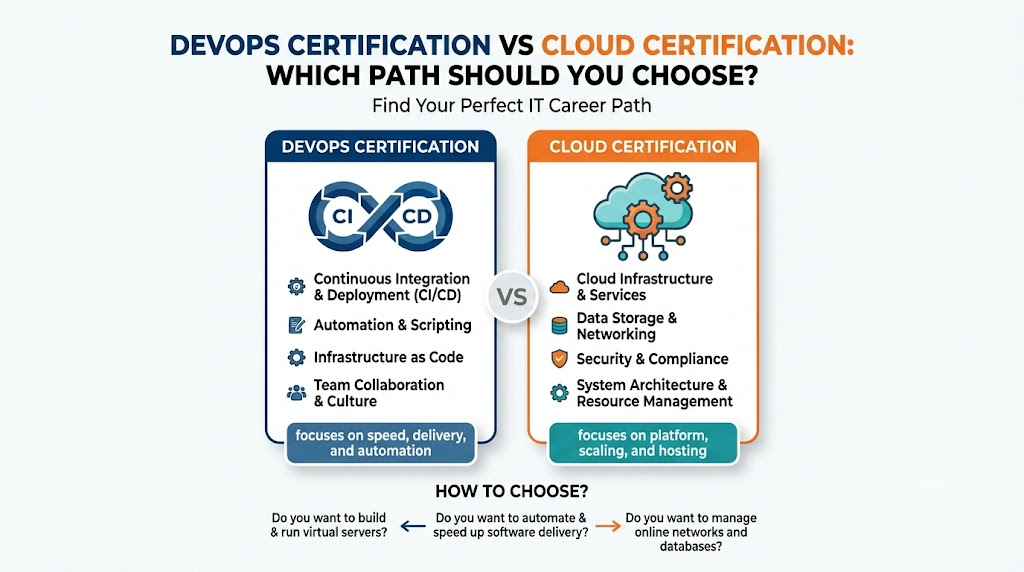
Picking the right tech path feels hard when you start out. Both software delivery and cloud systems offer great jobs. You can build strong skills through structured courses at DevOpsSchool to guide your learning journey. So, you will gain real practice and grow fast.
Cloud learning teaches you how to rent computers over the internet. These big shared computers live in huge server centers. DevOps teaches you how to test, build, and ship code fast. So, both skill paths help tech teams make great apps.
Choosing the best path depends on your daily goals. Do you want to build rented cloud networks? Or do you want to speed up daily coding workflows? This complete guide shows you every key detail.
What Does the Cloud Really Mean?
The cloud is just someone else’s computer. In the past, companies bought heavy metal servers. They kept these noisy machines in cold rooms.
Now, companies rent space from big cloud providers. They pay only for what they use. So, teams save big money and launch fast.
Cloud engineers set up these digital machines. They also connect virtual cables and hard drives. Next, they make sure hackers cannot break into the system.
What Does DevOps Mean for Teams?
DevOps connects software makers with the operations crew. Developers write the app code all day. The operations team keeps the servers alive and safe.
In older offices, these two groups worked in separate rooms. They blamed each other whenever an app broke. Because of this fighting, releases took months.
DevOps brings these teams together as one team. They share tools and fix bugs together. So, they ship fresh updates every single day without fear.
Key Operational Concepts You Must Know
Before you choose a certification, you must understand core operational ideas. These concepts power all modern software teams today.
What Continuous Code Delivery Means
First, you must understand continuous code delivery. Developers save their new work into a shared folder every day. We call this storage hub a code bank.
Next, a robot program wakes up right away. This robot builds the app and tests every line. So, bugs get caught before customers ever see them.
If a test fails, the robot warns the author. Then, the coder fixes the error within minutes. Because of this robot, teams never ship broken code.
Understanding Containers and Virtual Boxes
Containers are like small lunchboxes for software code. A container packs an app with everything it needs to run. So, it runs the same way on any computer.
Before containers, apps often broke on different machines. A program worked on a laptop but failed on a server. That messy problem caused major headaches.
Now, containers solve that problem completely. You can run hundreds of containers on one big machine. Therefore, companies save money and cut wasted compute power.
What Infrastructure as Code Means
In the past, engineers clicked buttons on screen menus. They set up each server by hand. But humans make mistakes when they click menus all day.
Infrastructure as code fixes this problem with text files. Engineers write down their server setup like a simple recipe. Next, a tool reads the recipe and builds the servers.
Because the recipe is text, you can copy it easily. You can build twenty identical servers in five minutes. Also, you can delete them just as fast when you finish.
What System Observability Means
Observability means watching how your system feels on the inside. You track computer health using numbers, logs, and traces.
- System numbers: These show how hard the computer processor works.
- Activity logs: These record every error and user action in text.
- Journey traces: These show how a click travels across ten different servers.
So, when a website slows down, engineers spot the trouble right away. They fix the bottleneck before users notice any glitch.
Platform Implementation vs. Culture — What’s the Real Difference?
Many teams buy fancy software tools and call themselves modern. However, tools without good habits always lead to failure.
| Feature Area | Platform Implementation (The Tools) | Team Culture (The Mindset) |
|---|---|---|
| Main Target | Setting up cloud servers and pipelines | Sharing goals and talking kindly |
| Daily Work | Writing scripts and configuring networks | Helping teammates and learning from errors |
| How to Measure | Counting deployments and server uptime | Checking team trust and quick recovery |
| Handling Outages | Restarting broken boxes and servers | Running post-mortems without pointing fingers |
Why Tools Alone Cannot Save You
Buying a fast race car does not make you a great driver. In the same way, buying cloud tools does not fix bad habits.
If teams do not talk, work still moves slowly. A developer will finish code and toss it over a wall. Then, the operations engineer will complain about bad code.
Therefore, you must pair good tools with team respect. When people solve problems together, magic happens. Next, projects finish on time and work stays fun.
Why Shared Team Ownership Matters
In a healthy team, everyone owns the live product. Developers help watch the servers on busy days. Operations engineers give feedback on early design plans.
Because everyone shares duty, nobody plays the blame game. When an outage happens, the team fixes it together. Next, they write down how to avoid the same bug.
This open mindset creates a safe workspace for learning. Engineers try bold ideas because mistakes become helpful lessons. Thus, the company grows stronger every month.
Real-World Use Cases of Modern Operations
Let us look at how real companies use these skills every day. These true stories show how cloud and pipeline skills work in action.
Online Shopping Stores on Big Sale Days
Imagine an online store during a giant holiday sale. Millions of shoppers arrive at the exact same minute. A normal server would crash from the heavy load.
Cloud systems watch the visitor traffic count live. When shoppers rush in, the cloud adds fifty new servers. So, the website stays snappy and never crashes.
Next, pipeline tools push out flash sale banners smoothly. Coders update sale prices without taking the website down. Therefore, the store earns huge profits all day.
Mobile Banking Apps Keeping Money Safe
Banks handle your money, so they must be extra careful. A single software bug could leak private user data.
To prevent leaks, banks run robot security checks on every code change. The robot looks for weak passwords and open backdoors. If it finds a flaw, it halts the release.
Also, bank systems run across multiple cloud regions. If a storm hits one server warehouse, traffic shifts instantly. So, users can still check their balances anywhere.
Video Streaming Apps for Millions of Viewers
Think about your favorite online cartoon and movie apps. Millions of people stream high-definition video at night.
These streaming apps slice big files into small bits. Next, they store those bits on cloud servers near your hometown. Because the files sit close by, videos start instantly.
Meanwhile, DevOps tools update the movie app weekly. Engineers add new search filters while you watch your favorite show. You never even notice the update happening.
Common Mistakes in Operations Engineering
Many beginners take wrong turns when they start their training. Learn these common traps so you can avoid them early.
- Chasing too many tools at once: Beginners try to learn twenty tools in one month. You will learn better by mastering two core tools first.
- Ignoring simple Linux commands: Most cloud systems run on Linux operating systems. If you skip basic terminal commands, you will get stuck later.
- Leaving security for the end: Adding locks after building a house never works well. You must build safety checks into your daily steps from day one.
- Forgetting about cloud bills: Cloud servers cost real money every hour. If you forget to turn off test servers, huge bills will pile up.
- Skipping basic networking rules: Every cloud system relies on IP addresses and ports. Learning how data flows between computers saves hours of trouble.
How to Become an Operations Expert — Career Roadmap
Becoming an operations pro takes steady practice over time. Follow this step-by-step path to build your skills the right way.
+-------------------------------------------------------------------+
|                  Your Operations Learning Journey                 |
+-------------------------------------------------------------------+
|  Step 1: Learn Linux, bash commands, and simple networking        |
|  Step 2: Master Git to track and share all your code files        |
|  Step 3: Learn a top cloud platform like AWS or Azure             |
|  Step 4: Package your apps using Docker containers                |
|  Step 5: Write automation scripts to build and deploy apps        |
+-------------------------------------------------------------------+
Learning Paths for Different Roles
- For absolute beginners: Start with a basic cloud certification like Cloud Practitioner or Azure Fundamentals. These easy exams teach you cloud words and core ideas without deep coding.
- For system administrators: Learn infrastructure code tools and container systems. This knowledge helps you trade manual clicking for fast, repeatable scripts.
- For software coders: Focus directly on delivery pipelines and container management. This training helps you package your code and deploy it safely to production.
- For security fans: Study cloud firewalls and automated pipeline scanners. Companies pay top dollar for engineers who protect data from cyber threats.
Step-by-Step Milestones for Learners
- Master the Command Line: Open your terminal and practice daily. Learn how to move files, read logs, and check computer memory using text commands.
- Learn Code Storage: Create an account on a code-sharing website. Practice saving changes, branching code, and merging work with sample project files.
- Earn Your First Cloud Badge: Study for a foundational cloud exam. Build real virtual machines and storage buckets in a free practice account.
- Build Simple Containers: Package a small web page inside a container image. Run that container on your laptop, then run it on a cloud server.
- Automate the Whole Flow: Connect your code bank to your cloud server with a pipeline robot. Watch your website update itself automatically every time you save.
FAQ Section
- Should I get a cloud certification before a DevOps certification?Yes, learning cloud basics first gives you a firm foundation. You must know where servers live before you can build automated pipelines for them.
- Do I need to know deep math to work in the cloud?No, you do not need advanced math for these roles. You only need simple logic, clear thinking, and good problem-solving habits.
- Can I land a good tech job with only one certification?A certificate helps you get interviews, but hands-on projects win the job. Always build real projects to show hiring managers what you can do.
- How many hours should I study each week?Studying five to ten hours each week works very well. Steady daily practice helps you remember concepts much better than cramming on weekends.
- Is it expensive to practice cloud tools at home?Most major cloud providers offer free accounts with basic limits. Just remember to shut down your test servers every day so you avoid surprise charges.
Final Summary
Both cloud and DevOps certifications open doors to great tech careers. If you enjoy building networks, storing files, and organizing servers, start with a cloud track. However, if you love building automated pipelines and helping developers ship code, choose the DevOps track.
Many top engineers learn both skill sets over time. Starting with cloud fundamentals and then adding pipeline automation gives you a massive career boost. Pick one clear path today, practice on real labs, and watch your technical confidence soar.
Leave a Reply