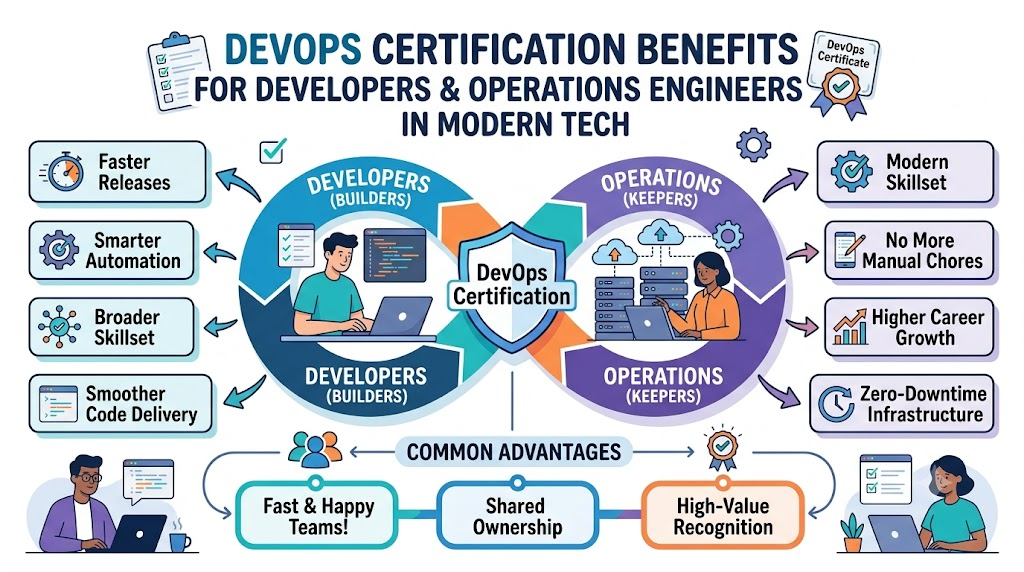
Software teams want to build and share apps very fast. But they also need these apps to work safely without crashing. In the past, builders and system helpers worked apart. Builders made the app code. System helpers set up the big machines and fixed server errors.
Today, smart teams work together as one happy group. To learn these top team skills, engineers join DevOpsSchool
. This training helps people learn modern tools through simple, hands-on tasks. It turns hard work into easy, fast habits for every worker.
When people earn a stamp of skill, good things happen. This stamp is called a certification. It shows that you know how to build, test, and run code. Both app makers and computer helpers gain a lot from this special proof.
What Is DevOps in Simple Words?
Think of building an app like baking cookies for a big school party. Developers are like the bakers who mix the dough and add sweet chocolate chips. Operations engineers are like the helpers who run the hot ovens and pack the boxes.
If the bakers and box packers do not talk, cookies burn or arrive late. DevOps brings both teams to the same table. They share tools, talk daily, and help each other out. Because they work as one team, apps reach users fast and stay super safe.
+--------------------------------------------------------------+
|                    The Simple DevOps Loop                    |
+--------------------------------------------------------------+
|   [Write Code]   -->   [Test Code]   -->   [Pack in Box]     |
|         ^                                        |           |
|         |                                        v           |
|   [Fix & Learn]  <--   [Watch Logs]  <--   [Run on Cloud]    |
+--------------------------------------------------------------+
Why Do Teams Need This Shared Loop?
- Fewer silly mistakes: Robots check the code for errors right away.
- Fast release dates: Teams ship new features every day instead of once a year.
- Happy users: Games and apps do not freeze when lots of people play at once.
- Less stress: Workers do not need to stay up late to fix broken computers.
Why Certification Matters for Both Sides
A certification is a verified badge that shows you passed a tough, real test. It proves that you can run real tools, build smart robot scripts, and fix hard computer bugs.
| Feature Area | App Developers (Code Builders) | Operations Engineers (System Keepers) |
| Main Daily Focus | Writing cool features, app logic, and bug fixes | Keeping cloud computers safe, fast, and running |
| New Learned Skill | Packaging code into tidy digital boxes | Writing clean scripts that make servers automatically |
| Biggest Work Benefit | Code runs smoothly everywhere without weird errors | No more boring, repetitive hand tasks on servers |
| Team Superpower | Better empathy for how big cloud systems run | Better empathy for how software gets written |
Key Operational Concepts You Must Know
Before you take a test, you need to know the core puzzle pieces of modern operations. These pieces help computers run without human hands touching them all day.
Version Control and Code Repositories
First, every engineer must use code storage vaults like Git. Think of this like a magical time machine for words and code. If you make a bad change today, you can jump back to yesterday in one click.
Also, it lets ten people work on the same file without erasing each other’s work. The whole team shares one safe source of truth.
Robots That Test and Deliver Code
Next, teams use robot pipelines. In plain words, this is a digital factory line. When a builder saves code, the robot wakes up.
The robot builds the app, runs tests, and checks for bugs. If the code passes all tests, the robot moves it to the live website. But if something breaks, the robot stops and tells the builder right away.
+--------------------------------------------------------------+
|                 The Automatic Robot Pipeline                 |
+--------------------------------------------------------------+
| 1. Save Code     --> Developer saves new code to Git         |
| 2. Robot Build   --> System builds the fresh app program    |
| 3. Auto-Test     --> Robot runs 100 fast safety tests        |
| 4. Ship to Live  --> Robot puts safe app on the web server   |
+--------------------------------------------------------------+
Digital Lunchboxes and Cloud Homes
Next comes container boxes. A container is like a neat lunchbox for your app. It holds the code, the tools, and the settings in one tight package.
Because of this, the app runs the exact same way on a tiny laptop and on a huge server. Then, a smart helper tool acts like a bus driver. It drives hundreds of these boxes and replaces any box that drops or breaks.
Platform Implementation vs. Culture — What’s the Real Difference?
Many groups think they can just buy shiny tools and fix everything. But tools alone do not make a great team. You must mix good tools with great teamwork.
+--------------------------------------------------------------+
|             Tools vs. Culture: The Winning Mix               |
+--------------------------------------------------------------+
|   [Shiny Tools & Cloud Bots]  +  [Kind, Helpful Teamwork]    |
|                                                              |
|               = FAST, HAPPY, AND SAFE TEAMS!                 |
+--------------------------------------------------------------+
The Difference in Daily Life
- Tools are the gear: These are the programs, cloud dashboards, and robot scripts you run.
- Culture is the habit: This is how people talk, share credit, and help when things break.
- Tools give speed: Scripts let you launch twenty servers in five minutes.
- Culture gives safety: People feel safe to tell the truth when an app goes down.
When a server crashes, bad teams look for someone to yell at. But great teams run a blameless review. They sit down, drink water, and ask how the system let the bug happen. Then they fix the system so nobody makes that mistake again.
Real-World Use Cases of Modern Operations
Every app you love uses these cool tricks every single day. Here is how big groups use them to win.
Fun Video Games on the Internet
Imagine millions of players jumping into a new game world at four o’clock. If the team uses old ways, the game servers catch fire and crash.
With modern cloud tools, smart robot monitors watch the traffic. When more kids log in, the system spawns fifty new game servers in seconds. Then, when players go to sleep, the extra servers vanish so the studio saves money.
Shopping Apps on Giant Sale Days
On huge shopping days, people buy shirts and toys all at once. Developers test new sales buttons weeks before the rush.
Because they use robot testing lines, they know the checkout cart will not freeze. If one button has a flaw, the system rolls back to the old button in one second. Customers never see an ugly error screen.
Common Mistakes in Operations Engineering
Even smart engineers make silly mistakes when they start out. Knowing these traps helps you avoid them.
- Clicking buttons by hand: Never set up servers by clicking on a screen; always write a simple script.
- Forgetting the watchtowers: If you do not set up alert alarms, users will find your bugs before you do.
- Testing only on your own laptop: Always test code inside a container so it acts like real production.
- Skipping security checks: Never leave passwords or secret keys inside your public code files.
- Hiding your mistakes: Never bury an error; share it so the whole team learns and grows together.
How to Become an Operations Expert — Career Roadmap
Becoming a top tech pro does not happen overnight. But you can follow this simple, step-by-step path to level up your career.
+--------------------------------------------------------------+
|                   Your 5-Step Learning Map                   |
+--------------------------------------------------------------+
| Step 1: Learn Linux and Bash commands                        |
| Step 2: Learn Git to save and share your work                |
| Step 3: Learn Containers to pack apps in tidy boxes          |
| Step 4: Learn Cloud and IaC to make servers with code        |
| Step 5: Earn your badge to prove your awesome skills         |
+--------------------------------------------------------------+
The Step-by-Step Path
- Master the Command Line: Learn basic Linux text commands. You will type words to move files and check system memory without using a mouse.
- Learn Code Tracking: Use Git every single day. Make small changes, save your work, and practice working with other people on the same project.
- Pack Your Apps: Learn how to put small web pages inside container boxes. Make sure your app starts with one single command.
- Set Up Robot Pipelines: Connect your code vault to an automated build tool. Make the robot run checks every time you push new code.
- Pass Your Certification Exam: Pick a beginner-friendly cloud or container test. Study hard, do lots of real labs, and earn your official badge!
FAQ Section
- Do I need to be a math genius to learn DevOps?
No, you do not need hard math at all. You just need to like solving puzzles, writing simple logic, and working with others. - How does this badge help a software developer?
It helps developers write cleaner code that fits real cloud servers easily. It also saves them time because robots handle the boring testing work. - How does this badge help a systems engineer?
It teaches systems helpers how to use code instead of doing manual tasks. This stops boring busywork and opens doors to higher pay. - Which simple tool should I learn first?
Start with Git to save your code. Next, learn basic Linux commands so you can talk to cloud servers with confidence. - How long does it take to get certified?
Most students study for three to six months. If you practice with real hands-on labs every week, you will be ready fast!
Final Summary
Getting a DevOps certification is one of the best ways to grow in tech. It helps developers write code that runs anywhere without annoying surprises. At the same time, it helps system helpers turn slow manual chores into fast, automated scripts.
Most importantly, it teaches both sides to speak the same language and work as one team. When you mix smart automation with kind, open teamwork, everyone wins. Start small, practice on real labs every day, and grab your shiny badge to take your career to the next level!
Leave a Reply