Computers run apps for schools, games, and banks every day. But building apps and running them on servers takes team work. Software makers and system helpers used to work in different rooms. So, work moved slowly and mistakes happened often.
DevOps fixes this problem by bringing both teams together. They share tools and talk every day. Learning these tools helps you build fast and safe systems. You can learn these steps with DevOpsSchool to gain real skills quickly.
Therefore, learners who build these skills find great jobs. You learn how to fix bugs fast. Also, you help teams ship updates without breaking things.
What Is DevOps and Why Do Teams Need It?
DevOps connects code builders with system runners. The word comes from Development and Operations. Development means writing code. Operations means keeping computers alive and running.
In the past, one team threw code over a wall. Then the other team had to run it. If the code failed, everyone argued. But DevOps turns them into one team with one goal.
Because of this change, updates take minutes instead of months. Teams fix broken parts right away. So, users stay happy and apps stay online.
Key Operational Concepts You Must Know
You need strong basics before you touch big systems. Think of these basics like building blocks. Each block keeps your system strong and steady.
Version Control Keeps Work Safe
First, you must learn Git. Git tracks every change you make to a file. It acts like a time machine for your code.
If your new code breaks, you do not worry. You just step back to an older, working copy. Also, team members can work on the same app together without losing work.
Automated Testing Finds Bugs Early
Next, computers must test code on their own. Humans get tired and miss errors. But automated test tools check code day and night.
They check every line of fresh code right away. So, bad code never reaches real users. This keeps your apps fast and safe.
Building Fast Delivery Tracks
Teams use pipelines to move code to the web. A pipeline is like a factory belt. The belt picks up fresh code, tests it, and packs it up.
Then, it puts the code onto live servers without human hands. This factory belt is called CI/CD. It saves hours of boring manual work every day.
Platform Implementation vs. Culture — What’s the Real Difference?
Many teams buy fancy tools and think they finished the job. But tools are only half of the story. You also need to change how people think and talk.
| Area | Platform Implementation (The Tools) | Cultural Transformation (The People) |
|---|---|---|
| Main Goal | Set up cloud tools and build pipes | Build trust and share daily tasks |
| Key Actions | Write setup scripts and track logs | Talk openly and learn from errors |
| Big Win | Fast and automatic server builds | No blame when something breaks |
| How to Fix Errors | Run a script to replace a broken server | Sit together and find the root cause |
Why Good Habits Beat Just Buying Tools
A fast car is useless if the driver does not know how to steer. In the same way, great tools fail without good habits. Teams must talk openly every morning.
When an app crashes, good teams do not point fingers. Instead, they ask how the system let the crash happen. Then, they fix the system so it never happens again.
Real-World Use Cases of Modern Operations
Every app on your phone uses these smart steps to run smoothly. Here are three clear examples from real life.
Video Apps Keep Videos Playing
Big movie apps stream shows to millions of screens. When a new show comes out, many people watch at once. Smart tools see this crowd right away.
So, the system starts new servers in seconds to help. When people go to sleep, the system turns those extra servers off. This saves huge amounts of money.
Bank Apps Keep Your Coins Safe
Banks must guard money with high care. They cannot let bad files into their system. So, their pipeline runs security scans on every single file.
The scan checks for weak locks and bad code. If a file looks risky, the pipeline stops it cold. As a result, users bank safely every day.
Shopping Sites on Big Sale Days
Online toy stores get very busy on big holiday sales. A broken buy button can lose millions of dollars. Therefore, teams run small tests on tiny groups of shoppers first.
If the button works great, everyone gets the new button. But if it breaks, the tool pulls it back instantly. Most shoppers never even notice a problem.
Common Mistakes in Operations Engineering
Beginners often make the same few mistakes when they start. Knowing these traps helps you skip them.
- Writing messy scripts without notes: Always write clean steps so your team can read your work.
- Trying to learn every tool at once: Master one tool first before you jump to another.
- Skipping basic computer rules: Learn how networks and files work before you touch cloud systems.
- Forgetting to save backups: Always keep extra copies of your work in a safe place.
- Blaming others for crashes: Focus on fixing the broken step instead of blaming a person.
How to Become an Operations Expert — Career Roadmap
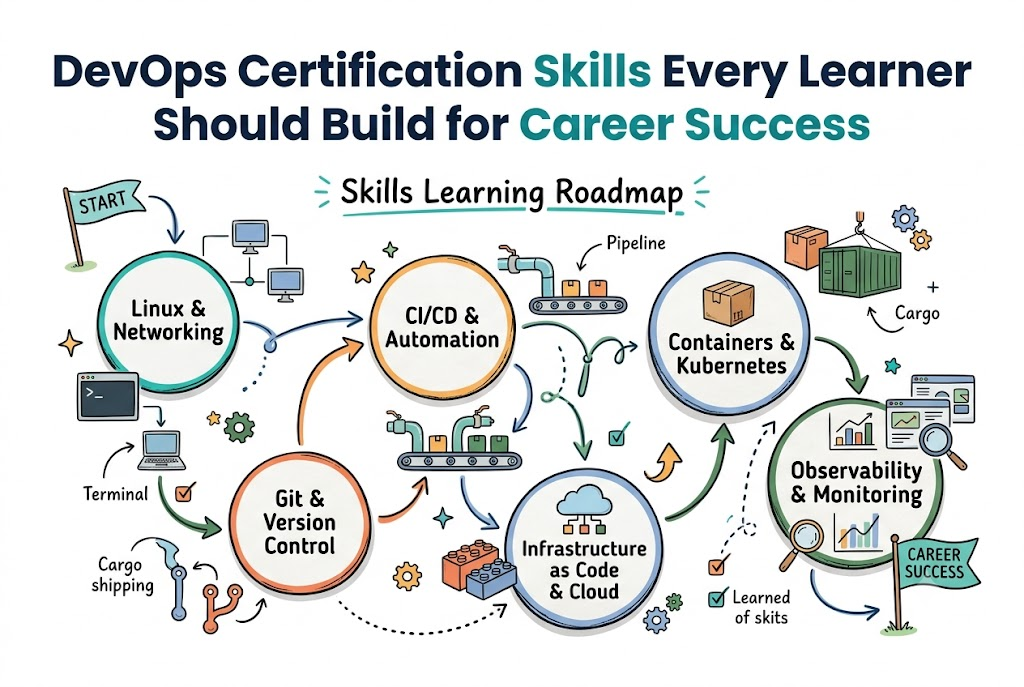
You can follow a clear path to grow your skills. Step by step, you will build the power to run big systems.
+-----------------------------------------------------------------+
|                    Five Steps to Success                        |
+-----------------------------------------------------------------+
| Step 1: Learn Linux commands and shell basics                   |
| Step 2: Save your files with Git version control                |
| Step 3: Pack your apps into small Docker boxes                  |
| Step 4: Write code that builds servers automatically            |
| Step 5: Watch system health with simple dashboards              |
+-----------------------------------------------------------------+
Steps to Take for Your New Career
- Learn the basics of Linux: Most big servers run on Linux. Learn how to move files, open folders, and check system memory with text commands.
- Master Git for your code: Save your work often. Learn how to merge branches and share code with friends on the web.
- Pack apps inside containers: Containers hold an app and all its toys in one box. This makes the app run the same way on every machine.
- Build servers with code: Do not click buttons to set up servers. Write simple script files that make cloud servers for you on demand.
- Watch your systems closely: Set up screens that show server heat and speed. When an alarm rings, fix the problem before users call for help.
FAQ Section
- Do I need to know how to write code first?You only need basic script skills to start. Writing small helper scripts in Python or Bash is plenty to get going.
- What does a container do in simple words?A container is like a lunchbox for your app. It holds your sandwich, apple, and spoon together so you can eat anywhere.
- Why do companies pay high salaries for these skills?Companies lose money when their apps stop working. People who keep apps fast and safe save companies millions of dollars.
- Is it hard to pass a certification test?Tests take study time and daily practice. But if you build real projects on your home computer, you will pass easily.
- How long does it take to learn the basics?Most learners build solid skills in about six months. Practice every day, build small apps, and test your own tools often.
Final Summary
Learning modern system skills opens big doors in tech. You learn how to connect builders with runners to make super teams. Also, you save teams time by letting computers do boring, repetitive chores.
Start with simple Linux tools and track your files with Git. Next, pack your apps into boxes and build clean delivery pipes. Practice every single day, keep your tools simple, and you will become a great engineer.
Leave a Reply