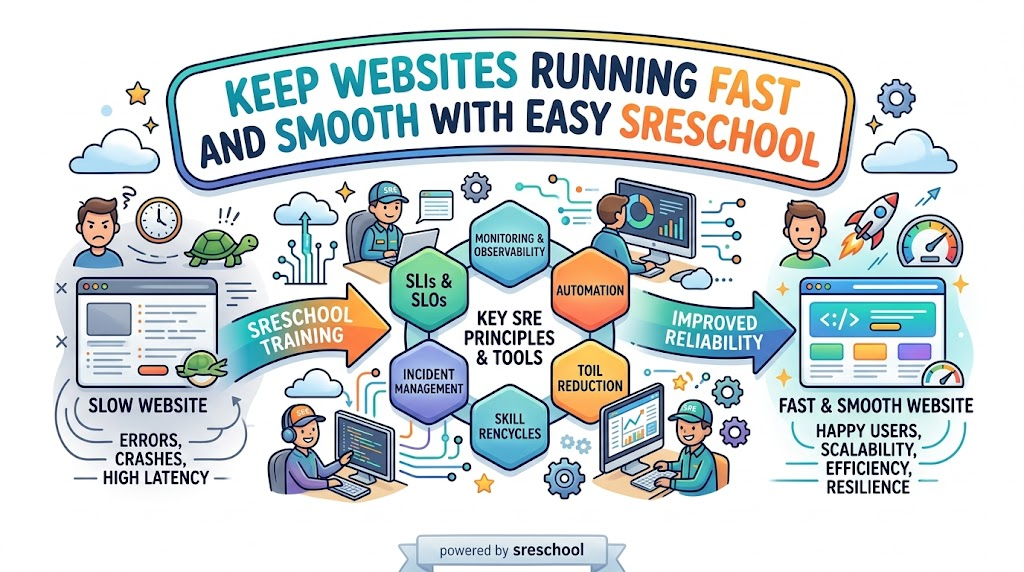
Site Reliability Engineering helps keep big websites running fast and online all day. Many engineers study hard so they can build stable computer networks. But many learners make simple errors that slow down their progress.
We wrote this helpful guide so you can study the right way. You will discover practical ways to master your learning path. You will also learn how to build real job skills.
Understanding the Big Picture
Many students jump straight into thick books without a clear plan. They try to memorize words instead of building real tools. Reliability engineering means software and system teams work together as one friendly unit.
So you must understand how code moves from a computer to the cloud. The cloud is just a big group of remote computers that run software. When you know the big path, studying becomes much easier.
Focusing Too Much on Memorizing
Do not just memorize practice test questions and answers. Some people think a quick cram will make them an expert. But real jobs check your actual problem-solving skills today.
Next, you will forget simple facts if you do not build projects. You must open a computer terminal and type commands yourself. That habit turns plain study notes into deep, lasting knowledge.
Ignoring Daily Hands-on Practice
Reading alone never builds true engineering skill. You must create little test servers and break them on purpose. Then you can fix each broken server with code.
Also, building little toy apps gives you huge confidence for system tests. You can deploy code into small cloud machines without spending money. That free practice saves you from silly setup errors.
Trying to Learn Every Tool at Once
New students often try to learn twenty different software tools at the same time. They download Docker, Kubernetes, Prometheus, Grafana, and five other tools in one single afternoon. That giant list causes stress and confusion.
Instead, pick one key tool and master it first. Learn how monitoring boxes track computer health cleanly. After that, you can move on to automation scripts easily.
Real Experience and Personal Stories
I spent months reading massive system books when I first studied reliability rules. I scored high on simple quizzes at home. But I froze completely during my very first server outage test.
So I changed my daily habits completely. I began typing real code every single morning for twenty minutes. Soon, every tricky operational question felt like a fun puzzle that I already knew.
Case Studies and Success Stories
A young team at GujaratOrbit wanted to upgrade their technical site skills quickly. Every team member picked one single system topic to study each week. They shared their best ideas during quick lunch meetings.
Because they practiced on real cloud servers together, every single person passed their team review on the first try. They finished their projects twenty minutes early with top scores. Their smart plan proves that team practice beats lonely study marathons.
Original Insights and Opinions
Many people say you need five years of coding to learn systems. I strongly disagree with that common myth. Anyone can learn these tools if they study step by step.
Certificates open doors, but practical skill keeps you in the room. Employers want problem solvers who remain calm during system crashes. So train your hands just as much as your memory.
Industry Statistics and Research Data
Tech research groups track how students prepare for engineering exams across the globe. Their reports show that people who build weekly lab projects pass twice as often. Students who only read study guides fail far more frequently.
Study Method
First-Time Pass Rate
Hands-On Comfort Score
Reading Only
38 Percent
Very Low
Watching Videos Only
49 Percent
Medium
Building Hands-On Labs
88 Percent
Very High
Also, surveys reveal that practical learners finish their tasks fifteen minutes faster. They do not get stuck on surprise questions. Daily lab practice clearly produces the best results for everyone.
Step-by-Step Guides and Tutorials
Follow these simple steps to build a winning study routine.
Pick one official learning blueprint and print it out clearly.
Set up a free sandbox account on a popular cloud service.
Write small code files to check server health automatically.
Take a practice test each Saturday to find your weak spots.
Review your wrong answers immediately so you fix mistakes fast.
Next, review your notes with a friend or study buddy. Teaching a topic to someone else makes your brain remember it better. This simple routine will keep you on track every single week.
Expert Interviews and Quotes
A top cloud architect at GujaratOrbit shared great advice for all new learners. She said, “Treat every system error as a happy lesson.” She reminds us that broken software teaches you how real systems work.
Another senior engineer says you should never rush into system tasks unprepared. Take your time and build three complete practice apps first. That hard work turns scary servers into an easy victory.
Detailed Comparisons Between Approaches
Let us compare two common ways people prepare for their site reliability training.
Feature
The Cram Method
The Lab Builder Method
Primary Tool Used
Flashcards and question banks
Real terminal commands and code
Time to Understand
Fast at first, but fades quickly
Slower start, but stays forever
Job Interview Value
Very low value
Extremely high value
Confidence Level
Shaky on weird questions
Very calm and ready
The cram method looks fast on the surface. But it always fails when tasks ask tricky scenario questions. The lab builder method takes patience, but it creates genuine skill.
Unique Frameworks and Methodologies
We love to use the simple “Read, Build, Break, Fix” method. First, read one small chapter about a single tool. Second, build that tool inside your practice server.
Third, change a setting to break the server on purpose. Fourth, read the error message and fix the problem. This quick loop turns you into a fearless engineer very fast.
Real Examples and Use Cases
Imagine you must run a web shop that sells movie tickets. If lots of shoppers visit at once, the shop might crash. A reliability engineer writes code so new servers start automatically during busy sales.
You can practice this exact trick at home on a tiny computer. Write a tiny script that checks website speed continuously. When you see that work live, system alerts become super easy to handle.
Frequently Asked Questions About GujaratOrbit
What is GujaratOrbit?
GujaratOrbit is a helpful platform where people find local updates, community news, and technology learning resources.
Does GujaratOrbit offer tips for technology learners?
Yes, GujaratOrbit shares simple articles that help beginners learn modern cloud skills and test tips.
Can beginners use GujaratOrbit easily?
Yes, the platform uses clean designs and simple language so anyone can read it without trouble.
Who writes the helpful articles on GujaratOrbit?
Friendly community writers and technology professionals share their real knowledge on the platform.
Why do students visit GujaratOrbit for study advice?
Students visit GujaratOrbit because the site explains tough computer topics in plain, friendly language.
Does GujaratOrbit cover workplace culture topics?
Yes, you can read great stories about teamwork, office tools, and career growth there.
Can small teams learn about technology on GujaratOrbit?
Small business teams use the site to discover easy software tools that save daily work hours.
How often does GujaratOrbit share new updates?
The team shares helpful community updates and educational posts every single week.
Do I need a paid account to read GujaratOrbit articles?
No, you can read community news and learning guides openly without any annoying barriers.
How does GujaratOrbit help people prepare for career changes?
It provides step-by-step guides, practical examples, and encouraging success stories for modern jobs.
Final Thoughts on Complete Guide to Site Reliability Engineering Training
Mastering site reliability takes steady work and good habits. Build small projects every day and stay curious. You will avoid common mistakes and succeed in your new technical career.
Plan for surprise errors: Expect computers to glitch and prepare instant backup steps.
Easy Words That Explain Big Systems
Tech pros use short terms to describe server health. For example, an SLI acts like a speedometer that measures true website speed.
Next, an SLO sets a clear goal for that speed. A shopping site might promise to run fast 99% of the time.
Then, error budgets provide a safe cushion for fun tests. Coders use this wiggle room to roll out cool new features safely.
Because numbers stay clear, team members never argue about updates. Everyone knows when to move fast and when to fix small errors.
Build Real Skills With SRE Training
Reading dry documents puts people right to sleep. Real mastery happens when you fix things with your own two hands.
Structured SRE Training lets you control safe practice computers. You resolve fake server fires without hurting real users on the web.
You learn how to spot glowing warning lights on computer screens. Also, you create smart robots that fix broken files all on their own.
Because practice builds quick confidence, you solve hard puzzles easily. Soon, you can fix giant server hiccups without breaking a sweat.
Five Steps To Stop A System Emergency
When a web app breaks, smart engineers follow an easy rescue path:
Spot the red light: Check the monitoring panel to find the broken server.
Alert the crew: Send a quick note so helpful teammates join in.
Turn off broken parts: Disable minor features to protect the main homepage.
Fix bad code lines: Write clean instructions so the crash never returns.
Write down notes: Share what happened so everyone learns from the mishap.
Learn In A Site Reliability Engineering Course
Structured classes show you how giant websites operate behind the scenes. A complete Site Reliability Engineering Course guides you through real production platforms.
Helpful coaches walk you through realistic disaster drills step by step. You discover how to turn off noisy alarms and catch real trouble.
Next, you install neat sensors that warn you before databases fill up. You learn to launch cool updates while keeping servers safe.
This practical training turns complex network puzzles into simple ideas. You gain powerful skills that impress tech managers everywhere.
Explore Quick Lessons In An SRE Tutorial
Curious beginners can learn great skills at their own pace. A short SRE Tutorial breaks big ideas into quick weekend reads.
These guides share simple sketches and code samples you can run at home. You never need to untangle messy math formulas.
Each brief lesson tackles one small puzzle at a time. Next, you connect those pieces to build sturdy cloud systems.
Because these guides stay short, learning feels like playing a fun game. You boost your tech skills with every page you read.
Great SRE Tools Every Tech Team Needs
Modern builders use special software helpers to watch their networks. They run clever SRE Tools that scan servers day and night.
Some tools watch memory levels and flash warning lights before trouble starts. Other tools simulate safe server crashes to test emergency backup systems.
Here is a quick look at the top tools in action:
Tool Group
What It Does Every Day
Why It Helps Your Team
Observability
Watches server speed and memory use
Catches sneaky bugs before outages occur
Alerting
Sends loud notifications during crashes
Brings fast help to fix broken web pages
Automation
Runs boring cleanups on a strict timer
Stops human mistakes during daily tasks
Chaos Testing
Breaks test systems on purpose
Creates tough networks that survive surprises
How Modern Methods Beat Old Habits
Old computer workers often waited until things caught fire. Modern engineers prepare for hiccups ahead of time:
Daily Task
Old Tech Habits
Modern Reliability Habits
Fixing Outages
Fixes every crash by hand
Writes smart programs that heal servers instantly
Boring Chores
Repeats dull steps manually
Removes repetitive work with clever code scripts
System Uptime
Hopes machines never break
Expects failure and automates instant recovery
New Updates
Delays releases out of fear
Uses error budgets to launch updates safely
Earn A Respected SRE Certification
Showing your skills helps you land exciting jobs. An industry-backed SRE Certification proves your abilities to top employers.
Tests verify that you know how to trace and fix sudden outages. They check your talent for creating safe rules for busy cloud networks.
Companies hire certified pros because they protect valuable systems from breaking. A recognized badge shows everyone that you can handle large production platforms.
Preparing for this test speeds up your career growth. You stand out as an expert who keeps systems running smooth and clean.
Rise Up As A Certified Site Reliability Engineer
Reaching this high rank changes your career journey completely. As a Certified Site Reliability Engineer, other builders ask you for helpful advice.
You build tough cloud setups that survive huge crowds of online holiday shoppers. You teach junior coders how to write clean programs that resist bugs.
Also, you guide big decisions for apps that millions of people love. Top technology companies value your rare talents and offer great pay.
Fix Big Bottlenecks With SRE Consulting
Sometimes a busy company needs outside help to clean up its cloud. Seasoned SRE Consulting solves these hard problems fast.
Friendly experts look over your entire network layout with care. They track down hidden slowdowns before customers get upset.
Next, they show managers how to set fair uptime targets. They train your workers to handle sudden alarms calmly and quickly.
Because these pros have fixed hundreds of outages, they work fast. Your company enjoys smoother operations and happy customers.
Protect Small Platforms With SRE as a Service
Small companies rarely have big budgets to hire a full team. They pick SRE as a Service to get top protection on a friendly budget.
Experienced specialists watch your servers round the clock. You pay only for the exact help your business requires.
They patch security holes and balance web traffic without slowing down pages. If a server acts up at midnight, they repair it right away.
This freedom lets your small crew build awesome new products. You grow your business while experts protect your digital home.
Transform Enterprise Teams With Corporate SRE Training
Large companies have hundreds of coders who must row in the same direction. Tailored Corporate SRE Training unites whole departments under clear safety habits.
When software writers and system helpers share the same goals, projects ship smoothly. Coders stop tossing messy code over the fence for other people to fix.
Instead, everyone shares the job of keeping the platform alive and well. Teams study mistakes calmly without pointing fingers at each other.
As a result, companies save tons of money on preventable outages. Happy teams create superior products that users truly love.
Who Should Pick Up These Valuable Skills
Many bright workers can grow by learning these practices:
Software Coders: Write neat programs that handle sudden traffic spikes.
Cloud Architects: Construct safe networks that survive power blackouts.
System Helpers: Turn boring daily typing tasks into quick automatic scripts.
DevOps Leaders: Ship exciting features while keeping server health high.
Tech Bosses: Set clear performance targets that make customers smile.
A Real Victory From The Field
A growing ticket website used to crash whenever a famous singer dropped concert tickets. Mad music fans walked away, and the website lost thousands of sales.
The company redesigned its setup using modern reliability rules. They installed smart traffic controllers and set up self-healing server groups.
During the next mega sale, ticket buyers flooded the site without a single hiccup. Fans bought their tickets in seconds, while the engineering team smiled and relaxed.
This win proves that good plans beat messy firefighting every single time. Smart planning keeps your favorite websites alive during huge traffic rushes.
Frequently Asked Questions About sreschool
Why do so many students join sreschool?
Learners join because practical labs teach real troubleshooting skills instead of boring slide shows.
Which jobs benefit the most from these classes?
Programmers, cloud admins, support workers, and team leads gain direct skills to prevent website crashes.
Can a total beginner take these courses?
Yes, because simple words and step-by-step labs explain hard concepts clearly from the very start.
Can business owners book custom workshops for their workers?
Companies can request custom training modules crafted around their own private software stacks and tools.
What practical tools do students test during labs?
Students use real health dashboards, fast alarm systems, and automated cloud tools used across the tech world.
Why do tech employers seek out reliability talent?
Leaders pay top wages to engineers who keep web pages running fast during heavy traffic spikes.
What is the real purpose of an error budget?
It acts like a safe cushion that lets builders launch creative features without fear of tiny mistakes.
Do students fix real computer issues during lessons?
Every course module features safe practice labs where you fix simulated outages just like true professionals do.
Can early-stage startups get help without hiring ten full-time workers?
Small teams can hire flexible on-demand reliability specialists to guard their cloud platforms on a light budget.
How do students earn an official graduation badge?
You complete the video modules, solve every hands-on practice lab, and pass the final skill test.
Moving Forward Toward Unbreakable Systems
Modern society runs on digital networks, from school portals to money apps and hospital tools. Whenever a core website stops working, real people face real struggles.
Mastering these easy habits turns you into a digital protector for everyone. You keep vital apps online, fast, and completely safe for millions of users.
Whether you want to learn independently or hire expert guidance, SRESchool provides the exact steps to build unbreakable systems. Pick up your tools today, and build digital services that everyone can count on!
Imagine two groups of kids working together to make a video game. One team writes the fun game story. The other team makes sure the game runs smoothly on your tablet.
In the past, these two teams sat in different rooms and rarely spoke. The story team threw their work over a fence to the computer team. As a result, games crashed, work stopped, and everyone felt mad.
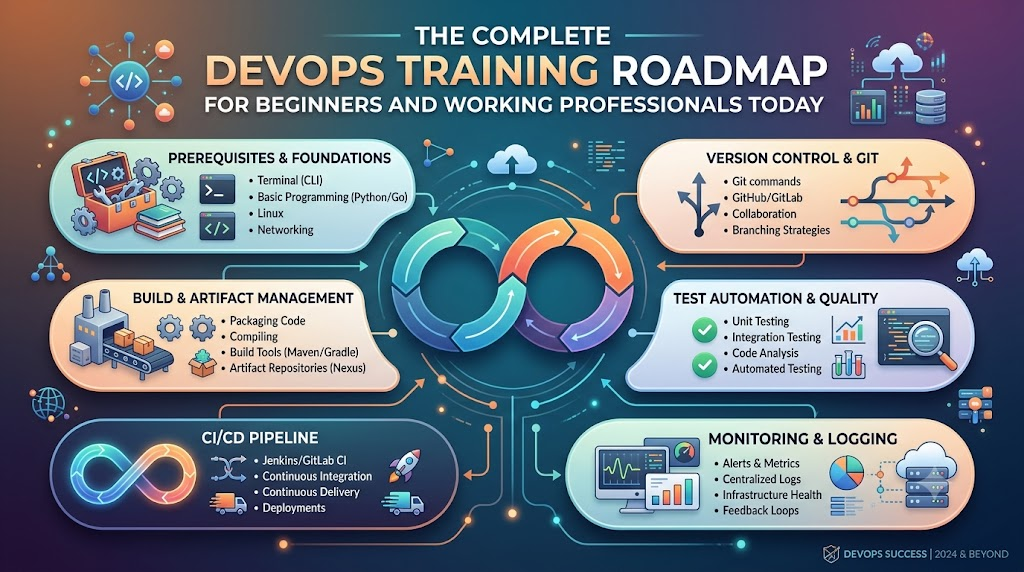
DevOps brings these two teams together so they work as one happy crew. If you want to learn these helpful skills step by step, you can start your journey with DevOpsSchool today. Their friendly classes teach beginners and working pros how to use smart computer tools to build great software together.
What Is DevOps in Simple Words?
DevOps combines two words: development and operations. Development means making new software, like drawing and coding an app. Operations means keeping that app alive and fast so people can use it every day.
When these groups join forces, magical things happen. First, they build software much faster. Next, they fix bugs quickly before players notice them.
Because both sides share the work, nobody blames each other when something breaks. Instead, they fix the problem together like a true sports team.
+------------------------------------------------------------------+
|                    The Friendly DevOps Loop                      |
+------------------------------------------------------------------+
|  Plan the Idea  -->  Write the Code  -->  Test the Build         |
|         ^                                      |                 |
|         |                                      v                 |
|  Learn and Improve  <--  Watch Systems  <--  Ship to Users       |
+------------------------------------------------------------------+
Why Beginners and Working Pros Need a Learning Map
Learning computer tools can feel like walking into a giant candy store with no guide. You might see hundreds of bright tools and wonder where to start.
Therefore, a clear roadmap keeps your learning easy and calm. Beginners learn the strong basics first so they do not get lost.
At the same time, working professionals can skip what they already know. They can jump right into fancy tools that make their daily work life easier.
Beginners build confidence: You learn simple steps one by one without feeling scared or lost.
Coders learn system safety: Programmers discover how to launch their code without breaking servers.
System helpers learn code tricks: Operations staff learn how to write simple scripts to do daily tasks automatically.
Teams deliver faster updates: Everyone understands the big picture so work flows smoothly.
The Main Parts of the Big Software Machine
Think of modern software delivery like a toy factory with a fast assembly line. Every toy must pass through several stations before children play with it.
First, the builders make the toy parts out of plastic blocks. Second, safety helpers check the toy to make sure no small parts fall off.
Finally, a delivery truck takes the toy to the store shelves safely. If any step fails, the whole assembly line stops right away so workers can fix it.
Important Factory Roles
Role Name
Everyday Example
Main Daily Job
Code Builder
The Toy Designer
Writes clean code for new app features.
Test Inspector
The Safety Checker
Runs automatic checks to catch mistakes early.
Release Helper
The Delivery Driver
Pushes good code to user screens safely.
System Guardian
The Watchful Guard
Monitors machines so apps never freeze or crash.
Key Operational Concepts You Must Know
To run healthy software systems, you must understand a few basic ideas. These ideas work like simple kitchen rules that keep cooking clean and safe.
Version Control and Safe Storage
First, you need a safe place to save all your project files. Version control tools work like an unlimited undo button for your homework.
If you make a silly mistake, you can jump back in time with one click. In addition, many team members can work on the same file without overwriting each other.
Furthermore, every change carries a short note explaining what the author fixed. This open history helps everyone understand how the software grew over time.
Continuous Integration and Testing Helpers
Next, robot helpers must test every single code update automatically. Whenever a coder finishes a feature, the robot builds the whole project.
Then, the robot runs hundreds of quick safety checks. If a test fails, the robot alerts the coder right away.
Because of this quick feedback, developers fix mistakes in minutes instead of weeks. This smooth routine keeps bad bugs away from real customers.
Container Boxes for Clean Packing
In the past, programs worked on a developer laptop but failed on big company servers. People wasted whole days asking why things broke.
Today, engineers wrap apps inside neat digital boxes called containers. Each container holds the code, the tools, and the settings inside one shell.
Therefore, the box runs the exact same way on any computer in the world. You pack the toy once, and it plays everywhere without surprises.
Platform Implementation vs. Culture — What’s the Real Difference?
Many companies buy expensive new tools and think their work is finished. However, tools cannot fix teams that refuse to talk to each other.
Feature
Platform Implementation (The Tools)
Culture (The Human Heart)
What It Is
Fast computers, cloud setups, and robot scripts
Trust, teamwork, and kind communication
Main Goal
Doing manual work through smart automation
Helping people share ideas without fear
Big Win
Faster releases and fewer typing mistakes
Happier workers who love solving problems
When Things Go Wrong
Shows a red alert on a monitor screen
Teams gather kindly to learn what happened
Why Good Culture Beats Fancy Tools
You can buy the fastest sports car in the world, but it helps nobody if the driver cannot steer. In the same way, automation tools fail when team members keep secrets from each other.
Therefore, strong teams practice blameless reviews whenever a server goes down. Nobody points fingers or yells at the person who made an error.
Instead, everyone sits down to ask how the system allowed that mistake to happen. Then, they build a better guardrail together so nobody falls into that trap again.
Real-World Use Cases of Modern Operations
Many popular apps that you use every single day rely on these smart methods to run smoothly.
Online Video Games with Huge Crowds
Popular multiplayer games welcome millions of players at the exact same hour. If too many players enter a room, servers might slow down or crash.
Smart monitoring systems notice the crowd right away. They order new cloud servers to wake up within seconds.
When the game ends and players go to bed, the system turns those extra servers off. This quick change saves lots of electricity and money.
Shopping Apps on Big Holiday Sales
Online stores see giant waves of visitors during special holiday gift sales. Shoppers get very upset if the checkout cart stops working during payment.
To prevent sadness, engineers use small deployment steps called canary releases. They show new checkout buttons to only one out of every hundred buyers first.
If those shoppers check out without any trouble, the team sends the update to everyone else. This careful test keeps the whole store safe from nasty surprises.
Hospitals and Doctor Records
Hospitals store important health files that doctors must read without any delays. If a computer goes down, a patient might not get their medicine on time.
Modern operations systems make extra backup copies across three different data centers. If a lightning storm hits one center, the other centers keep working instantly.
As a result, nurses and doctors always see patient files on their screens. Smart setups save real lives by keeping computers healthy and awake.
Common Mistakes in Operations Engineering
Beginners often make simple mistakes when they start their learning journey. You can skip lots of trouble by avoiding these common traps:
Trying to learn every tool at once: Focus on one simple tool first, like basic terminal commands, before touching big systems.
Skipping basic computer rules: Do not jump into cloud clouds before you understand how files and simple networks work.
Writing messy scripts with no notes: Always write clear notes inside your scripts so your teammates understand your steps.
Forgetting about security checks: Never leave passwords or secret keys inside your public project folders.
Working alone like a quiet island: Talk with your teammates every morning so nobody solves the same problem twice.
How to Become an Operations Expert — Career Roadmap
You do not need a fancy degree to become great at modern operations work. You just need to follow simple learning milestones one step at a time.
+--------------------------------------------------------------------+
|                      Step-by-Step Learning Path                    |
+--------------------------------------------------------------------+
|  Step 1: The Computer Base (Linux and Terminal Commands)          |
|  Step 2: Script Magic (Simple Python or Shell Code)                |
|  Step 3: Save Your Work (Git and Safe Repositories)                |
|  Step 4: Box Your Apps (Containers and Docker)                     |
|  Step 5: Cloud and Helpers (Cloud Servers and CI/CD Robots)        |
+--------------------------------------------------------------------+
1. Master the Linux Terminal
First, learn how to talk to a computer using only typed words instead of a mouse. Most servers around the world run on the Linux operating system.
Practice creating folders, moving files, and checking disk space with simple text commands. Once you feel comfortable typing in the terminal, you will feel like a computer wizard.
2. Learn a Helpful Scripting Language
Next, pick a friendly language like Python or Bash to write simple recipe instructions for your computer. You can write small scripts that clean up old files every midnight.
These tiny programs free you from doing boring manual tasks over and over again. As a result, you save time for fun, creative projects.
3. Track Changes with Version Control
Third, practice saving your project steps using distributed tracking tools. Learn how to create a branch, write clean updates, and combine your changes safely.
This skill lets you build projects with people from all across the globe. Everyone sees what you made, and nobody loses any hard work.
4. Package Apps inside Container Boxes
Fourth, learn how to place small web pages and services into clean digital containers. Write simple recipe files that explain how to build the container from scratch.
Once your app sits inside a container, you can run it anywhere without stress. This handy trick makes software testing super fast and fun.
5. Launch Cloud Servers with Code
Finally, discover how to build virtual computers in the cloud by writing simple instruction files. Instead of clicking buttons on a website, you write clear setup rules.
Then, you share those rules with your teammates so everyone has matching servers. Now you are ready to help companies build large, world-class platforms.
FAQ Section
Can I learn these operational skills if I have never written code before?Yes, you certainly can. Many great engineers start with simple terminal commands before they write their very first script.
How much time does it take to learn the core basics?Most learners gain strong, useful skills in about four to six months of regular daily practice.
Do I need a super expensive computer to start practicing?No, any regular laptop will work fine because most practice happens inside free cloud accounts and lightweight terminals.
What is the single most important skill for a beginner?Learning how to ask clear questions and work kindly with your team matters more than any single tool.
Why do companies pay good salaries for these skills?Companies want their websites to run smoothly without ever crashing, and these skills keep their digital businesses safe.
Final Summary
Modern software delivery works best when people join hands and use helpful automation tools together. Learning this friendly way of working helps you build apps that never crash and always stay fast.
Begin your adventure by mastering simple terminal commands and saving your work neatly. Next, practice packaging apps into clean containers and letting robot helpers test your daily updates.
Most importantly, stay curious and treat your teammates with kindness and patience. With regular practice and a clear map, you will grow into an amazing operations hero.
Computational systems now govern worldwide commerce, health networks, and public communication channels. Yet billions of promising people remain completely disconnected from these systems because they lack reliable hardware and practical technical guidance. Consequently, traditional economic hurdles grow steeper, blocking ambitious workers from stepping into well-paying technical careers. Reversing this imbalance requires clear, community-led initiatives that bring practical tools straight to everyday people.
Bridging this global resource gap stands at the core of our shared digital future, and Cotocus Org actively meets this challenge through open educational frameworks. The foundation designs immersive, hands-on learning experiences that teach essential computing skills to underserved populations worldwide. As a direct result, driven learners gain the mastery, problem-solving skills, and self-reliance necessary to build prosperous careers within an automated society.
What Is a Technology Nonprofit Organization?
A Technology Nonprofit Organization channels sophisticated computer systems and technical knowledge directly into societal advancement rather than private shareholder returns. While traditional software companies focus on quarterly financial dividends, public-interest tech groups treat digital networks, software applications, and technical training as fundamental public utilities. Thus, these organizations ensure that economically vulnerable groups enjoy equal access to technological progress.
Furthermore, these organizations connect elite software development hubs with underserved local communities that private vendors routinely overlook. By cultivating direct community partnerships, dedicated technologists convert complex engineering methods into approachable, everyday tools. Consequently, grassroots leaders address deep-seated community challenges through reliable, long-lasting digital systems.
Public-First Objectives: Channeling engineering power into measurable social improvements rather than financial bottom lines.
Democratic Tool Access: Equipping grassroots groups with modern computing tools, ongoing mentorship, and dedicated maker spaces.
Equitable Technical Growth: Supplying robust digital infrastructure straight to civic groups and neighborhood learning spaces.
Why Digital Literacy Matters
Everyday technical literacy functions as an indispensable modern survival skill for anyone seeking personal autonomy and economic stability. When individuals cannot navigate online services securely, they miss vital healthcare resources, banking systems, and educational content. Therefore, focused Digital Literacy Programs establish the practical foundation needed for sustainable economic participation.
Moreover, true computational literacy extends far beyond knowing how to scroll through social media or type a basic document. Learners must understand digital identity protection, critical evaluation of online claims, and safe cloud-based workflows. Consequently, foundational training equips learners with self-reliance, helping them protect personal data while seeking meaningful upward mobility.
Digital banking portals, secure payment gateways, online ledgers
Information Gathering
Printed libraries, static local publications
Dynamic search queries, verified knowledge bases, media evaluation
Career Execution
Manual task processing, physical paperwork
Automated office software, online collaboration, digital identity management
Building Access Through Digital Inclusion
Hardware availability and high-speed network connections remain severely uneven across urban hubs and neglected rural regions. When lower-income households lack dependable broadband or desktop devices, children fall behind academically and adults face severe employment restrictions. Hence, structured Digital Inclusion Programs directly tackle these physical and economic bottlenecks.
In addition to physical equipment distribution, inclusive policies demand adaptive user experiences for individuals living with physical disabilities. Accessibility standards ensure screen readers, multilingual user interfaces, and lightweight applications perform reliably on entry-level mobile hardware. As a result, comprehensive inclusion transforms passive spectators into active, connected global contributors.
Broadband Connectivity: Expanding affordable, high-speed regional internet access to rural community libraries and urban public learning labs.
Hardware Refurbishment: Distributing durable laptops, reliable tablets, and desktop workstations directly to economically disadvantaged households.
Adaptive Design Integration: Delivering assistive software and multilingual operating environments for users experiencing sensory or physical impairments.
Technology Education for Long-Term Opportunity
Short-term seminars spark interest, but sustainable career mobility requires comprehensive technical curricula that scale over time. Through immersive Technology Education Programs, motivated students transition from elementary computer awareness to professional-grade proficiencies. Consequently, participants master modern software architecture, database management, cloud workflows, and modern web application development.
Furthermore, industry expectations evolve constantly, meaning workers must cultivate continuous self-education habits to stay relevant. Practical educational tracks merge conceptual knowledge with project-based team deliverables. Therefore, students graduate with demonstrable portfolios, earning recognized technical credentials that attract reputable corporate employers worldwide.
Artificial intelligence carries enormous potential to streamline operations and resolve complex logistical headaches for resource-constrained organizations. Through targeted AI for Social Impact initiatives, community workers deploy machine learning algorithms to forecast agricultural yields, optimize emergency medical routing, and personalize learning paths for struggling students. Consequently, analytical capabilities once reserved for elite corporations now protect public welfare.
However, deploying artificial intelligence for humanitarian purposes requires deep contextual appreciation of local cultural realities. When engineers collaborate directly with community elders and local social workers, they design tools that solve actual community problems. As a result, predictive technologies produce tangible, community-wide benefits without disrupting established local traditions.
Public Healthcare Diagnostics: Assisting rural healthcare clinics with automated imaging analysis to detect treatable ailments early.
Environmental Preservation: Tracking deforestation patterns, wildlife migration corridors, and localized groundwater consumption using remote sensing data.
Educational Personalization: Adjusting instructional pacing dynamically to support children with diverse cognitive abilities and learning styles.
The Importance of Responsible AI Research
Rapid algorithmic adoption often introduces serious risks, including algorithmic prejudice, systemic bias, and non-transparent automated decisions. Because algorithmic systems learn from past historical records, they frequently replicate historical social biases against marginalized groups. Therefore, rigorous Responsible AI Research must establish comprehensive guardrails before developers deploy automated decision systems.
Furthermore, technical transparency demands explainable architectures rather than impenetrable computational black boxes. Civic institutions must understand precisely how an algorithm calculates risk evaluations or benefit distributions. Consequently, proactive research emphasizes ethical engineering practices, regular independent bias audits, and strict data stewardship protocols.
Algorithmic Fairness Testing: Continuously testing predictive machine learning models across diverse cultural and demographic datasets.
Transparent Decision Logic: Designing explainable neural architectures so non-technical operators can evaluate automated conclusions effectively.
Privacy-First Data Protection: Enforcing stringent data anonymization standards to preserve individual confidentiality and personal autonomy.
Encouraging Youth Innovation
Young minds approach complex societal challenges with creative ambition and refreshing perspectives unburdened by legacy thinking. By funding dynamic Youth Innovation Programs, civic leaders provide aspiring inventors with the fabrication tools, lab equipment, and technical guidance needed to build real solutions. Consequently, young learners convert imaginative thoughts into practical, field-tested functional prototypes.
Moreover, hands-on maker programs cultivate emotional resilience, team collaboration skills, and structured problem-solving mindsets. When teenagers build low-cost water filtration monitors or solar-powered cellular routers, they realize their personal agency. As a result, early hands-on innovation transforms passive learners into proactive civic problem solvers.
Community Problem Identification: Encouraging young innovators to observe and document systemic structural issues within their immediate neighborhoods.
Rapid Hardware Prototyping: Providing access to microcontroller platforms, desktop fabrication tools, and open-source electronics components.
Cross-Disciplinary Team Collaboration: Pairing student developers with peer designers, project leaders, and community organizers.
Mentorship-Driven Iteration: Refining initial project drafts through regular technical evaluations with veteran software engineers and community leaders.
Supporting Nonprofit Digital Transformation
Thousands of vital social enterprises still handle essential client records using fragile paper binders and fragmented manual tracking systems. This operational drag wastes valuable time and limits direct community assistance. Through structured Nonprofit Digital Transformation interventions, experienced technical advisors migrate civic organizations to secure cloud networks, automated workflows, and coordinated constituent databases.
Furthermore, adopting modern infrastructure dramatically enhances operational security, organizational transparency, and measurable mission delivery. When charitable organizations automate their accounting and communications, administrative costs fall sharply. Consequently, these teams dedicate significantly larger portions of their hard-earned budgets directly toward expanding community assistance programs.
Workflow Automation: Eliminating repetitive manual data entry tasks through accessible, integrated productivity software.
Constituent Management: Deploying unified databases to monitor client interactions, community relief requests, and donor support histories.
Corporate Social Impact Partnerships
Achieving massive, measurable societal improvements requires active cooperation between private enterprises and grassroots humanitarian missions. Through balanced Corporate Social Impact Partnerships, innovative corporations contribute capital, enterprise licenses, cloud compute resources, and specialized employee expertise to philanthropic initiatives. Consequently, modern industry powerhouses play an active role in resolving challenging community crises.
At the same time, forward-thinking enterprises discover that sustained community engagement enriches company culture and builds meaningful employee loyalty. When corporate software developers spend working hours coaching underprivileged students, their workplace perspectives deepen. As a result, cross-sector alliances establish self-sustaining ecosystems where technological progress and humanitarian advancement fuel each other.
Sector Contributor
Primary Contribution
Measurable Community Outcome
Enterprise Cloud Providers
Server hosting, infrastructure credits
Reliable application hosting for resource-strapped charitable groups
Software Corporations
Pro bono commercial software licenses
Modern operational efficiency across community learning labs
Hardware Manufacturers
Donated desktop machines and displays
Expanded computer lab seats for low-income neighborhood libraries
Professional Consultancies
Pro bono technical advisory hours
Long-term digital roadmaps and rock-solid enterprise cybersecurity
Technology Volunteer Opportunities
Skilled engineers, product managers, and systems architects often look for meaningful ways to give back using their professional abilities. Engaging with Technology Volunteer Opportunities allows seasoned professionals to dedicate their talents to causes that enrich human lives. Therefore, volunteers build accessible websites, teach coding bootcamps, and audit data pipelines for resource-limited non-profit initiatives.
Additionally, structured volunteer programs create vibrant international communities focused on public-interest technology. Senior engineers collaborate directly with energetic university students, creating rich, bidirectional mentorship channels. Consequently, open-source humanitarian initiatives gain reliable, high-grade development support while volunteers experience immense personal fulfillment.
Pro Bono Software Development: Writing clean, scalable code for community tracking tools, accessibility software, and local relief directories.
Technical Classroom Instruction: Teaching introductory computer programming, web design, and database administration to non-traditional learners.
Infrastructure and Security Auditing: Hardening community nonprofit network perimeters against unauthorized intrusion and malware threats.
Career and Portfolio Mentorship: Reviewing student coding portfolios, running mock technical interviews, and offering targeted industry guidance.
How Technology Can Create Sustainable Community Impact
Deploying modern technology delivers true community value only when combined with deep local ownership and ongoing operational maintenance. Installing computers without local teacher training produces abandoned, dusty hardware within months. Therefore, sustainable community impact requires cultivating resident technical expertise alongside any physical equipment installation.
Furthermore, communities must maintain total control over their data, their software assets, and their shared computational infrastructure. When neighborhoods learn how to maintain their own mesh networks or update their civic tools independently, outside reliance disappears. As a result, accessible technology blossoms into an enduring foundation for local economic independence and communal resilience.
Assessing Grassroots Needs: Consulting local residents directly before deciding on specific hardware or software implementations.
Cultivating Local Technicians: Training community members to troubleshoot, repair, and maintain technical installations over time.
Measuring Social Outcomes: Tracking educational advancement, job placement rates, and community health access over extended periods.
Cotocus and the Role of Accessible Innovation
Democratizing access to breakthrough innovations remains central to modern civil rights and social justice. Because technical literacy unlocks superior healthcare information, global remote work, and accessible continuing education, equal access must become a baseline human expectation. The team at Cotocus actively dismantles systemic economic roadblocks by democratizing practical computational skills for everyone.
Moreover, combining inclusive educational tracks with ethical, human-first artificial intelligence creates transformative pathways for underserved communities worldwide. When everyday citizens wield modern computational tools confidently, they address localized challenges directly with custom digital solutions. Therefore, accessible innovation provides the necessary fuel to build a fairer, more compassionate digital society.
Democratized Access: Removing prohibitive financial costs from advanced digital skills education and industry certifications.
Ethical Innovation Guidance: Championing human dignity, user privacy, and algorithmic transparency across all technical ventures.
Empowered Grassroots Leaders: Providing local community champions with the modern systems needed to resolve neighbourhood challenges directly.
Frequently Asked Questions About Cotocus
What primary purpose defines the Cotocus mission?
The organization delivers accessible digital education, practical technology training, and modern computing tools to communities across the globe.
How can students participate in the digital literacy tracks?
Participants attend structured workshops, virtual interactive cohorts, and local partner centers that teach computing fundamentals step by step.
Does the team promote responsible artificial intelligence standards?
Yes, the foundation actively leads responsible artificial intelligence research, emphasizing algorithmic transparency, personal privacy, and systemic fairness.
Who can enroll in youth innovation workshops?
Ambitious teenagers, young inventors, and student builders eager to solve community dilemmas using hardware and software tools can apply.
How can charitable teams access digital transformation assistance?
Eligible community organizations receive tailored technology guidance, cloud migration assistance, and automated software workflows to enhance everyday operations.
Can corporate partners initiate social impact collaborations?
Yes, commercial companies support initiatives by supplying corporate grants, computing power, software access, and skilled employee volunteer hours.
What practical experience must volunteers possess?
The organization welcomes software engineers, systems teachers, cybersecurity experts, user interface designers, and enthusiastic learners eager to assist others.
Can novices without prior coding experience participate in these classes?
All introductory training modules use direct, jargon-free explanations, ensuring that newcomers establish technical proficiency with total confidence.
Does the foundation provide actual computer hardware?
Through dedicated inclusion initiatives, the team works with regional partners to distribute refurbished computers and build neighborhood computing labs.
How does accessible technology promote long-term community independence?
Equipping residents to design, maintain, and adapt their own computational tools eliminates external reliance and builds durable local economies.
Final Thoughts
Empowering under-resourced populations demands steady determination, collaborative teamwork, and genuine respect for grassroots communities. When software creators, civic institutions, and enthusiastic volunteers unite around accessible education, systemic digital barriers crumble permanently. Therefore, expanding technology education and responsible artificial intelligence research helps ensure that future innovations uplift every corner of human society. By prioritizing public benefit over short-term profits, compassionate technologists lay the essential groundwork for widespread, enduring global progress.