Tag: #LearnDevOps

  • DevOps Certification Skills Every Learner Should Build for Career Success

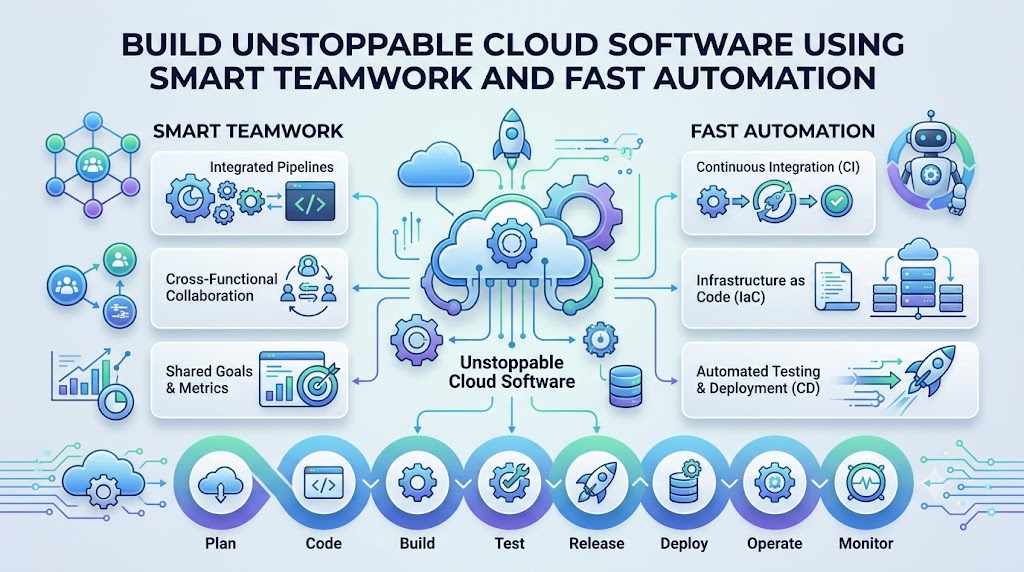
    Computers run our world today, from video games to bank apps. But building computer software takes teamwork. People who write code must work well with people who run the servers. You can learn these teamwork tricks through DevOpsSchool to gain real skills fast.

    Good training helps you learn how to fix bugs quickly. Also, you learn how to send updates to users without crashing the app.

    When you study these tools, you help teams work as one unit. Next, we will look at how this teamwork actually works.

    What Is DevOps and How Does It Work?

    DevOps connects two different groups of tech workers. First, developers write the code for apps. Second, operations workers keep the computers and networks running.

    In the past, these two teams worked in separate rooms. They often blamed each other when things broke down.

    Now, they use shared tools to build and fix apps together. So, apps launch faster, and fewer errors happen.

    Why Teams Need Fast Software Delivery

    Today, users want new app features right away. If a game crashes, players want an instant fix.

    DevOps uses smart robots and scripts to test code automatically. Because of this, teams can launch updates every single day.

    How Automated Pipelines Work

    An automated pipeline works like a factory belt for software. First, a coder writes new instructions and saves them.

    Then, the system checks the code for mistakes right away. If the code passes every test, the pipeline sends it to users.

    Key Operational Concepts You Must Know

    To run modern software, you must understand a few basic ideas. These ideas keep big computer systems safe and fast.

    Version Control and Saving Your Work

    Version control works just like a magic save button for your code. It keeps track of every single change you make.

    If you make a big mistake, you do not need to panic. You simply click a button to bring back the older, working code.

    +-------------------------------------------------------------+
    |                The Version Control Timeline                 |
    +-------------------------------------------------------------+
    | [Save 1: First Draft] -> [Save 2: New Feature] -> [Save 3]  |
    |                                                     |       |
    |    Roll back here if code breaks! <-----------------+       |
    +-------------------------------------------------------------+
    

    Automated Testing for Fewer Bugs

    Computers can test code much faster than humans can. Automated testing runs hundreds of checks in just a few seconds.

    So, developers find spelling errors and math bugs immediately. This habit keeps broken code away from real customers.

    Cloud Computing and Virtual Servers

    The cloud means renting computers over the internet instead of buying them. Big companies own huge rooms full of servers.

    You can rent five new servers with one click. Then, you can turn them off when you finish your work.

    Platform Implementation vs. Culture — What’s the Real Difference?

    Many people buy expensive software tools and think they are done. But tools are only one half of the puzzle.

    You also need a healthy team mindset to win. Let us compare the tools against the culture.

    PartPlatform Implementation (Tools)Team Culture (Mindset)
    Main GoalSet up robots, scripts, and cloud serversBuild trust, share goals, and help peers
    Daily TasksWrite code templates and watch dashboardsTalk openly, share notes, and solve issues
    How to MeasureCount how many times you update an appCheck how happy and calm the team feels
    When Things BreakRun auto-repair scripts to restart serversFind why it broke without blaming people

    Why Good Culture Matters More

    Tools cannot fix an angry or fearful team. If workers fear getting blamed, they hide their mistakes.

    A great culture encourages people to speak up early. Because of this trust, teams solve hard problems much faster.

    How Tools Support the Team

    Smart tools free up your time by doing boring chores. For example, robots can copy files across ten servers at night.

    So, engineers get more free time to invent fun features. Good tools make happy teams even more productive.

    Real-World Use Cases of Modern Operations

    Every company you know uses these methods behind the scenes. Here are three real examples of how they work.

    Online Video Streaming Services

    When millions of kids watch cartoons at night, servers get busy. Streaming apps use smart scripts to spot traffic jumps.

    The system quickly turns on extra servers to handle the crowd. Therefore, your cartoon never stops to buffer.

    Shopping Apps on Big Sale Days

    Shopping websites get millions of shoppers during big holiday sales. If a server stops, the shop loses money every minute.

    Modern operations systems test the store’s code before the sale begins. So, shoppers can buy gifts without seeing error screens.

    Mobile Bank Apps

    Bank apps must protect your money from bad actors. These teams use automated security scanners on every single line of code.

    The system blocks any code that has safety holes. Because of this, your account stays safe every day.

    Common Mistakes in Operations Engineering

    Beginners often make simple mistakes when they start out. Knowing these traps helps you avoid them early.

    • Skipping Backups: Forgetting to save safe copies of your data causes huge headaches later.
    • Doing Tasks by Hand: Typing manual setup commands over and over wastes time and invites typos.
    • Ignoring Computer Alerts: Turning off loud alarms leads to missed warnings when disks fill up.
    • Blaming Coworkers: Pointing fingers when an app breaks stops the team from fixing the real problem.
    • Skipping Security Checks: Leaving open doors in your code invites hackers into your private systems.

    How to Become an Operations Expert — Career Roadmap

    You can follow a clear, step-by-step path to master these skills. Take your time and practice each step on your computer.

    +-------------------------------------------------------------+
    |                   Your 5-Step Learning Path                 |
    +-------------------------------------------------------------+
    | Step 1: Learn Linux and type basic terminal commands.       |
    | Step 2: Practice saving code with Git version control.      |
    | Step 3: Put small web apps into Docker containers.          |
    | Step 4: Rent cloud servers and set them up with code.       |
    | Step 5: Build automated pipelines to test your work.        |
    +-------------------------------------------------------------+
    

    Steps to Build Real Skills

    1. Master the Command Line: Learn how to move files and read logs using text commands in Linux.
    2. Track Your Code: Practice saving project snapshots so you never lose your homework or code.
    3. Use Containers: Box up your app with all its files so it runs anywhere without errors.
    4. Learn Cloud Systems: Create virtual hard drives and networks using internet cloud platforms.
    5. Set Up Pipelines: Connect your code box to an automated test engine that checks your work.

    FAQ Section

    1. What is DevOps in simple words?It is a way for software builders and computer runners to work as one happy team.
    2. Do I need to be a math genius to learn this?No, you only need curiosity, patience, and a desire to solve fun computer puzzles.
    3. What is a software container?A container is like a digital lunchbox that holds an app and everything it needs to run.
    4. Why do teams use the cloud?Teams use the cloud because renting internet servers is faster and cheaper than buying heavy physical boxes.
    5. How long does it take to learn these basic skills?Most new learners can pick up the core basics in about six months of steady daily practice.

    Final Summary

    Learning modern operations skills opens up great opportunities in technology. You learn how to build apps, fix errors, and run global servers with ease.

    Always remember that good teamwork matters just as much as smart code. Treat your teammates with respect, automate boring chores, and keep practicing your skills every day.
  • How Great Computer Crews Join Hands to Build Wonder Apps

    Introduction

    Tap a tablet screen and watch magic unfold right in front of you. Music streams instantly to your tiny earphones. Bright games load fresh, sunny worlds without a single pause.

    Lots of quiet machinery hums deep in the background to bring you that joy. People write code on laptops to build those games. Other workers flip switches on tall server racks. Another group counts points and saves high scores.

    Years ago, these workers sat in dark cubicles and never spoke a word. When a game crashed, they pointed fingers and argued angrily. Now, smart crews work as one united family to make software work like a charm.

    What is XOps in Plain Words

    Curious folks always pause to ask, What is XOps? Let us explain this idea using tiny words. The letter X stands for any computer job inside a company. The short word Ops means keeping machines running well.

    So, this idea pulls every worker into one circle. Programmers chat with server helpers. Robot trainers join hands with data keepers. Everyone shares ideas, files, and tools.

    Think of an orchestra playing a sweet song. The violin plays high notes, the drum keeps the beat, and the flute adds color. When they play together, they make beautiful music for the whole crowd.

    Getting Ahead with Step-by-Step Lessons

    Building big apps takes practice, just like baking a cake. If you open a helpful XOps Tutorial, you learn the craft step by step. You find out how to move code safely to the cloud.

    Next, you set up smart check tools to test your work. These helper bots scan your code while you type. They catch mistakes early so your friends never see a glitch.

    Taking a full XOps Course leads you even further. You learn how to run websites that welcome millions of visitors. You also learn how to build apps that never fall over when crowds rush in.

    Meeting the Four Main Specialists

    Four special helpers make this teamwork click every single day. Each person uses a neat talent to guide the team forward:

    • The App Launcher: Bridges coders and cloud hosts to ship software fast.
    • The Fact Washer: Cleans messy piles of numbers so managers make great choices.
    • The Robot Guide: Coaches smart computer brains to spot faces, voices, and pictures.
    • The Night Watchman: Employs clever AI scouts to spot broken wires before machines freeze.

    How the Four Roles Compare

    Specialist NameMain DutyEveryday ChoreThe Big Prize
    DevOpsShip softwareBuild test botsSpeedy app releases
    DataOpsWash numbersFilter messy listsSpotless records
    MLOpsCoach robot brainsFeed fresh facts to botsBright digital minds
    AIOpsWatch serversCatch sudden glitchesZero server freezes

    Shipping Code Fast with DevOps

    Coders love to write fun software, but they need strong machines to run it. In the past, coders finished an app and dumped it on the server desk. The machines broke often, and workers yelled all day.

    Taking active DevOps Training removes that wall once and for all. Programmers and cloud builders work side by side. They use clever tools like Kubernetes and Terraform to turn on hundreds of computers in seconds.

    A busy shoe shop had trouble posting fresh sales. Their workers took two weeks to add one tiny button to their website. After adopting shared delivery pipelines, they pushed updates in eight minutes. Customers bought shoes faster, and the store cheered.

    Coaching Smart Models with MLOps

    Machine learning lets computers solve tricky puzzles on their own. Your phone uses it to spot your dog in a photo album. Even so, these clever brains need regular practice to stay sharp.

    Through structured MLOps Training, engineers learn how to guide these digital minds. They feed clear pictures to the model, test its guesses, and ship it to phones. They also check the model weekly so it never forgets its tricks.

    A team built a voice helper that kept mishearing children. The crew set up auto-checkers to feed fresh sound clips to the bot weekly. Thanks to that fix, the bot understood kids clearly. Smart systems need regular practice to stay helpful.

    Washing Dirty Numbers with DataOps

    Online stores collect giant piles of facts every single minute. They track what you buy, where you click, and what you search. But raw lists look like a pile of muddy shoes.

    High-quality DataOps Training shows workers how to build clean data roads. Think of a bright water filter on your sink. Muddy water pours in, the filter traps the dirt, and sweet water fills your cup.

    When records stay clean, managers make wise choices for their stores. But if dirty numbers slip through, owners order the wrong goods. Clean data pipelines keep teams safe from costly mistakes.

    Guarding Web Health Around the Clock with AIOps

    Global websites use thousands of computer boxes across the world. No human being can watch thousands of blinking screens all night. Eyes get tired, workers need lunch, and people must sleep.

    Joining AIOps Training solves this tough puzzle using smart software bots. Clever AI scouts watch the machines every second. They spot tiny warning signs long before a computer blows a fuse.

    Real studies show that smart helpers cut repair times by more than half. The bot fixes small errors on its own or calls an engineer for big trouble. Because of this helper, your favorite games stay online all weekend.

    Exploring the Modern Tool Chest

    Top mechanics never fix fast cars using only their bare fingers. They reach for shiny wrenches, jacks, and screwdrivers. Tech workers also pick up special digital tools to build modern software.

    Learning popular XOps Tools makes your daily duties smooth and breezy. Some tools wrap your programs inside neat boxes. Other tools build giant cloud systems with just a few lines of text.

    Here are four handy tools engineers use every day:

    • Docker: Wraps programs inside neat capsules so they run on any computer.
    • Kubernetes: Guides thousands of app capsules across the web safely.
    • Terraform: Creates giant cloud networks using short text files.
    • Prometheus: Listens to server pulses and rings a bell if trouble strikes.

    Five Easy Steps to Level Up Your Team

    Starting out in modern tech operations sounds huge at first glance. But you can start small and take one cheerful step at a time. Share this simple action plan with your group:

    1. Meet Briefly: Talk with your teammates for five quick minutes every morning.
    2. Save Files Together: Drop your project notes into one shared digital locker.
    3. Run Auto-Checkers: Let helper bots scan your work for bugs before you share it.
    4. Watch System Pulses: Turn on simple dashboards that glow green when machines run well.
    5. Learn Together: Fix bugs side by side without blaming your friends.

    Boosting Your Skills at XOpsSchool

    Tech knowledge grows fast, so workers must practice often. Finding clean lessons in one friendly spot saves lots of time. That is why ambitious learners search for great XOps Training to grow their careers.

    XOpsSchool.com provides crystal-clear lessons on automation, cloud engineering, and modern operations. Students discover how DevOps, DataOps, and AIOps snap together like building blocks. You build hands-on projects that mirror actual workplace challenges.

    Finishing an XOps Certification lets you show off your practical talents to employers everywhere. This special badge proves you can ship apps, polish data, and keep servers safe. It gives you the confidence to chase great tech jobs.

    Exciting Jobs in Modern Tech

    Teaming up across operations creates plenty of neat jobs for people who love computers. Choose the path that matches your favorite interests:

    • Platform Builder: Crafts simple internal dashboards so other coders build apps faster.
    • Reliability Guard: Keeps massive websites alive even when millions of users log on at once.
    • Data Highway Engineer: Lays down smooth digital roads so numbers travel without crashing.
    • Cloud Safety Officer: Locks digital doors so sneaky intruders cannot steal private records.

    Wisdom from an Expert Builder

    Senior engineers always remind us that kindness and teamwork beat fancy code. Maya Lin, a lead system architect, shares this helpful rule: “Computers freeze when workers hide inside separate rooms. When we share our tools and cheer each other on, our software runs smoothly and our jobs feel fun.”

    When coders and machine keepers look at the same dashboards, great things happen. They stop arguing about who created a bug. Instead, they fix the problem together and celebrate their win with high-fives.

    Frequently Asked Questions

    Which small step should a beginner take first? Begin by learning basic code and simple command lines. Next, practice placing small web apps into Docker containers. Once you feel comfortable, share your project files with others on Git.

    Must a person master hard math to work here? No, you do not need advanced math to do this job well. You only need curiosity, steady logic, and patience. Solving system puzzles feels a lot like piecing together colorful jigsaw puzzles.

    Why do modern server keepers invite AI to join their teams? AI acts like an energetic teammate who never takes a nap. It scans system logs instantly, catches tiny hiccups, and prevents server crashes before players notice any lag.

    Should one person try to learn every single skill at once? Pick one area you love first, such as cloud machines or data pipelines. Once you master that craft, pick up bits of the other areas so you can chat easily with your friends.

    Stepping Out into the Tech World

    Clever teamwork makes our digital universe spin happily every day. When talented people join hands with smart automation, teams ship awesome apps faster than ever before.

    You can clean numbers, coach robot minds, or guard cloud servers with pride. Pick up your tools, build neat things, and enjoy your exciting adventure in technology!

  • The Complete DevOps Training Roadmap for Beginners and Working Professionals Today

    Imagine two groups of kids working together to make a video game. One team writes the fun game story. The other team makes sure the game runs smoothly on your tablet.

    In the past, these two teams sat in different rooms and rarely spoke. The story team threw their work over a fence to the computer team. As a result, games crashed, work stopped, and everyone felt mad.

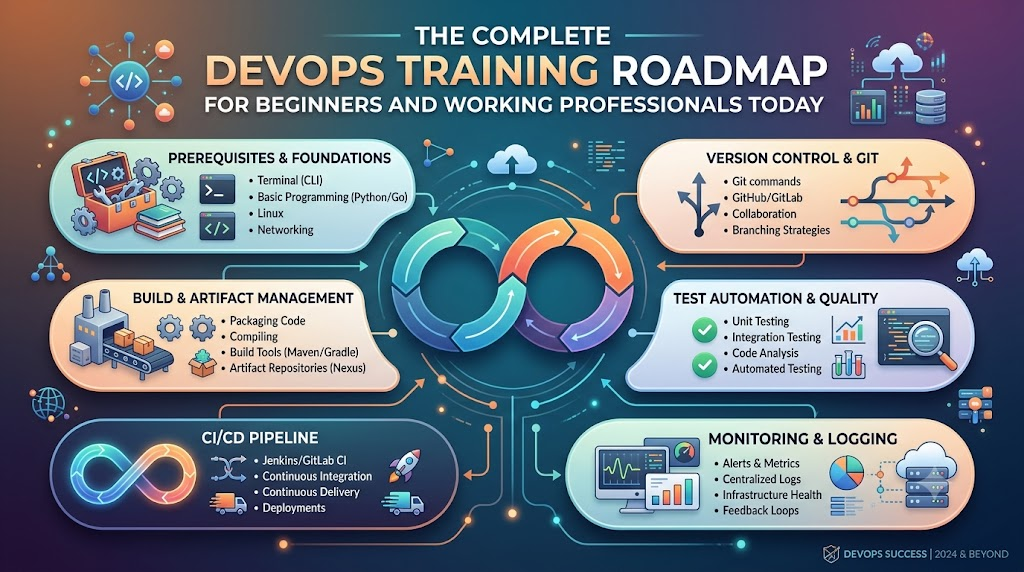
    DevOps brings these two teams together so they work as one happy crew. If you want to learn these helpful skills step by step, you can start your journey with DevOpsSchool today. Their friendly classes teach beginners and working pros how to use smart computer tools to build great software together.

    What Is DevOps in Simple Words?

    DevOps combines two words: development and operations. Development means making new software, like drawing and coding an app. Operations means keeping that app alive and fast so people can use it every day.

    When these groups join forces, magical things happen. First, they build software much faster. Next, they fix bugs quickly before players notice them.

    Because both sides share the work, nobody blames each other when something breaks. Instead, they fix the problem together like a true sports team.

    +------------------------------------------------------------------+
    |                    The Friendly DevOps Loop                      |
    +------------------------------------------------------------------+
    |  Plan the Idea  -->  Write the Code  -->  Test the Build         |
    |         ^                                      |                 |
    |         |                                      v                 |
    |  Learn and Improve  <--  Watch Systems  <--  Ship to Users       |
    +------------------------------------------------------------------+
    

    Why Beginners and Working Pros Need a Learning Map

    Learning computer tools can feel like walking into a giant candy store with no guide. You might see hundreds of bright tools and wonder where to start.

    Therefore, a clear roadmap keeps your learning easy and calm. Beginners learn the strong basics first so they do not get lost.

    At the same time, working professionals can skip what they already know. They can jump right into fancy tools that make their daily work life easier.

    • Beginners build confidence: You learn simple steps one by one without feeling scared or lost.
    • Coders learn system safety: Programmers discover how to launch their code without breaking servers.
    • System helpers learn code tricks: Operations staff learn how to write simple scripts to do daily tasks automatically.
    • Teams deliver faster updates: Everyone understands the big picture so work flows smoothly.

    The Main Parts of the Big Software Machine

    Think of modern software delivery like a toy factory with a fast assembly line. Every toy must pass through several stations before children play with it.

    First, the builders make the toy parts out of plastic blocks. Second, safety helpers check the toy to make sure no small parts fall off.

    Finally, a delivery truck takes the toy to the store shelves safely. If any step fails, the whole assembly line stops right away so workers can fix it.

    Important Factory Roles

    Role NameEveryday ExampleMain Daily Job
    Code BuilderThe Toy DesignerWrites clean code for new app features.
    Test InspectorThe Safety CheckerRuns automatic checks to catch mistakes early.
    Release HelperThe Delivery DriverPushes good code to user screens safely.
    System GuardianThe Watchful GuardMonitors machines so apps never freeze or crash.

    Key Operational Concepts You Must Know

    To run healthy software systems, you must understand a few basic ideas. These ideas work like simple kitchen rules that keep cooking clean and safe.

    Version Control and Safe Storage

    First, you need a safe place to save all your project files. Version control tools work like an unlimited undo button for your homework.

    If you make a silly mistake, you can jump back in time with one click. In addition, many team members can work on the same file without overwriting each other.

    Furthermore, every change carries a short note explaining what the author fixed. This open history helps everyone understand how the software grew over time.

    Continuous Integration and Testing Helpers

    Next, robot helpers must test every single code update automatically. Whenever a coder finishes a feature, the robot builds the whole project.

    Then, the robot runs hundreds of quick safety checks. If a test fails, the robot alerts the coder right away.

    Because of this quick feedback, developers fix mistakes in minutes instead of weeks. This smooth routine keeps bad bugs away from real customers.

    Container Boxes for Clean Packing

    In the past, programs worked on a developer laptop but failed on big company servers. People wasted whole days asking why things broke.

    Today, engineers wrap apps inside neat digital boxes called containers. Each container holds the code, the tools, and the settings inside one shell.

    Therefore, the box runs the exact same way on any computer in the world. You pack the toy once, and it plays everywhere without surprises.

    Platform Implementation vs. Culture — What’s the Real Difference?

    Many companies buy expensive new tools and think their work is finished. However, tools cannot fix teams that refuse to talk to each other.

    FeaturePlatform Implementation (The Tools)Culture (The Human Heart)
    What It IsFast computers, cloud setups, and robot scriptsTrust, teamwork, and kind communication
    Main GoalDoing manual work through smart automationHelping people share ideas without fear
    Big WinFaster releases and fewer typing mistakesHappier workers who love solving problems
    When Things Go WrongShows a red alert on a monitor screenTeams gather kindly to learn what happened

    Why Good Culture Beats Fancy Tools

    You can buy the fastest sports car in the world, but it helps nobody if the driver cannot steer. In the same way, automation tools fail when team members keep secrets from each other.

    Therefore, strong teams practice blameless reviews whenever a server goes down. Nobody points fingers or yells at the person who made an error.

    Instead, everyone sits down to ask how the system allowed that mistake to happen. Then, they build a better guardrail together so nobody falls into that trap again.

    Real-World Use Cases of Modern Operations

    Many popular apps that you use every single day rely on these smart methods to run smoothly.

    Online Video Games with Huge Crowds

    Popular multiplayer games welcome millions of players at the exact same hour. If too many players enter a room, servers might slow down or crash.

    Smart monitoring systems notice the crowd right away. They order new cloud servers to wake up within seconds.

    When the game ends and players go to bed, the system turns those extra servers off. This quick change saves lots of electricity and money.

    Shopping Apps on Big Holiday Sales

    Online stores see giant waves of visitors during special holiday gift sales. Shoppers get very upset if the checkout cart stops working during payment.

    To prevent sadness, engineers use small deployment steps called canary releases. They show new checkout buttons to only one out of every hundred buyers first.

    If those shoppers check out without any trouble, the team sends the update to everyone else. This careful test keeps the whole store safe from nasty surprises.

    Hospitals and Doctor Records

    Hospitals store important health files that doctors must read without any delays. If a computer goes down, a patient might not get their medicine on time.

    Modern operations systems make extra backup copies across three different data centers. If a lightning storm hits one center, the other centers keep working instantly.

    As a result, nurses and doctors always see patient files on their screens. Smart setups save real lives by keeping computers healthy and awake.

    Common Mistakes in Operations Engineering

    Beginners often make simple mistakes when they start their learning journey. You can skip lots of trouble by avoiding these common traps:

    • Trying to learn every tool at once: Focus on one simple tool first, like basic terminal commands, before touching big systems.
    • Skipping basic computer rules: Do not jump into cloud clouds before you understand how files and simple networks work.
    • Writing messy scripts with no notes: Always write clear notes inside your scripts so your teammates understand your steps.
    • Forgetting about security checks: Never leave passwords or secret keys inside your public project folders.
    • Working alone like a quiet island: Talk with your teammates every morning so nobody solves the same problem twice.

    How to Become an Operations Expert — Career Roadmap

    You do not need a fancy degree to become great at modern operations work. You just need to follow simple learning milestones one step at a time.

    +--------------------------------------------------------------------+
    |                      Step-by-Step Learning Path                    |
    +--------------------------------------------------------------------+
    |  Step 1: The Computer Base (Linux and Terminal Commands)          |
    |  Step 2: Script Magic (Simple Python or Shell Code)                |
    |  Step 3: Save Your Work (Git and Safe Repositories)                |
    |  Step 4: Box Your Apps (Containers and Docker)                     |
    |  Step 5: Cloud and Helpers (Cloud Servers and CI/CD Robots)        |
    +--------------------------------------------------------------------+
    

    1. Master the Linux Terminal

    First, learn how to talk to a computer using only typed words instead of a mouse. Most servers around the world run on the Linux operating system.

    Practice creating folders, moving files, and checking disk space with simple text commands. Once you feel comfortable typing in the terminal, you will feel like a computer wizard.

    2. Learn a Helpful Scripting Language

    Next, pick a friendly language like Python or Bash to write simple recipe instructions for your computer. You can write small scripts that clean up old files every midnight.

    These tiny programs free you from doing boring manual tasks over and over again. As a result, you save time for fun, creative projects.

    3. Track Changes with Version Control

    Third, practice saving your project steps using distributed tracking tools. Learn how to create a branch, write clean updates, and combine your changes safely.

    This skill lets you build projects with people from all across the globe. Everyone sees what you made, and nobody loses any hard work.

    4. Package Apps inside Container Boxes

    Fourth, learn how to place small web pages and services into clean digital containers. Write simple recipe files that explain how to build the container from scratch.

    Once your app sits inside a container, you can run it anywhere without stress. This handy trick makes software testing super fast and fun.

    5. Launch Cloud Servers with Code

    Finally, discover how to build virtual computers in the cloud by writing simple instruction files. Instead of clicking buttons on a website, you write clear setup rules.

    Then, you share those rules with your teammates so everyone has matching servers. Now you are ready to help companies build large, world-class platforms.

    FAQ Section

    1. Can I learn these operational skills if I have never written code before?Yes, you certainly can. Many great engineers start with simple terminal commands before they write their very first script.
    2. How much time does it take to learn the core basics?Most learners gain strong, useful skills in about four to six months of regular daily practice.
    3. Do I need a super expensive computer to start practicing?No, any regular laptop will work fine because most practice happens inside free cloud accounts and lightweight terminals.
    4. What is the single most important skill for a beginner?Learning how to ask clear questions and work kindly with your team matters more than any single tool.
    5. Why do companies pay good salaries for these skills?Companies want their websites to run smoothly without ever crashing, and these skills keep their digital businesses safe.

    Final Summary

    Modern software delivery works best when people join hands and use helpful automation tools together. Learning this friendly way of working helps you build apps that never crash and always stay fast.

    Begin your adventure by mastering simple terminal commands and saving your work neatly. Next, practice packaging apps into clean containers and letting robot helpers test your daily updates.

    Most importantly, stay curious and treat your teammates with kindness and patience. With regular practice and a clear map, you will grow into an amazing operations hero.