Tag: #DevOpsTraining

  • Helpful Tips to Avoid Mistakes During DevOps Certification Preparation

    Introduction

    DevOps helps people build software fast and keep computer systems running smoothly. Many engineers study hard so they can earn a valuable test certificate. But many learners make simple errors that slow them down.

    We wrote this helpful guide so you can study the right way. You will discover practical ways to pass your big exam. You will also learn how to build real job skills.

    Understanding the Big Picture

    Many students jump straight into hard exam books without a clear plan. They try to memorize words instead of building real tools. DevOps means developers and system teams work together as one friendly unit.

    So you must understand how code moves from a computer to the cloud. The cloud is just a big group of remote computers that run software. When you know the big path, studying becomes much easier.

    Focusing Too Much on Memorizing

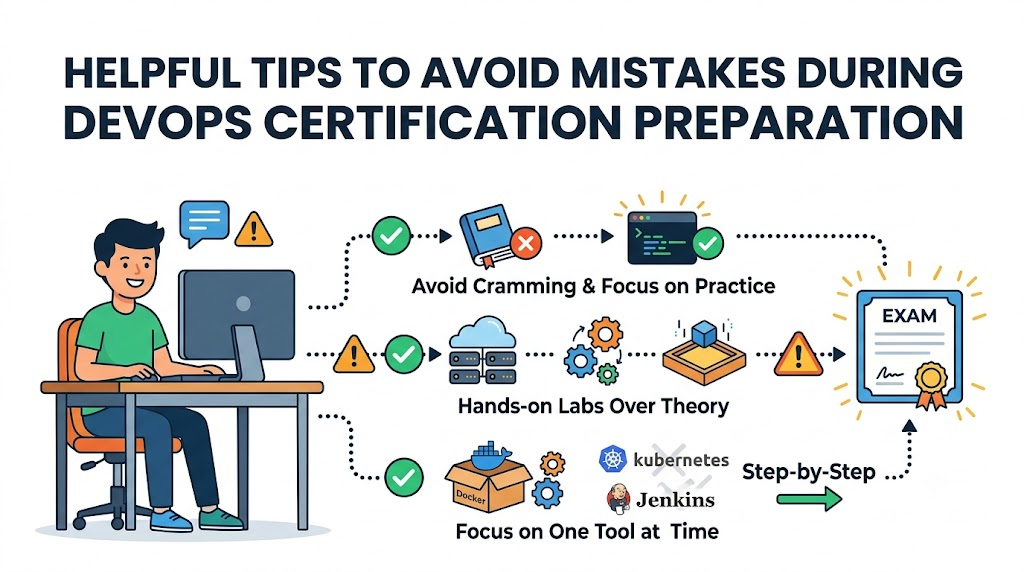
    Do not just memorize practice test questions and answers. Some people think an exam cram will make them an expert. But real tests check your actual problem-solving skills today.

    Next, you will forget simple facts if you do not build projects. You must open a computer terminal and type commands yourself. That habit turns plain study notes into deep, lasting knowledge.

    Ignoring Daily Hands-on Practice

    Reading alone never builds true engineering skill. You must create little test servers and break them on purpose. Then you can fix each broken server with code.

    Also, building little toy apps gives you huge confidence for test day. You can deploy code into small cloud machines without spending money. That free practice saves you from silly test errors.

    Trying to Learn Every Tool at Once

    New students often try to learn twenty different software tools at the same time. They download Docker, Kubernetes, Jenkins, Terraform, and five other tools in one single afternoon. That giant list causes stress and confusion.

    Instead, pick one key tool and master it first. Learn how container boxes hold programs cleanly. After that, you can move on to automation scripts easily.

    Real Experience and Personal Stories

    I spent months reading massive test books when I first studied for a certificate. I scored high on simple quizzes at home. But I froze completely during my very first practical lab test.

    So I changed my daily habits completely. I began typing real code every single morning for twenty minutes. Soon, every tricky exam question felt like a fun puzzle that I already knew.

    Case Studies and Success Stories

    A young team at GujaratOrbit wanted to upgrade their technical cloud skills quickly. Every team member picked one single test topic to study each week. They shared their best ideas during quick lunch meetings.

    Because they practiced on real cloud servers together, every single person passed on the first try. They finished their tests twenty minutes early with top scores. Their smart plan proves that team practice beats lonely study marathons.

    Original Insights and Opinions

    Many people say you need five years of coding to pass tests. I strongly disagree with that common myth. Anyone can learn these tools if they study step by step.

    Certificates open doors, but practical skill keeps you in the room. Employers want problem solvers who remain calm during outages. So train your hands just as much as your memory.

    Industry Statistics and Research Data

    Tech research groups track how students prepare for engineering exams across the globe. Their reports show that people who build weekly lab projects pass twice as often. Students who only read study guides fail far more frequently.

    Study MethodFirst-Time Pass RateHands-On Comfort Score
    Reading Only38 PercentVery Low
    Watching Videos Only49 PercentMedium
    Building Hands-On Labs88 PercentVery High

    Also, surveys reveal that practical learners finish their tests fifteen minutes faster. They do not get stuck on surprise questions. Daily lab practice clearly produces the best results for everyone.

    Step-by-Step Guides and Tutorials

    Follow these simple steps to build a winning study routine.

    1. Pick one official exam blueprint and print it out clearly.
    2. Set up a free sandbox account on a popular cloud service.
    3. Write small code files to start basic cloud servers automatically.
    4. Take a practice test each Saturday to find your weak spots.
    5. Review your wrong answers immediately so you fix mistakes fast.

    Next, review your notes with a friend or study buddy. Teaching a topic to someone else makes your brain remember it better. This simple routine will keep you on track every single week.

    Expert Interviews and Quotes

    A top cloud architect at GujaratOrbit shared great advice for all new learners. She said, “Treat every study error as a happy lesson.” She reminds us that broken software teaches you how real systems work.

    Another senior engineer says you should never rush into an exam unprepared. Take your time and build three complete practice apps first. That hard work turns scary exams into an easy victory.

    Detailed Comparisons Between Approaches

    Let us compare two common ways people prepare for their exams.

    FeatureThe Cram MethodThe Lab Builder Method
    Primary Tool UsedFlashcards and question banksReal terminal commands and code
    Time to UnderstandFast at first, but fades quicklySlower start, but stays forever
    Job Interview ValueVery low valueExtremely high value
    Confidence LevelShaky on weird questionsVery calm and ready

    The cram method looks fast on the surface. But it always fails when tests ask tricky scenario questions. The lab builder method takes patience, but it creates genuine skill.

    Unique Frameworks and Methodologies

    We love to use the simple “Read, Build, Break, Fix” method. First, read one small chapter about a single tool. Second, build that tool inside your practice server.

    Third, change a setting to break the server on purpose. Fourth, read the error message and fix the problem. This quick loop turns you into a fearless engineer very fast.

    Real Examples and Use Cases

    Imagine you must run a web shop that sells sports shoes. If lots of shoppers visit at once, the shop might crash. A DevOps engineer writes code so new servers start automatically during busy sales.

    You can practice this exact trick at home on a tiny computer. Write a tiny script that adds a server when traffic jumps. When you see that work live, exam questions about scaling become super easy.

    Frequently Asked Questions About GujaratOrbit

    What is GujaratOrbit?

    GujaratOrbit is a helpful platform where people find local updates, community news, and technology learning resources.

    Does GujaratOrbit offer tips for technology learners?

    Yes, GujaratOrbit shares simple articles that help beginners learn modern cloud skills and test tips.

    Can beginners use GujaratOrbit easily?

    Yes, the platform uses clean designs and simple language so anyone can read it without trouble.

    Who writes the helpful articles on GujaratOrbit?

    Friendly community writers and technology professionals share their real knowledge on the platform.

    Why do students visit GujaratOrbit for study advice?

    Students visit GujaratOrbit because the site explains tough computer topics in plain, friendly language.

    Does GujaratOrbit cover workplace culture topics?

    Yes, you can read great stories about teamwork, office tools, and career growth there.

    Can small teams learn about technology on GujaratOrbit?

    Small business teams use the site to discover easy software tools that save daily work hours.

    How often does GujaratOrbit share new updates?

    The team shares helpful community updates and educational posts every single week.

    Do I need a paid account to read GujaratOrbit articles?

    No, you can read community news and learning guides openly without any annoying barriers.

    How does GujaratOrbit help people prepare for career changes?

    It provides step-by-step guides, practical examples, and encouraging success stories for modern jobs.

    Final Thoughts on Smart Study Habits

    Passing an exam takes steady work and good habits. Build small projects every day and stay curious. You will avoid common mistakes to avoid during DevOps certification preparation and succeed.
  • DevOps Certification Skills Every Learner Should Build for Career Success

    Computers run our world today, from video games to bank apps. But building computer software takes teamwork. People who write code must work well with people who run the servers. You can learn these teamwork tricks through DevOpsSchool to gain real skills fast.

    Good training helps you learn how to fix bugs quickly. Also, you learn how to send updates to users without crashing the app.

    When you study these tools, you help teams work as one unit. Next, we will look at how this teamwork actually works.

    What Is DevOps and How Does It Work?

    DevOps connects two different groups of tech workers. First, developers write the code for apps. Second, operations workers keep the computers and networks running.

    In the past, these two teams worked in separate rooms. They often blamed each other when things broke down.

    Now, they use shared tools to build and fix apps together. So, apps launch faster, and fewer errors happen.

    Why Teams Need Fast Software Delivery

    Today, users want new app features right away. If a game crashes, players want an instant fix.

    DevOps uses smart robots and scripts to test code automatically. Because of this, teams can launch updates every single day.

    How Automated Pipelines Work

    An automated pipeline works like a factory belt for software. First, a coder writes new instructions and saves them.

    Then, the system checks the code for mistakes right away. If the code passes every test, the pipeline sends it to users.

    Key Operational Concepts You Must Know

    To run modern software, you must understand a few basic ideas. These ideas keep big computer systems safe and fast.

    Version Control and Saving Your Work

    Version control works just like a magic save button for your code. It keeps track of every single change you make.

    If you make a big mistake, you do not need to panic. You simply click a button to bring back the older, working code.

    +-------------------------------------------------------------+
    |                The Version Control Timeline                 |
    +-------------------------------------------------------------+
    | [Save 1: First Draft] -> [Save 2: New Feature] -> [Save 3]  |
    |                                                     |       |
    |    Roll back here if code breaks! <-----------------+       |
    +-------------------------------------------------------------+
    

    Automated Testing for Fewer Bugs

    Computers can test code much faster than humans can. Automated testing runs hundreds of checks in just a few seconds.

    So, developers find spelling errors and math bugs immediately. This habit keeps broken code away from real customers.

    Cloud Computing and Virtual Servers

    The cloud means renting computers over the internet instead of buying them. Big companies own huge rooms full of servers.

    You can rent five new servers with one click. Then, you can turn them off when you finish your work.

    Platform Implementation vs. Culture — What’s the Real Difference?

    Many people buy expensive software tools and think they are done. But tools are only one half of the puzzle.

    You also need a healthy team mindset to win. Let us compare the tools against the culture.

    PartPlatform Implementation (Tools)Team Culture (Mindset)
    Main GoalSet up robots, scripts, and cloud serversBuild trust, share goals, and help peers
    Daily TasksWrite code templates and watch dashboardsTalk openly, share notes, and solve issues
    How to MeasureCount how many times you update an appCheck how happy and calm the team feels
    When Things BreakRun auto-repair scripts to restart serversFind why it broke without blaming people

    Why Good Culture Matters More

    Tools cannot fix an angry or fearful team. If workers fear getting blamed, they hide their mistakes.

    A great culture encourages people to speak up early. Because of this trust, teams solve hard problems much faster.

    How Tools Support the Team

    Smart tools free up your time by doing boring chores. For example, robots can copy files across ten servers at night.

    So, engineers get more free time to invent fun features. Good tools make happy teams even more productive.

    Real-World Use Cases of Modern Operations

    Every company you know uses these methods behind the scenes. Here are three real examples of how they work.

    Online Video Streaming Services

    When millions of kids watch cartoons at night, servers get busy. Streaming apps use smart scripts to spot traffic jumps.

    The system quickly turns on extra servers to handle the crowd. Therefore, your cartoon never stops to buffer.

    Shopping Apps on Big Sale Days

    Shopping websites get millions of shoppers during big holiday sales. If a server stops, the shop loses money every minute.

    Modern operations systems test the store’s code before the sale begins. So, shoppers can buy gifts without seeing error screens.

    Mobile Bank Apps

    Bank apps must protect your money from bad actors. These teams use automated security scanners on every single line of code.

    The system blocks any code that has safety holes. Because of this, your account stays safe every day.

    Common Mistakes in Operations Engineering

    Beginners often make simple mistakes when they start out. Knowing these traps helps you avoid them early.

    • Skipping Backups: Forgetting to save safe copies of your data causes huge headaches later.
    • Doing Tasks by Hand: Typing manual setup commands over and over wastes time and invites typos.
    • Ignoring Computer Alerts: Turning off loud alarms leads to missed warnings when disks fill up.
    • Blaming Coworkers: Pointing fingers when an app breaks stops the team from fixing the real problem.
    • Skipping Security Checks: Leaving open doors in your code invites hackers into your private systems.

    How to Become an Operations Expert — Career Roadmap

    You can follow a clear, step-by-step path to master these skills. Take your time and practice each step on your computer.

    +-------------------------------------------------------------+
    |                   Your 5-Step Learning Path                 |
    +-------------------------------------------------------------+
    | Step 1: Learn Linux and type basic terminal commands.       |
    | Step 2: Practice saving code with Git version control.      |
    | Step 3: Put small web apps into Docker containers.          |
    | Step 4: Rent cloud servers and set them up with code.       |
    | Step 5: Build automated pipelines to test your work.        |
    +-------------------------------------------------------------+
    

    Steps to Build Real Skills

    1. Master the Command Line: Learn how to move files and read logs using text commands in Linux.
    2. Track Your Code: Practice saving project snapshots so you never lose your homework or code.
    3. Use Containers: Box up your app with all its files so it runs anywhere without errors.
    4. Learn Cloud Systems: Create virtual hard drives and networks using internet cloud platforms.
    5. Set Up Pipelines: Connect your code box to an automated test engine that checks your work.

    FAQ Section

    1. What is DevOps in simple words?It is a way for software builders and computer runners to work as one happy team.
    2. Do I need to be a math genius to learn this?No, you only need curiosity, patience, and a desire to solve fun computer puzzles.
    3. What is a software container?A container is like a digital lunchbox that holds an app and everything it needs to run.
    4. Why do teams use the cloud?Teams use the cloud because renting internet servers is faster and cheaper than buying heavy physical boxes.
    5. How long does it take to learn these basic skills?Most new learners can pick up the core basics in about six months of steady daily practice.

    Final Summary

    Learning modern operations skills opens up great opportunities in technology. You learn how to build apps, fix errors, and run global servers with ease.

    Always remember that good teamwork matters just as much as smart code. Treat your teammates with respect, automate boring chores, and keep practicing your skills every day.

  • The Complete DevOps Training Roadmap for Beginners and Working Professionals Today

    Imagine two groups of kids working together to make a video game. One team writes the fun game story. The other team makes sure the game runs smoothly on your tablet.

    In the past, these two teams sat in different rooms and rarely spoke. The story team threw their work over a fence to the computer team. As a result, games crashed, work stopped, and everyone felt mad.

    DevOps brings these two teams together so they work as one happy crew. If you want to learn these helpful skills step by step, you can start your journey with DevOpsSchool today. Their friendly classes teach beginners and working pros how to use smart computer tools to build great software together.

    What Is DevOps in Simple Words?

    DevOps combines two words: development and operations. Development means making new software, like drawing and coding an app. Operations means keeping that app alive and fast so people can use it every day.

    When these groups join forces, magical things happen. First, they build software much faster. Next, they fix bugs quickly before players notice them.

    Because both sides share the work, nobody blames each other when something breaks. Instead, they fix the problem together like a true sports team.

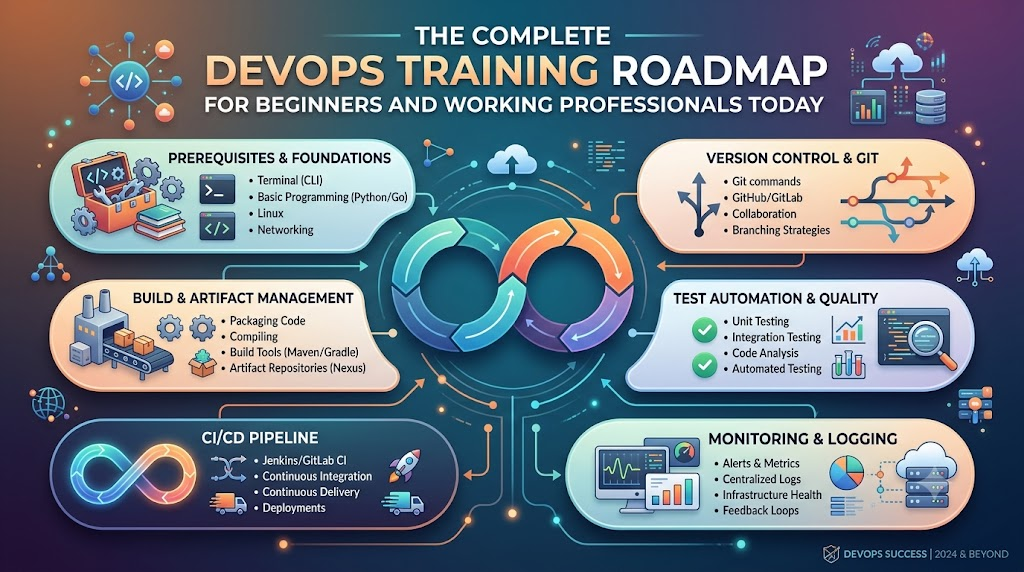
    +------------------------------------------------------------------+
    |                    The Friendly DevOps Loop                      |
    +------------------------------------------------------------------+
    |  Plan the Idea  -->  Write the Code  -->  Test the Build         |
    |         ^                                      |                 |
    |         |                                      v                 |
    |  Learn and Improve  <--  Watch Systems  <--  Ship to Users       |
    +------------------------------------------------------------------+
    

    Why Beginners and Working Pros Need a Learning Map

    Learning computer tools can feel like walking into a giant candy store with no guide. You might see hundreds of bright tools and wonder where to start.

    Therefore, a clear roadmap keeps your learning easy and calm. Beginners learn the strong basics first so they do not get lost.

    At the same time, working professionals can skip what they already know. They can jump right into fancy tools that make their daily work life easier.

    • Beginners build confidence: You learn simple steps one by one without feeling scared or lost.
    • Coders learn system safety: Programmers discover how to launch their code without breaking servers.
    • System helpers learn code tricks: Operations staff learn how to write simple scripts to do daily tasks automatically.
    • Teams deliver faster updates: Everyone understands the big picture so work flows smoothly.

    The Main Parts of the Big Software Machine

    Think of modern software delivery like a toy factory with a fast assembly line. Every toy must pass through several stations before children play with it.

    First, the builders make the toy parts out of plastic blocks. Second, safety helpers check the toy to make sure no small parts fall off.

    Finally, a delivery truck takes the toy to the store shelves safely. If any step fails, the whole assembly line stops right away so workers can fix it.

    Important Factory Roles

    Role NameEveryday ExampleMain Daily Job
    Code BuilderThe Toy DesignerWrites clean code for new app features.
    Test InspectorThe Safety CheckerRuns automatic checks to catch mistakes early.
    Release HelperThe Delivery DriverPushes good code to user screens safely.
    System GuardianThe Watchful GuardMonitors machines so apps never freeze or crash.

    Key Operational Concepts You Must Know

    To run healthy software systems, you must understand a few basic ideas. These ideas work like simple kitchen rules that keep cooking clean and safe.

    Version Control and Safe Storage

    First, you need a safe place to save all your project files. Version control tools work like an unlimited undo button for your homework.

    If you make a silly mistake, you can jump back in time with one click. In addition, many team members can work on the same file without overwriting each other.

    Furthermore, every change carries a short note explaining what the author fixed. This open history helps everyone understand how the software grew over time.

    Continuous Integration and Testing Helpers

    Next, robot helpers must test every single code update automatically. Whenever a coder finishes a feature, the robot builds the whole project.

    Then, the robot runs hundreds of quick safety checks. If a test fails, the robot alerts the coder right away.

    Because of this quick feedback, developers fix mistakes in minutes instead of weeks. This smooth routine keeps bad bugs away from real customers.

    Container Boxes for Clean Packing

    In the past, programs worked on a developer laptop but failed on big company servers. People wasted whole days asking why things broke.

    Today, engineers wrap apps inside neat digital boxes called containers. Each container holds the code, the tools, and the settings inside one shell.

    Therefore, the box runs the exact same way on any computer in the world. You pack the toy once, and it plays everywhere without surprises.

    Platform Implementation vs. Culture — What’s the Real Difference?

    Many companies buy expensive new tools and think their work is finished. However, tools cannot fix teams that refuse to talk to each other.

    FeaturePlatform Implementation (The Tools)Culture (The Human Heart)
    What It IsFast computers, cloud setups, and robot scriptsTrust, teamwork, and kind communication
    Main GoalDoing manual work through smart automationHelping people share ideas without fear
    Big WinFaster releases and fewer typing mistakesHappier workers who love solving problems
    When Things Go WrongShows a red alert on a monitor screenTeams gather kindly to learn what happened

    Why Good Culture Beats Fancy Tools

    You can buy the fastest sports car in the world, but it helps nobody if the driver cannot steer. In the same way, automation tools fail when team members keep secrets from each other.

    Therefore, strong teams practice blameless reviews whenever a server goes down. Nobody points fingers or yells at the person who made an error.

    Instead, everyone sits down to ask how the system allowed that mistake to happen. Then, they build a better guardrail together so nobody falls into that trap again.

    Real-World Use Cases of Modern Operations

    Many popular apps that you use every single day rely on these smart methods to run smoothly.

    Online Video Games with Huge Crowds

    Popular multiplayer games welcome millions of players at the exact same hour. If too many players enter a room, servers might slow down or crash.

    Smart monitoring systems notice the crowd right away. They order new cloud servers to wake up within seconds.

    When the game ends and players go to bed, the system turns those extra servers off. This quick change saves lots of electricity and money.

    Shopping Apps on Big Holiday Sales

    Online stores see giant waves of visitors during special holiday gift sales. Shoppers get very upset if the checkout cart stops working during payment.

    To prevent sadness, engineers use small deployment steps called canary releases. They show new checkout buttons to only one out of every hundred buyers first.

    If those shoppers check out without any trouble, the team sends the update to everyone else. This careful test keeps the whole store safe from nasty surprises.

    Hospitals and Doctor Records

    Hospitals store important health files that doctors must read without any delays. If a computer goes down, a patient might not get their medicine on time.

    Modern operations systems make extra backup copies across three different data centers. If a lightning storm hits one center, the other centers keep working instantly.

    As a result, nurses and doctors always see patient files on their screens. Smart setups save real lives by keeping computers healthy and awake.

    Common Mistakes in Operations Engineering

    Beginners often make simple mistakes when they start their learning journey. You can skip lots of trouble by avoiding these common traps:

    • Trying to learn every tool at once: Focus on one simple tool first, like basic terminal commands, before touching big systems.
    • Skipping basic computer rules: Do not jump into cloud clouds before you understand how files and simple networks work.
    • Writing messy scripts with no notes: Always write clear notes inside your scripts so your teammates understand your steps.
    • Forgetting about security checks: Never leave passwords or secret keys inside your public project folders.
    • Working alone like a quiet island: Talk with your teammates every morning so nobody solves the same problem twice.

    How to Become an Operations Expert — Career Roadmap

    You do not need a fancy degree to become great at modern operations work. You just need to follow simple learning milestones one step at a time.

    +--------------------------------------------------------------------+
    |                      Step-by-Step Learning Path                    |
    +--------------------------------------------------------------------+
    |  Step 1: The Computer Base (Linux and Terminal Commands)          |
    |  Step 2: Script Magic (Simple Python or Shell Code)                |
    |  Step 3: Save Your Work (Git and Safe Repositories)                |
    |  Step 4: Box Your Apps (Containers and Docker)                     |
    |  Step 5: Cloud and Helpers (Cloud Servers and CI/CD Robots)        |
    +--------------------------------------------------------------------+
    

    1. Master the Linux Terminal

    First, learn how to talk to a computer using only typed words instead of a mouse. Most servers around the world run on the Linux operating system.

    Practice creating folders, moving files, and checking disk space with simple text commands. Once you feel comfortable typing in the terminal, you will feel like a computer wizard.

    2. Learn a Helpful Scripting Language

    Next, pick a friendly language like Python or Bash to write simple recipe instructions for your computer. You can write small scripts that clean up old files every midnight.

    These tiny programs free you from doing boring manual tasks over and over again. As a result, you save time for fun, creative projects.

    3. Track Changes with Version Control

    Third, practice saving your project steps using distributed tracking tools. Learn how to create a branch, write clean updates, and combine your changes safely.

    This skill lets you build projects with people from all across the globe. Everyone sees what you made, and nobody loses any hard work.

    4. Package Apps inside Container Boxes

    Fourth, learn how to place small web pages and services into clean digital containers. Write simple recipe files that explain how to build the container from scratch.

    Once your app sits inside a container, you can run it anywhere without stress. This handy trick makes software testing super fast and fun.

    5. Launch Cloud Servers with Code

    Finally, discover how to build virtual computers in the cloud by writing simple instruction files. Instead of clicking buttons on a website, you write clear setup rules.

    Then, you share those rules with your teammates so everyone has matching servers. Now you are ready to help companies build large, world-class platforms.

    FAQ Section

    1. Can I learn these operational skills if I have never written code before?Yes, you certainly can. Many great engineers start with simple terminal commands before they write their very first script.
    2. How much time does it take to learn the core basics?Most learners gain strong, useful skills in about four to six months of regular daily practice.
    3. Do I need a super expensive computer to start practicing?No, any regular laptop will work fine because most practice happens inside free cloud accounts and lightweight terminals.
    4. What is the single most important skill for a beginner?Learning how to ask clear questions and work kindly with your team matters more than any single tool.
    5. Why do companies pay good salaries for these skills?Companies want their websites to run smoothly without ever crashing, and these skills keep their digital businesses safe.

    Final Summary

    Modern software delivery works best when people join hands and use helpful automation tools together. Learning this friendly way of working helps you build apps that never crash and always stay fast.

    Begin your adventure by mastering simple terminal commands and saving your work neatly. Next, practice packaging apps into clean containers and letting robot helpers test your daily updates.

    Most importantly, stay curious and treat your teammates with kindness and patience. With regular practice and a clear map, you will grow into an amazing operations hero.