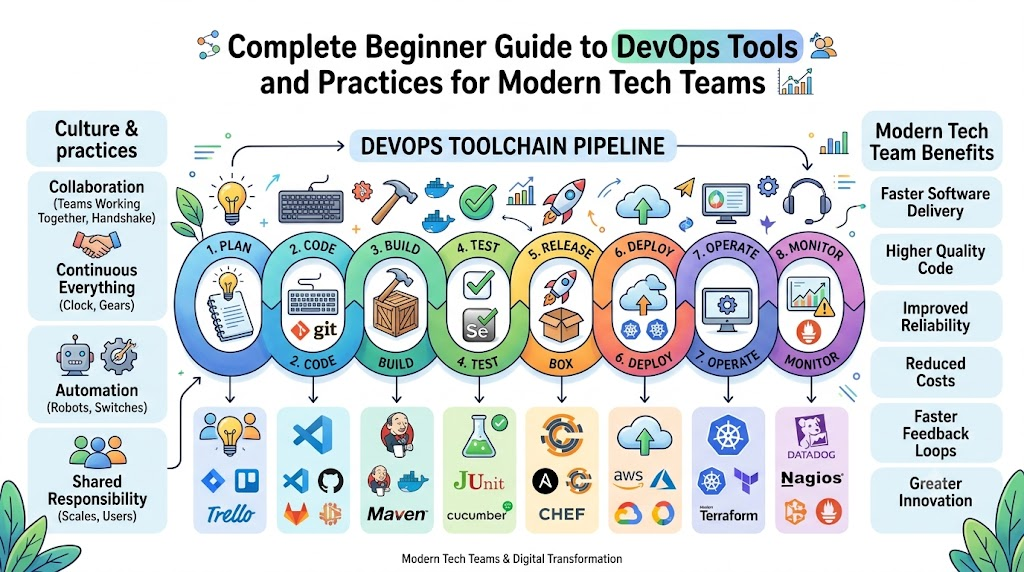
DevOps brings two main computer teams together to build awesome apps. First, developers write code to create new software games and helpful tools. Next, operations helpers run big cloud servers so these apps work smoothly every day.
You can learn these skills step by step with DevOpsSchool. Their friendly mentors show beginners how to use cool tools to deliver software fast. Therefore, learning these basic steps will help you build, test, and ship your ideas safely!
devopsschool.cn
What Is DevOps and Why Do Teams Need It?
Long ago, coders and server keepers worked in separate rooms. Coders wrote programs and tossed them over a tall wall. Then, the server keepers had to figure out how to run them.
Because the two teams did not talk, apps broke often. Users got mad because games crashed and took months to update. So, smart workers decided to join forces and work as one happy team.
Now, DevOps lets teams build and share new computer programs quickly. Everyone shares the work and helps each other fix small mistakes right away.
+--------------------------------------------------------------------+
|                      The Simple DevOps Loop                        |
+--------------------------------------------------------------------+
|  1. Plan App  -->  2. Write Code  -->  3. Test Program             |
|       ^                                     |                      |
|  6. Check Bugs  <--  5. Watch App  <--  4. Ship to Users           |
+--------------------------------------------------------------------+
Key Operational Concepts You Must Know
To keep modern software running fast, beginners must learn a few easy ideas.
The Big Magic Notebook for Code
First, coders use a system named version control to save their daily work. Think of it like a magical notebook that remembers every single word you write.
If you make a silly mistake, you can flip back to an older page. As a result, you never lose your work or ruin the whole program.
- Git: This free tool records every line of code you change.
- GitHub: This website stores your code online so friends can work together.
- Branches: These are separate workspaces where you try new ideas safely.
The Friendly Assembly Line
Next, teams build an automated assembly line for their software. In tech speak, we call this continuous integration and continuous delivery.
When you finish writing your code, a robot helper tests it right away. If the robot finds an error, it sends you a message immediately.
+--------------------------------------------------------------------+
|                   The Software Assembly Line                       |
+--------------------------------------------------------------------+
|  Step 1: Save code to the shared project folder.                   |
|  Step 2: A robot checks the code for spelling mistakes.            |
|  Step 3: The robot runs tests to make sure games run fast.         |
|  Step 4: The system puts the finished game on the web.             |
+--------------------------------------------------------------------+
Neat Lunchboxes for Software
Also, modern engineers pack their apps into neat digital boxes called containers. Just like your school lunchbox keeps your sandwich safe, containers hold everything an app needs.
Because of this, the app runs the same way on your laptop as it does on huge cloud computers. You never have to worry about missing files or broken system settings.
Platform Implementation vs. Culture — What’s the Real Difference?
Many companies buy fancy computer programs and expect instant success. But shiny tools alone do not make a great team.
| What We Look At | Setting Up Tools (The Tech Box) | Building Culture (The Team Spirit) |
|---|---|---|
| Main Goal | Set up robots, servers, and automated pipelines. | Help people talk nicely and work together every day. |
| Key Helpers | Code scripts, dashboards, and cloud storage systems. | Friendly chats, team support, and shared goals. |
| How to Measure | Count how fast updates reach user phones. | Check how much team members trust and help each other. |
| When Things Break | Robots restart servers and sound quick warning alarms. | The team meets to fix the issue without blaming anyone. |
Tools Are Only Toys Without Teamwork
You can buy the best soccer ball in the world. But if players never pass the ball, the team will still lose the game.
Culture means people share goals and help each other learn new tricks. When coders and server helpers trust each other, they solve tough problems fast.
Real-World Use Cases of Modern Operations
Many popular apps you use every day rely on modern operations practices.
Online Video Streaming Services
Think about your favorite cartoon streaming site on a busy Saturday morning. Millions of kids log in at the very same time to watch new shows.
Smart systems spot the huge crowd and start up more servers right away. Then, when night comes and kids go to sleep, the extra servers turn off to save money.
Mobile Game Update Days
Have you ever played a mobile game that updates every single week? In the past, companies stopped the game for hours to fix bugs.
Now, teams send small updates to user phones while people play. The new features slip into the game quietly without stopping your fun.
Bank and Store Websites
Online stores get very busy during holiday sales events. Shoppers rush to buy toys and shoes before the items sell out.
DevOps tools test the checkout page thousands of times before the rush begins. So, parents can buy gifts quickly without the shop page freezing up.
Common Mistakes in Operations Engineering
Beginners often make a few easy-to-fix mistakes when they start their learning journey.
- Doing Every Task by Hand: Click-happy workers waste hours clicking buttons when a simple script can do the job.
- Buying Too Many Tools at Once: Using ten complex tools on day one confuses everyone and slows down the work.
- Forgetting to Test Early: Skipping quick tests lets nasty bugs sneak directly onto user screens.
- Blaming People for Mistakes: Pointing fingers hurts feelings and stops people from speaking up when things break.
- Ignoring System Alarms: Turning off warning bells means you will not notice when your app runs out of memory.
How to Become an Operations Expert — Career Roadmap
You can grow from a curious beginner into an expert engineer with steady practice.
Step 1: Learn Basic Computer Commands
First, learn how to talk to computers using simple text commands. Linux is the operating system that runs most of the internet today.
So, practice typing short words to make folders, move files, and read system notes. Once you feel comfortable typing commands, you can manage any big server.
Step 2: Pick Up a Simple Code Language
Next, learn a beginner-friendly programming language like Python. Python reads almost like plain English books.
You can write short scripts to do your daily chores automatically. For example, your script can back up your files every day at dinner time.
+--------------------------------------------------------------------+
|                      Your Friendly Learning Steps                  |
+--------------------------------------------------------------------+
|  Level 1: Master Linux commands and Git file saving.               |
|  Level 2: Write small Python scripts to do simple chores.          |
|  Level 3: Pack apps inside Docker containers.                      |
|  Level 4: Run apps on cloud servers like AWS or Google Cloud.      |
|  Level 5: Set up watchtower alerts to catch broken parts fast.     |
+--------------------------------------------------------------------+
Step 3: Pack Apps and Send Them to the Cloud
After you learn basic code, start playing with container tools like Docker. Build a small website and pack it into a digital container.
Next, rent a tiny cloud server online and launch your container there. You will feel proud when your friends open your website on their phones!
FAQ Section
- Do I need to be a math genius to learn these tools?No, you do not need hard math skills to work with these tools. You only need to think clearly, solve puzzles, and follow simple step-by-step instructions.
- What is the first computer tool I should install on my laptop?You should install Git first because it teaches you how to save and track your work. It protects your practice projects from getting lost or accidentally deleted.
- How is a container different from a regular computer program?A regular program needs specific software pieces already installed on your machine to work. A container carries all its own pieces inside, so it runs anywhere without extra setup.
- Can I practice these tools for free at home?Yes, almost all core tools like Linux, Git, and Docker are completely free to download. Many cloud companies also offer free practice accounts for new learners.
- How long will it take to build my first software pipeline?Most new students can build their first simple automated pipeline in just a few weeks. Taking friendly classes helps you practice the right steps quickly and safely.
Final Summary
Modern software delivery works best when people team up and use smart tools. By saving code with Git, packing apps into containers, and running automatic tests, you can build reliable platforms.
Always remember that working kindly with your team matters just as much as learning complex tools. Keep practicing your steps every day, stay curious, and enjoy building the next generation of amazing computer apps!