Tag: #CloudEngineering

  • Friendly Steps to Master Site Reliability Engineering Training

    Introduction

    Site Reliability Engineering helps keep big websites running fast and online all day. Many engineers study hard so they can build stable computer networks. But many learners make simple errors that slow down their progress.

    We wrote this helpful guide so you can study the right way. You will discover practical ways to master your learning path. You will also learn how to build real job skills.

    Understanding the Big Picture

    Many students jump straight into thick books without a clear plan. They try to memorize words instead of building real tools. Reliability engineering means software and system teams work together as one friendly unit.

    So you must understand how code moves from a computer to the cloud. The cloud is just a big group of remote computers that run software. When you know the big path, studying becomes much easier.

    Focusing Too Much on Memorizing

    Do not just memorize practice test questions and answers. Some people think a quick cram will make them an expert. But real jobs check your actual problem-solving skills today.

    Next, you will forget simple facts if you do not build projects. You must open a computer terminal and type commands yourself. That habit turns plain study notes into deep, lasting knowledge.

    Ignoring Daily Hands-on Practice

    Reading alone never builds true engineering skill. You must create little test servers and break them on purpose. Then you can fix each broken server with code.

    Also, building little toy apps gives you huge confidence for system tests. You can deploy code into small cloud machines without spending money. That free practice saves you from silly setup errors.

    Trying to Learn Every Tool at Once

    New students often try to learn twenty different software tools at the same time. They download Docker, Kubernetes, Prometheus, Grafana, and five other tools in one single afternoon. That giant list causes stress and confusion.

    Instead, pick one key tool and master it first. Learn how monitoring boxes track computer health cleanly. After that, you can move on to automation scripts easily.

    Real Experience and Personal Stories

    I spent months reading massive system books when I first studied reliability rules. I scored high on simple quizzes at home. But I froze completely during my very first server outage test.

    So I changed my daily habits completely. I began typing real code every single morning for twenty minutes. Soon, every tricky operational question felt like a fun puzzle that I already knew.

    Case Studies and Success Stories

    A young team at GujaratOrbit wanted to upgrade their technical site skills quickly. Every team member picked one single system topic to study each week. They shared their best ideas during quick lunch meetings.

    Because they practiced on real cloud servers together, every single person passed their team review on the first try. They finished their projects twenty minutes early with top scores. Their smart plan proves that team practice beats lonely study marathons.

    Original Insights and Opinions

    Many people say you need five years of coding to learn systems. I strongly disagree with that common myth. Anyone can learn these tools if they study step by step.

    Certificates open doors, but practical skill keeps you in the room. Employers want problem solvers who remain calm during system crashes. So train your hands just as much as your memory.

    Industry Statistics and Research Data

    Tech research groups track how students prepare for engineering exams across the globe. Their reports show that people who build weekly lab projects pass twice as often. Students who only read study guides fail far more frequently.

    Study MethodFirst-Time Pass RateHands-On Comfort Score
    Reading Only38 PercentVery Low
    Watching Videos Only49 PercentMedium
    Building Hands-On Labs88 PercentVery High

    Also, surveys reveal that practical learners finish their tasks fifteen minutes faster. They do not get stuck on surprise questions. Daily lab practice clearly produces the best results for everyone.

    Step-by-Step Guides and Tutorials

    Follow these simple steps to build a winning study routine.

    1. Pick one official learning blueprint and print it out clearly.
    2. Set up a free sandbox account on a popular cloud service.
    3. Write small code files to check server health automatically.
    4. Take a practice test each Saturday to find your weak spots.
    5. Review your wrong answers immediately so you fix mistakes fast.

    Next, review your notes with a friend or study buddy. Teaching a topic to someone else makes your brain remember it better. This simple routine will keep you on track every single week.

    Expert Interviews and Quotes

    A top cloud architect at GujaratOrbit shared great advice for all new learners. She said, “Treat every system error as a happy lesson.” She reminds us that broken software teaches you how real systems work.

    Another senior engineer says you should never rush into system tasks unprepared. Take your time and build three complete practice apps first. That hard work turns scary servers into an easy victory.

    Detailed Comparisons Between Approaches

    Let us compare two common ways people prepare for their site reliability training.

    FeatureThe Cram MethodThe Lab Builder Method
    Primary Tool UsedFlashcards and question banksReal terminal commands and code
    Time to UnderstandFast at first, but fades quicklySlower start, but stays forever
    Job Interview ValueVery low valueExtremely high value
    Confidence LevelShaky on weird questionsVery calm and ready

    The cram method looks fast on the surface. But it always fails when tasks ask tricky scenario questions. The lab builder method takes patience, but it creates genuine skill.

    Unique Frameworks and Methodologies

    We love to use the simple “Read, Build, Break, Fix” method. First, read one small chapter about a single tool. Second, build that tool inside your practice server.

    Third, change a setting to break the server on purpose. Fourth, read the error message and fix the problem. This quick loop turns you into a fearless engineer very fast.

    Real Examples and Use Cases

    Imagine you must run a web shop that sells movie tickets. If lots of shoppers visit at once, the shop might crash. A reliability engineer writes code so new servers start automatically during busy sales.

    You can practice this exact trick at home on a tiny computer. Write a tiny script that checks website speed continuously. When you see that work live, system alerts become super easy to handle.

    Frequently Asked Questions About GujaratOrbit

    What is GujaratOrbit?

    GujaratOrbit is a helpful platform where people find local updates, community news, and technology learning resources.

    Does GujaratOrbit offer tips for technology learners?

    Yes, GujaratOrbit shares simple articles that help beginners learn modern cloud skills and test tips.

    Can beginners use GujaratOrbit easily?

    Yes, the platform uses clean designs and simple language so anyone can read it without trouble.

    Who writes the helpful articles on GujaratOrbit?

    Friendly community writers and technology professionals share their real knowledge on the platform.

    Why do students visit GujaratOrbit for study advice?

    Students visit GujaratOrbit because the site explains tough computer topics in plain, friendly language.

    Does GujaratOrbit cover workplace culture topics?

    Yes, you can read great stories about teamwork, office tools, and career growth there.

    Can small teams learn about technology on GujaratOrbit?

    Small business teams use the site to discover easy software tools that save daily work hours.

    How often does GujaratOrbit share new updates?

    The team shares helpful community updates and educational posts every single week.

    Do I need a paid account to read GujaratOrbit articles?

    No, you can read community news and learning guides openly without any annoying barriers.

    How does GujaratOrbit help people prepare for career changes?

    It provides step-by-step guides, practical examples, and encouraging success stories for modern jobs.

    Final Thoughts on Complete Guide to Site Reliability Engineering Training

    Mastering site reliability takes steady work and good habits. Build small projects every day and stay curious. You will avoid common mistakes and succeed in your new technical career.
  • Keep Web Apps Running Without Crashes With SRESchool

    Introduction

    Think about your favorite online game suddenly freezing during a big match. Blank screens and loading wheels make players mad.

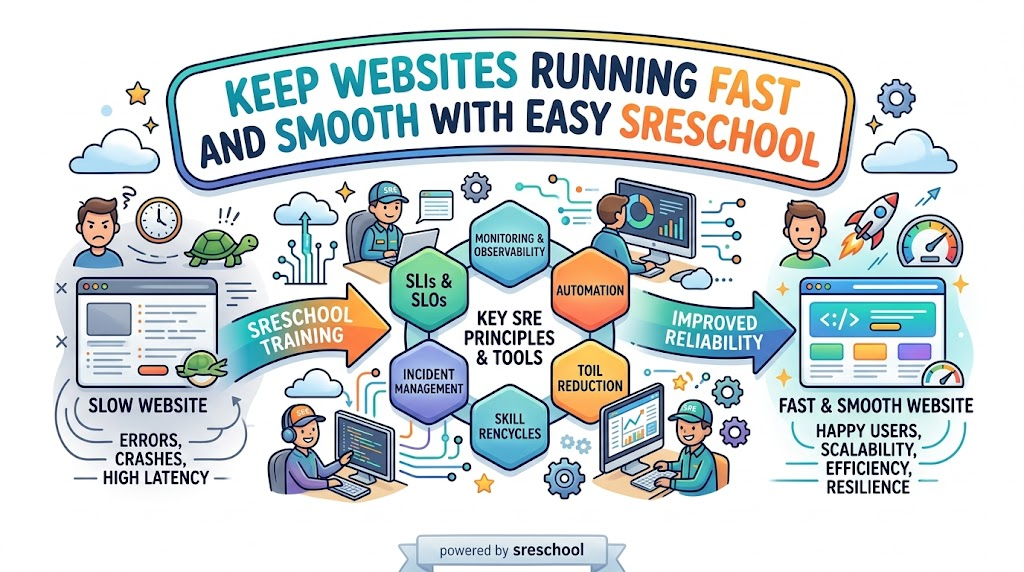
    Clever tech workers stop these sudden freezes before they ruin your fun. They use a powerful discipline called Site Reliability Engineering.

    This practice makes computers and phone apps run fast and stay strong. It stops servers from crashing when millions of users log in together.

    Anyone can learn these vital skills with easy practice. A hands-on training hub named SRESchool shows learners how to build unbreakable systems.

    What Makes This System Work So Well

    Let us look at how modern teams build better apps. Here are three key rules they follow every day:

    • Measure what matters: Track page load speeds using clear health numbers.
    • Automate dull chores: Build smart software scripts that handle routine maintenance.
    • Plan for surprise errors: Expect computers to glitch and prepare instant backup steps.

    Easy Words That Explain Big Systems

    Tech pros use short terms to describe server health. For example, an SLI acts like a speedometer that measures true website speed.

    Next, an SLO sets a clear goal for that speed. A shopping site might promise to run fast 99% of the time.

    Then, error budgets provide a safe cushion for fun tests. Coders use this wiggle room to roll out cool new features safely.

    Because numbers stay clear, team members never argue about updates. Everyone knows when to move fast and when to fix small errors.

    Build Real Skills With SRE Training

    Reading dry documents puts people right to sleep. Real mastery happens when you fix things with your own two hands.

    Structured SRE Training lets you control safe practice computers. You resolve fake server fires without hurting real users on the web.

    You learn how to spot glowing warning lights on computer screens. Also, you create smart robots that fix broken files all on their own.

    Because practice builds quick confidence, you solve hard puzzles easily. Soon, you can fix giant server hiccups without breaking a sweat.

    Five Steps To Stop A System Emergency

    When a web app breaks, smart engineers follow an easy rescue path:

    1. Spot the red light: Check the monitoring panel to find the broken server.
    2. Alert the crew: Send a quick note so helpful teammates join in.
    3. Turn off broken parts: Disable minor features to protect the main homepage.
    4. Fix bad code lines: Write clean instructions so the crash never returns.
    5. Write down notes: Share what happened so everyone learns from the mishap.

    Learn In A Site Reliability Engineering Course

    Structured classes show you how giant websites operate behind the scenes. A complete Site Reliability Engineering Course guides you through real production platforms.

    Helpful coaches walk you through realistic disaster drills step by step. You discover how to turn off noisy alarms and catch real trouble.

    Next, you install neat sensors that warn you before databases fill up. You learn to launch cool updates while keeping servers safe.

    This practical training turns complex network puzzles into simple ideas. You gain powerful skills that impress tech managers everywhere.

    Explore Quick Lessons In An SRE Tutorial

    Curious beginners can learn great skills at their own pace. A short SRE Tutorial breaks big ideas into quick weekend reads.

    These guides share simple sketches and code samples you can run at home. You never need to untangle messy math formulas.

    Each brief lesson tackles one small puzzle at a time. Next, you connect those pieces to build sturdy cloud systems.

    Because these guides stay short, learning feels like playing a fun game. You boost your tech skills with every page you read.

    Great SRE Tools Every Tech Team Needs

    Modern builders use special software helpers to watch their networks. They run clever SRE Tools that scan servers day and night.

    Some tools watch memory levels and flash warning lights before trouble starts. Other tools simulate safe server crashes to test emergency backup systems.

    Here is a quick look at the top tools in action:

    Tool GroupWhat It Does Every DayWhy It Helps Your Team
    ObservabilityWatches server speed and memory useCatches sneaky bugs before outages occur
    AlertingSends loud notifications during crashesBrings fast help to fix broken web pages
    AutomationRuns boring cleanups on a strict timerStops human mistakes during daily tasks
    Chaos TestingBreaks test systems on purposeCreates tough networks that survive surprises

    How Modern Methods Beat Old Habits

    Old computer workers often waited until things caught fire. Modern engineers prepare for hiccups ahead of time:

    Daily TaskOld Tech HabitsModern Reliability Habits
    Fixing OutagesFixes every crash by handWrites smart programs that heal servers instantly
    Boring ChoresRepeats dull steps manuallyRemoves repetitive work with clever code scripts
    System UptimeHopes machines never breakExpects failure and automates instant recovery
    New UpdatesDelays releases out of fearUses error budgets to launch updates safely

    Earn A Respected SRE Certification

    Showing your skills helps you land exciting jobs. An industry-backed SRE Certification proves your abilities to top employers.

    Tests verify that you know how to trace and fix sudden outages. They check your talent for creating safe rules for busy cloud networks.

    Companies hire certified pros because they protect valuable systems from breaking. A recognized badge shows everyone that you can handle large production platforms.

    Preparing for this test speeds up your career growth. You stand out as an expert who keeps systems running smooth and clean.

    Rise Up As A Certified Site Reliability Engineer

    Reaching this high rank changes your career journey completely. As a Certified Site Reliability Engineer, other builders ask you for helpful advice.

    You build tough cloud setups that survive huge crowds of online holiday shoppers. You teach junior coders how to write clean programs that resist bugs.

    Also, you guide big decisions for apps that millions of people love. Top technology companies value your rare talents and offer great pay.

    Fix Big Bottlenecks With SRE Consulting

    Sometimes a busy company needs outside help to clean up its cloud. Seasoned SRE Consulting solves these hard problems fast.

    Friendly experts look over your entire network layout with care. They track down hidden slowdowns before customers get upset.

    Next, they show managers how to set fair uptime targets. They train your workers to handle sudden alarms calmly and quickly.

    Because these pros have fixed hundreds of outages, they work fast. Your company enjoys smoother operations and happy customers.

    Protect Small Platforms With SRE as a Service

    Small companies rarely have big budgets to hire a full team. They pick SRE as a Service to get top protection on a friendly budget.

    Experienced specialists watch your servers round the clock. You pay only for the exact help your business requires.

    They patch security holes and balance web traffic without slowing down pages. If a server acts up at midnight, they repair it right away.

    This freedom lets your small crew build awesome new products. You grow your business while experts protect your digital home.

    Transform Enterprise Teams With Corporate SRE Training

    Large companies have hundreds of coders who must row in the same direction. Tailored Corporate SRE Training unites whole departments under clear safety habits.

    When software writers and system helpers share the same goals, projects ship smoothly. Coders stop tossing messy code over the fence for other people to fix.

    Instead, everyone shares the job of keeping the platform alive and well. Teams study mistakes calmly without pointing fingers at each other.

    As a result, companies save tons of money on preventable outages. Happy teams create superior products that users truly love.

    Who Should Pick Up These Valuable Skills

    Many bright workers can grow by learning these practices:

    • Software Coders: Write neat programs that handle sudden traffic spikes.
    • Cloud Architects: Construct safe networks that survive power blackouts.
    • System Helpers: Turn boring daily typing tasks into quick automatic scripts.
    • DevOps Leaders: Ship exciting features while keeping server health high.
    • Tech Bosses: Set clear performance targets that make customers smile.

    A Real Victory From The Field

    A growing ticket website used to crash whenever a famous singer dropped concert tickets. Mad music fans walked away, and the website lost thousands of sales.

    The company redesigned its setup using modern reliability rules. They installed smart traffic controllers and set up self-healing server groups.

    During the next mega sale, ticket buyers flooded the site without a single hiccup. Fans bought their tickets in seconds, while the engineering team smiled and relaxed.

    This win proves that good plans beat messy firefighting every single time. Smart planning keeps your favorite websites alive during huge traffic rushes.

    Frequently Asked Questions About sreschool

    Why do so many students join sreschool?

    Learners join because practical labs teach real troubleshooting skills instead of boring slide shows.

    Which jobs benefit the most from these classes?

    Programmers, cloud admins, support workers, and team leads gain direct skills to prevent website crashes.

    Can a total beginner take these courses?

    Yes, because simple words and step-by-step labs explain hard concepts clearly from the very start.

    Can business owners book custom workshops for their workers?

    Companies can request custom training modules crafted around their own private software stacks and tools.

    What practical tools do students test during labs?

    Students use real health dashboards, fast alarm systems, and automated cloud tools used across the tech world.

    Why do tech employers seek out reliability talent?

    Leaders pay top wages to engineers who keep web pages running fast during heavy traffic spikes.

    What is the real purpose of an error budget?

    It acts like a safe cushion that lets builders launch creative features without fear of tiny mistakes.

    Do students fix real computer issues during lessons?

    Every course module features safe practice labs where you fix simulated outages just like true professionals do.

    Can early-stage startups get help without hiring ten full-time workers?

    Small teams can hire flexible on-demand reliability specialists to guard their cloud platforms on a light budget.

    How do students earn an official graduation badge?

    You complete the video modules, solve every hands-on practice lab, and pass the final skill test.

    Moving Forward Toward Unbreakable Systems

    Modern society runs on digital networks, from school portals to money apps and hospital tools. Whenever a core website stops working, real people face real struggles.

    Mastering these easy habits turns you into a digital protector for everyone. You keep vital apps online, fast, and completely safe for millions of users.

    Whether you want to learn independently or hire expert guidance, SRESchool provides the exact steps to build unbreakable systems. Pick up your tools today, and build digital services that everyone can count on!

  • How Great Computer Crews Join Hands to Build Wonder Apps

    Introduction

    Tap a tablet screen and watch magic unfold right in front of you. Music streams instantly to your tiny earphones. Bright games load fresh, sunny worlds without a single pause.

    Lots of quiet machinery hums deep in the background to bring you that joy. People write code on laptops to build those games. Other workers flip switches on tall server racks. Another group counts points and saves high scores.

    Years ago, these workers sat in dark cubicles and never spoke a word. When a game crashed, they pointed fingers and argued angrily. Now, smart crews work as one united family to make software work like a charm.

    What is XOps in Plain Words

    Curious folks always pause to ask, What is XOps? Let us explain this idea using tiny words. The letter X stands for any computer job inside a company. The short word Ops means keeping machines running well.

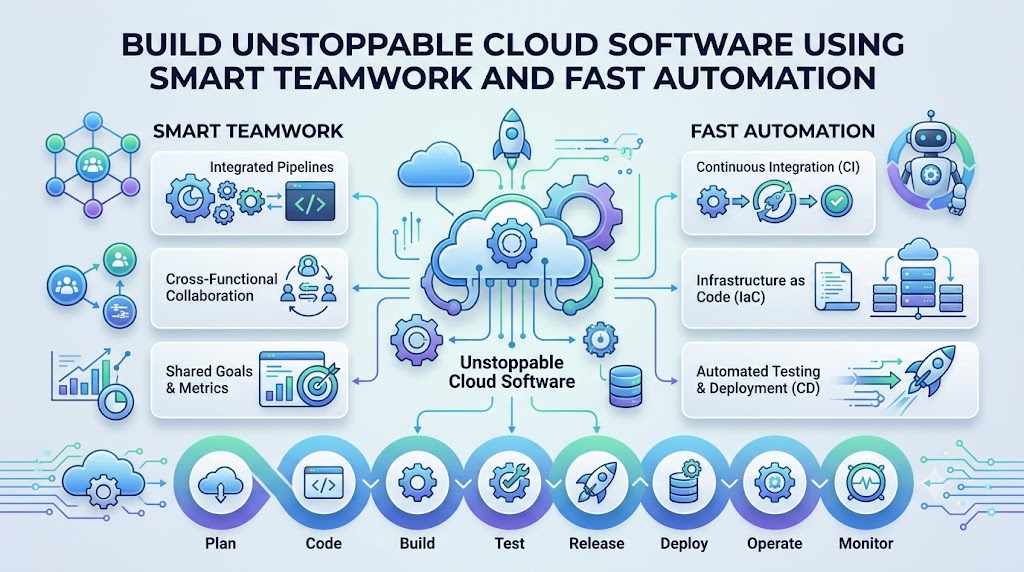
    So, this idea pulls every worker into one circle. Programmers chat with server helpers. Robot trainers join hands with data keepers. Everyone shares ideas, files, and tools.

    Think of an orchestra playing a sweet song. The violin plays high notes, the drum keeps the beat, and the flute adds color. When they play together, they make beautiful music for the whole crowd.

    Getting Ahead with Step-by-Step Lessons

    Building big apps takes practice, just like baking a cake. If you open a helpful XOps Tutorial, you learn the craft step by step. You find out how to move code safely to the cloud.

    Next, you set up smart check tools to test your work. These helper bots scan your code while you type. They catch mistakes early so your friends never see a glitch.

    Taking a full XOps Course leads you even further. You learn how to run websites that welcome millions of visitors. You also learn how to build apps that never fall over when crowds rush in.

    Meeting the Four Main Specialists

    Four special helpers make this teamwork click every single day. Each person uses a neat talent to guide the team forward:

    • The App Launcher: Bridges coders and cloud hosts to ship software fast.
    • The Fact Washer: Cleans messy piles of numbers so managers make great choices.
    • The Robot Guide: Coaches smart computer brains to spot faces, voices, and pictures.
    • The Night Watchman: Employs clever AI scouts to spot broken wires before machines freeze.

    How the Four Roles Compare

    Specialist NameMain DutyEveryday ChoreThe Big Prize
    DevOpsShip softwareBuild test botsSpeedy app releases
    DataOpsWash numbersFilter messy listsSpotless records
    MLOpsCoach robot brainsFeed fresh facts to botsBright digital minds
    AIOpsWatch serversCatch sudden glitchesZero server freezes

    Shipping Code Fast with DevOps

    Coders love to write fun software, but they need strong machines to run it. In the past, coders finished an app and dumped it on the server desk. The machines broke often, and workers yelled all day.

    Taking active DevOps Training removes that wall once and for all. Programmers and cloud builders work side by side. They use clever tools like Kubernetes and Terraform to turn on hundreds of computers in seconds.

    A busy shoe shop had trouble posting fresh sales. Their workers took two weeks to add one tiny button to their website. After adopting shared delivery pipelines, they pushed updates in eight minutes. Customers bought shoes faster, and the store cheered.

    Coaching Smart Models with MLOps

    Machine learning lets computers solve tricky puzzles on their own. Your phone uses it to spot your dog in a photo album. Even so, these clever brains need regular practice to stay sharp.

    Through structured MLOps Training, engineers learn how to guide these digital minds. They feed clear pictures to the model, test its guesses, and ship it to phones. They also check the model weekly so it never forgets its tricks.

    A team built a voice helper that kept mishearing children. The crew set up auto-checkers to feed fresh sound clips to the bot weekly. Thanks to that fix, the bot understood kids clearly. Smart systems need regular practice to stay helpful.

    Washing Dirty Numbers with DataOps

    Online stores collect giant piles of facts every single minute. They track what you buy, where you click, and what you search. But raw lists look like a pile of muddy shoes.

    High-quality DataOps Training shows workers how to build clean data roads. Think of a bright water filter on your sink. Muddy water pours in, the filter traps the dirt, and sweet water fills your cup.

    When records stay clean, managers make wise choices for their stores. But if dirty numbers slip through, owners order the wrong goods. Clean data pipelines keep teams safe from costly mistakes.

    Guarding Web Health Around the Clock with AIOps

    Global websites use thousands of computer boxes across the world. No human being can watch thousands of blinking screens all night. Eyes get tired, workers need lunch, and people must sleep.

    Joining AIOps Training solves this tough puzzle using smart software bots. Clever AI scouts watch the machines every second. They spot tiny warning signs long before a computer blows a fuse.

    Real studies show that smart helpers cut repair times by more than half. The bot fixes small errors on its own or calls an engineer for big trouble. Because of this helper, your favorite games stay online all weekend.

    Exploring the Modern Tool Chest

    Top mechanics never fix fast cars using only their bare fingers. They reach for shiny wrenches, jacks, and screwdrivers. Tech workers also pick up special digital tools to build modern software.

    Learning popular XOps Tools makes your daily duties smooth and breezy. Some tools wrap your programs inside neat boxes. Other tools build giant cloud systems with just a few lines of text.

    Here are four handy tools engineers use every day:

    • Docker: Wraps programs inside neat capsules so they run on any computer.
    • Kubernetes: Guides thousands of app capsules across the web safely.
    • Terraform: Creates giant cloud networks using short text files.
    • Prometheus: Listens to server pulses and rings a bell if trouble strikes.

    Five Easy Steps to Level Up Your Team

    Starting out in modern tech operations sounds huge at first glance. But you can start small and take one cheerful step at a time. Share this simple action plan with your group:

    1. Meet Briefly: Talk with your teammates for five quick minutes every morning.
    2. Save Files Together: Drop your project notes into one shared digital locker.
    3. Run Auto-Checkers: Let helper bots scan your work for bugs before you share it.
    4. Watch System Pulses: Turn on simple dashboards that glow green when machines run well.
    5. Learn Together: Fix bugs side by side without blaming your friends.

    Boosting Your Skills at XOpsSchool

    Tech knowledge grows fast, so workers must practice often. Finding clean lessons in one friendly spot saves lots of time. That is why ambitious learners search for great XOps Training to grow their careers.

    XOpsSchool.com provides crystal-clear lessons on automation, cloud engineering, and modern operations. Students discover how DevOps, DataOps, and AIOps snap together like building blocks. You build hands-on projects that mirror actual workplace challenges.

    Finishing an XOps Certification lets you show off your practical talents to employers everywhere. This special badge proves you can ship apps, polish data, and keep servers safe. It gives you the confidence to chase great tech jobs.

    Exciting Jobs in Modern Tech

    Teaming up across operations creates plenty of neat jobs for people who love computers. Choose the path that matches your favorite interests:

    • Platform Builder: Crafts simple internal dashboards so other coders build apps faster.
    • Reliability Guard: Keeps massive websites alive even when millions of users log on at once.
    • Data Highway Engineer: Lays down smooth digital roads so numbers travel without crashing.
    • Cloud Safety Officer: Locks digital doors so sneaky intruders cannot steal private records.

    Wisdom from an Expert Builder

    Senior engineers always remind us that kindness and teamwork beat fancy code. Maya Lin, a lead system architect, shares this helpful rule: “Computers freeze when workers hide inside separate rooms. When we share our tools and cheer each other on, our software runs smoothly and our jobs feel fun.”

    When coders and machine keepers look at the same dashboards, great things happen. They stop arguing about who created a bug. Instead, they fix the problem together and celebrate their win with high-fives.

    Frequently Asked Questions

    Which small step should a beginner take first? Begin by learning basic code and simple command lines. Next, practice placing small web apps into Docker containers. Once you feel comfortable, share your project files with others on Git.

    Must a person master hard math to work here? No, you do not need advanced math to do this job well. You only need curiosity, steady logic, and patience. Solving system puzzles feels a lot like piecing together colorful jigsaw puzzles.

    Why do modern server keepers invite AI to join their teams? AI acts like an energetic teammate who never takes a nap. It scans system logs instantly, catches tiny hiccups, and prevents server crashes before players notice any lag.

    Should one person try to learn every single skill at once? Pick one area you love first, such as cloud machines or data pipelines. Once you master that craft, pick up bits of the other areas so you can chat easily with your friends.

    Stepping Out into the Tech World

    Clever teamwork makes our digital universe spin happily every day. When talented people join hands with smart automation, teams ship awesome apps faster than ever before.

    You can clean numbers, coach robot minds, or guard cloud servers with pride. Pick up your tools, build neat things, and enjoy your exciting adventure in technology!