Imagine two groups of kids working together to make a video game. One team writes the fun game story. The other team makes sure the game runs smoothly on your tablet.
In the past, these two teams sat in different rooms and rarely spoke. The story team threw their work over a fence to the computer team. As a result, games crashed, work stopped, and everyone felt mad.
DevOps brings these two teams together so they work as one happy crew. If you want to learn these helpful skills step by step, you can start your journey with DevOpsSchool today. Their friendly classes teach beginners and working pros how to use smart computer tools to build great software together.
What Is DevOps in Simple Words?
DevOps combines two words: development and operations. Development means making new software, like drawing and coding an app. Operations means keeping that app alive and fast so people can use it every day.
When these groups join forces, magical things happen. First, they build software much faster. Next, they fix bugs quickly before players notice them.
Because both sides share the work, nobody blames each other when something breaks. Instead, they fix the problem together like a true sports team.
+------------------------------------------------------------------+
|                    The Friendly DevOps Loop                      |
+------------------------------------------------------------------+
|  Plan the Idea  -->  Write the Code  -->  Test the Build         |
|         ^                                      |                 |
|         |                                      v                 |
|  Learn and Improve  <--  Watch Systems  <--  Ship to Users       |
+------------------------------------------------------------------+
Why Beginners and Working Pros Need a Learning Map
Learning computer tools can feel like walking into a giant candy store with no guide. You might see hundreds of bright tools and wonder where to start.
Therefore, a clear roadmap keeps your learning easy and calm. Beginners learn the strong basics first so they do not get lost.
At the same time, working professionals can skip what they already know. They can jump right into fancy tools that make their daily work life easier.
- Beginners build confidence: You learn simple steps one by one without feeling scared or lost.
- Coders learn system safety: Programmers discover how to launch their code without breaking servers.
- System helpers learn code tricks: Operations staff learn how to write simple scripts to do daily tasks automatically.
- Teams deliver faster updates: Everyone understands the big picture so work flows smoothly.
The Main Parts of the Big Software Machine
Think of modern software delivery like a toy factory with a fast assembly line. Every toy must pass through several stations before children play with it.
First, the builders make the toy parts out of plastic blocks. Second, safety helpers check the toy to make sure no small parts fall off.
Finally, a delivery truck takes the toy to the store shelves safely. If any step fails, the whole assembly line stops right away so workers can fix it.
Important Factory Roles
| Role Name | Everyday Example | Main Daily Job |
|---|---|---|
| Code Builder | The Toy Designer | Writes clean code for new app features. |
| Test Inspector | The Safety Checker | Runs automatic checks to catch mistakes early. |
| Release Helper | The Delivery Driver | Pushes good code to user screens safely. |
| System Guardian | The Watchful Guard | Monitors machines so apps never freeze or crash. |
Key Operational Concepts You Must Know
To run healthy software systems, you must understand a few basic ideas. These ideas work like simple kitchen rules that keep cooking clean and safe.
Version Control and Safe Storage
First, you need a safe place to save all your project files. Version control tools work like an unlimited undo button for your homework.
If you make a silly mistake, you can jump back in time with one click. In addition, many team members can work on the same file without overwriting each other.
Furthermore, every change carries a short note explaining what the author fixed. This open history helps everyone understand how the software grew over time.
Continuous Integration and Testing Helpers
Next, robot helpers must test every single code update automatically. Whenever a coder finishes a feature, the robot builds the whole project.
Then, the robot runs hundreds of quick safety checks. If a test fails, the robot alerts the coder right away.
Because of this quick feedback, developers fix mistakes in minutes instead of weeks. This smooth routine keeps bad bugs away from real customers.
Container Boxes for Clean Packing
In the past, programs worked on a developer laptop but failed on big company servers. People wasted whole days asking why things broke.
Today, engineers wrap apps inside neat digital boxes called containers. Each container holds the code, the tools, and the settings inside one shell.
Therefore, the box runs the exact same way on any computer in the world. You pack the toy once, and it plays everywhere without surprises.
Platform Implementation vs. Culture — What’s the Real Difference?
Many companies buy expensive new tools and think their work is finished. However, tools cannot fix teams that refuse to talk to each other.
| Feature | Platform Implementation (The Tools) | Culture (The Human Heart) |
|---|---|---|
| What It Is | Fast computers, cloud setups, and robot scripts | Trust, teamwork, and kind communication |
| Main Goal | Doing manual work through smart automation | Helping people share ideas without fear |
| Big Win | Faster releases and fewer typing mistakes | Happier workers who love solving problems |
| When Things Go Wrong | Shows a red alert on a monitor screen | Teams gather kindly to learn what happened |
Why Good Culture Beats Fancy Tools
You can buy the fastest sports car in the world, but it helps nobody if the driver cannot steer. In the same way, automation tools fail when team members keep secrets from each other.
Therefore, strong teams practice blameless reviews whenever a server goes down. Nobody points fingers or yells at the person who made an error.
Instead, everyone sits down to ask how the system allowed that mistake to happen. Then, they build a better guardrail together so nobody falls into that trap again.
Real-World Use Cases of Modern Operations
Many popular apps that you use every single day rely on these smart methods to run smoothly.
Online Video Games with Huge Crowds
Popular multiplayer games welcome millions of players at the exact same hour. If too many players enter a room, servers might slow down or crash.
Smart monitoring systems notice the crowd right away. They order new cloud servers to wake up within seconds.
When the game ends and players go to bed, the system turns those extra servers off. This quick change saves lots of electricity and money.
Shopping Apps on Big Holiday Sales
Online stores see giant waves of visitors during special holiday gift sales. Shoppers get very upset if the checkout cart stops working during payment.
To prevent sadness, engineers use small deployment steps called canary releases. They show new checkout buttons to only one out of every hundred buyers first.
If those shoppers check out without any trouble, the team sends the update to everyone else. This careful test keeps the whole store safe from nasty surprises.
Hospitals and Doctor Records
Hospitals store important health files that doctors must read without any delays. If a computer goes down, a patient might not get their medicine on time.
Modern operations systems make extra backup copies across three different data centers. If a lightning storm hits one center, the other centers keep working instantly.
As a result, nurses and doctors always see patient files on their screens. Smart setups save real lives by keeping computers healthy and awake.
Common Mistakes in Operations Engineering
Beginners often make simple mistakes when they start their learning journey. You can skip lots of trouble by avoiding these common traps:
- Trying to learn every tool at once: Focus on one simple tool first, like basic terminal commands, before touching big systems.
- Skipping basic computer rules: Do not jump into cloud clouds before you understand how files and simple networks work.
- Writing messy scripts with no notes: Always write clear notes inside your scripts so your teammates understand your steps.
- Forgetting about security checks: Never leave passwords or secret keys inside your public project folders.
- Working alone like a quiet island: Talk with your teammates every morning so nobody solves the same problem twice.
How to Become an Operations Expert — Career Roadmap
You do not need a fancy degree to become great at modern operations work. You just need to follow simple learning milestones one step at a time.
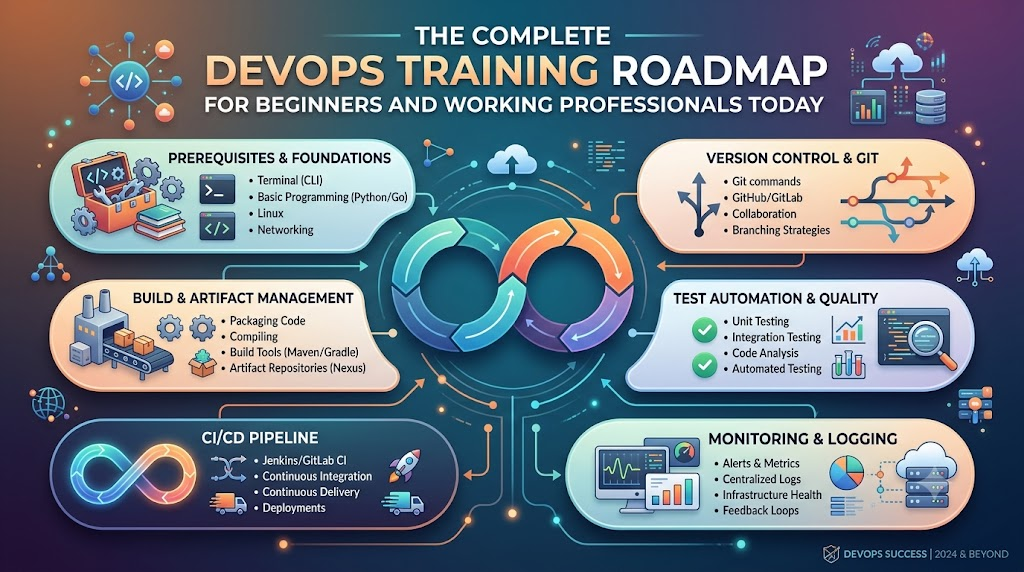
+--------------------------------------------------------------------+
|                      Step-by-Step Learning Path                    |
+--------------------------------------------------------------------+
|  Step 1: The Computer Base (Linux and Terminal Commands)          |
|  Step 2: Script Magic (Simple Python or Shell Code)                |
|  Step 3: Save Your Work (Git and Safe Repositories)                |
|  Step 4: Box Your Apps (Containers and Docker)                     |
|  Step 5: Cloud and Helpers (Cloud Servers and CI/CD Robots)        |
+--------------------------------------------------------------------+
1. Master the Linux Terminal
First, learn how to talk to a computer using only typed words instead of a mouse. Most servers around the world run on the Linux operating system.
Practice creating folders, moving files, and checking disk space with simple text commands. Once you feel comfortable typing in the terminal, you will feel like a computer wizard.
2. Learn a Helpful Scripting Language
Next, pick a friendly language like Python or Bash to write simple recipe instructions for your computer. You can write small scripts that clean up old files every midnight.
These tiny programs free you from doing boring manual tasks over and over again. As a result, you save time for fun, creative projects.
3. Track Changes with Version Control
Third, practice saving your project steps using distributed tracking tools. Learn how to create a branch, write clean updates, and combine your changes safely.
This skill lets you build projects with people from all across the globe. Everyone sees what you made, and nobody loses any hard work.
4. Package Apps inside Container Boxes
Fourth, learn how to place small web pages and services into clean digital containers. Write simple recipe files that explain how to build the container from scratch.
Once your app sits inside a container, you can run it anywhere without stress. This handy trick makes software testing super fast and fun.
5. Launch Cloud Servers with Code
Finally, discover how to build virtual computers in the cloud by writing simple instruction files. Instead of clicking buttons on a website, you write clear setup rules.
Then, you share those rules with your teammates so everyone has matching servers. Now you are ready to help companies build large, world-class platforms.
FAQ Section
- Can I learn these operational skills if I have never written code before?Yes, you certainly can. Many great engineers start with simple terminal commands before they write their very first script.
- How much time does it take to learn the core basics?Most learners gain strong, useful skills in about four to six months of regular daily practice.
- Do I need a super expensive computer to start practicing?No, any regular laptop will work fine because most practice happens inside free cloud accounts and lightweight terminals.
- What is the single most important skill for a beginner?Learning how to ask clear questions and work kindly with your team matters more than any single tool.
- Why do companies pay good salaries for these skills?Companies want their websites to run smoothly without ever crashing, and these skills keep their digital businesses safe.
Final Summary
Modern software delivery works best when people join hands and use helpful automation tools together. Learning this friendly way of working helps you build apps that never crash and always stay fast.
Begin your adventure by mastering simple terminal commands and saving your work neatly. Next, practice packaging apps into clean containers and letting robot helpers test your daily updates.
Most importantly, stay curious and treat your teammates with kindness and patience. With regular practice and a clear map, you will grow into an amazing operations hero.